Key takeaways
- A statement of account lists one customer's invoices, payments and credits, and ends with the balance due on one date. It bills nothing new: your customer checks it against their own records before paying.
- Send open item to a customer who pays invoice by invoice, and balance forward to one who pays "the balance." From the same rows both end at the same figure: $1,460.00 in the example.
- Count "past due" from each invoice's due date. Bayview Dental's INV 1032 was due September 30, so on October 31 it's 31 days past due. INV 1061 is Current until November 15.
- Before you send it, match the balance to the customer's balance in your books on the same date. A bounced check reopens the invoice it paid, and a payment nobody applied is money you owe the customer.
- Add interest only at a rate in the customer's signed terms (our advice), or one your state's statute sets without an agreement. Texas, for one, allows 6% a year from the 30th day after the due date (four states). Household accounts with a finance charge can also bring in Regulation Z (who).
Key figures
- Business accounts:
- Regulation Z, the federal Truth in Lending rule, doesn't apply to "An extension of credit primarily for a business, commercial or agricultural purpose" (12 CFR 1026.3(a)). A Net 15 account for a business is outside it (our reading).
- 6% a year:
- what Texas lets a creditor charge when no interest was agreed, starting "on the 30th day after the date on which the amount is due" (Finance Code § 302.002). One state's rule.
- 1 1/2% a month:
- the most Georgia's statute lets the owner of a commercial account charge on the part due 30 days or more (O.C.G.A. § 7-4-16). One state's rule, read on Justia's copy of the 2025 code.
- 4 years:
- California's limit for a suit on a book account, or on an account stated based on an account in writing (Code of Civil Procedure § 337). A household debt incurred since July 1, 2024 under a note or written contract isn't a book account (§ 337a). One state's rule; other states set their own.
Read at the source October 19, 2026. Sources are listed at the end of the guide.
What is a statement of account?
In short: A one-page record of where one customer's account stands on one date: what they owed, what you billed, what they paid, and what's due. Your customer uses it to match your records to theirs.
It isn't an invoice. An invoice bills one sale, and a statement bills nothing new. It lists the invoices you've already sent, the payments against them, and what's left.
Every statement has five parts. It names who it's from and to, and gives the statement date. Then come the open lines, an aging row, and what to pay by when, with a slip to send back.
Here they are on Maria Lopez's October 31, 2026 statement to Bayview Dental (Lopez Cleaning Co is fictional and bills on Net 15 terms):
From
Lopez Cleaning Co LLC
44 Prairie Avenue, Springfield, IL 62702
To
Bayview Dental
Account BAY-104
Statement of account
Statement date: 10/31/2026
Open invoices
| Invoice | Due | Status | Open | |
|---|---|---|---|---|
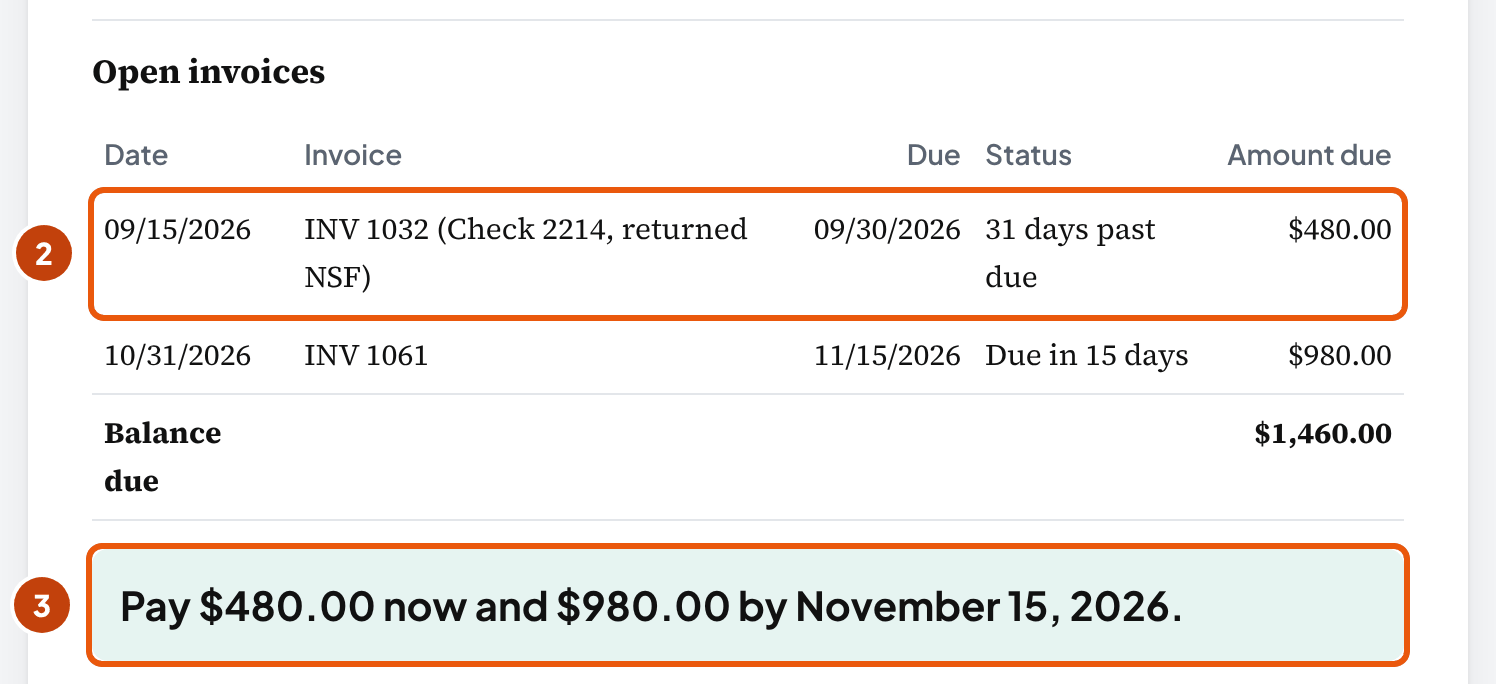
| INV 1032 | 09/30/2026 | 31 days past due | $480.00 | |
| INV 1061 | 11/15/2026 | Current | $980.00 | |
| Balance due | $1,460.00 | |||
Aging on 10/31/2026
| Current | 1–30 | 31–60 | 61–90 | 91+ |
|---|---|---|---|---|
| $980.00 | $0.00 | $480.00 | $0.00 | $0.00 |
Please pay $480.00 now and $980.00 by November 15, 2026.
Cut here and return with your payment: from Bayview Dental, account BAY-104, amount enclosed $______
Bayview's office manager can tick off each line against their own bills. INV 1061 isn't due for two weeks. INV 1032 is 31 days late because the check that paid it came back. So the only thing to pay now is $480.00.
Use the same test on yours: could your customer match every line to their records? If a line needs a phone call to explain, fix the line before you send it.
You'll also see it called a customer statement, as in QuickBooks Online and Xero. A "periodic statement" is stricter. Regulation Z requires it of a seller that regularly extends household open-account credit subject to a finance charge (who needs one).
An AR aging report is the inside view: every customer on one page, for you. The statement is one customer's line from it, sent to that customer. Bayview's line on Lopez's October 31 aging is the same $1,460.00.
Balance forward or open item: which one should you send?
In short: Send open item to a customer who pays invoice by invoice, and balance forward to one who pays whatever the balance says. Both end at the same balance due.
An open item statement lists each invoice still owed, with its due date and how late it is. Paid invoices drop off. Sage 50's help says it "lists each outstanding invoice that still has a balance due," and that "no previous balance will appear" on it.
A balance forward statement starts from last statement's balance and lists everything since, with a running balance. In Sage 50's words, these statements "consolidate a customer's unpaid balance from month to month."
Balance forward
| Date | What | Balance |
|---|---|---|
| 09/30/2026 | Previous balance | $480.00 |
| 10/19/2026 | Payment for INV 1032, thank you − $480.00 | $0.00 |
| 10/31/2026 | Payment returned unpaid, for INV 1032 + $480.00 | $480.00 |
| 10/31/2026 | INV 1061 + $980.00 | $1,460.00 |
| Balance due | $1,460.00 | |
Open item
| Invoice | Status | Open |
|---|---|---|
| INV 1032 | 31 days past due | $480.00 |
| INV 1061 | Current | $980.00 |
| Balance due | $1,460.00 | |
Harbor Coffee Co, open item
| INV 1058, due 11/15/2026 | $1,450.00 |
| Payment of 10/26/2026 not applied (a credit owed to Harbor) | −$150.00 |
| Balance due | $1,300.00 |
Bayview pays by invoice number, so send it open item: it names the late invoice. A customer on a flat monthly service who pays the balance each month can work from a running balance just as well.
Does any rule decide it for you? Not one we found: no US standard says which type to send. Open item is the tool's default for business customers, and that's our recommendation, because every line matches an invoice the customer already has.
Why the totals can differ in software
From the same rows, the two layouts give the same balance, and the tool checks that on every statement. Software can show two different totals when a payment isn't applied to an invoice.
Xero, for one, leaves prepayments off its outstanding statement. They're "not deducted from the total balance on the statement, as Xero doesn't account for a prepayment in accounts receivable until it's applied to an invoice."
The tool keeps that money on the statement instead. Harbor Coffee overpaid INV 1045 by $150.00, and its October 31 invoice, INV 1058, is $1,450.00. Its open item statement lists both lines: $1,450.00 − $150.00 = $1,300.00, the same as its balance forward total (the overpayment).
What your software calls each one
| Software | Close to open item | Close to balance forward |
|---|---|---|
| QuickBooks Online | Open Item: "Lists all unpaid invoices from a specific start date to the present" | Balance Forward: "Lists invoices, payments, and the current balance for a specific date range." A third type, Transaction Statement, lists every transaction in a date range |
| Xero | Outstanding: "only what's owed by the customer as at a certain date" | Activity: "all the activity for the customer within a date range" |
| Sage 50 | Open Item | Balance Forward |
| Wave | Outstanding statement, including "partially paid invoices" | Account activity statement: "all invoices, payments, and refunds for a customer within a selected date range" |
On your software's statement screen, pick the matching type and set the statement date to the month-end you're billing. The quotes come from each vendor's help page, read October 19, 2026.
How to make a statement of account, step by step
Six steps, with Bayview's numbers. You need the customer's open invoices, everything since the last statement, and their balance in your books. The tool doesn't fit more than one currency, VAT, installment plans, or sub-customers billed through a parent account; run those statements from your invoicing software, where each invoice already carries them.
- Pick the statement date. Use the last day of the month you're billing, so the statement matches your month-end books. Bayview's is 10/31/2026. For balance forward, the period starts the day after the last statement: October 1.
- Fill in your business and how to pay. Give your name and address, and how the customer pays you: check, ACH or a payment link. Ask customers to write the invoice numbers on their payment, as the example does (our suggestion), and step 4 gets easier. The tool keeps these details in this browser for your next customer.
- Enter the customer's rows. Add every invoice still open, plus every payment, credit memo and returned payment since the last statement. Give each invoice its terms, like Net 15. If your invoicing software exports to a spreadsheet, use Paste rows from a spreadsheet under the rows instead of typing.
- Say which invoice each payment pays. Pick it under Applies to invoice, from the check stub or the customer's remittance. Left empty, the tool applies the payment to the oldest open invoice, the way QuickBooks Online applies credits when Automatically apply credits is on. If a partial payment names no invoice, ask the customer before you apply it (our practice).
- Type the customer's balance from your books. It goes under Check the balance against your books, right after the rows. Take it from their line in your AR aging, or a customer balance report, for the same date. Bayview's is $1,460.00, so the statement ties.
- Read "Before you send it," then send. Fix what it flags. Then use Print or save as PDF and keep that copy. Download Excel gives you the same statement with live formulas.
Once October's statement is out, Start next month's statement in the menu carries the balance forward and keeps the rows, so November starts from $1,460.00.
If you only have last month's total
Enter it under More options as an earlier balance, with the date it was due. The statement shows it as one line, aged from that date (our convention).
It works, but your customer can't match a bare total to anything in their records. If you can find the invoices behind it, enter those instead, so the customer can match each one.
Payments, credits and bounced checks on a statement
In short: Show each payment and credit against the invoice it settles. A check that bounced puts its invoice back on the statement, and a payment nobody applied is money you owe the customer.
When a customer's check bounces
On our reading of the UCC, a check only holds the debt off until it bounces, so the invoice it paid is owed again. We keep its original due date (our convention). The model text says "suspension of the obligation continues until dishonor of the check" (§ 3-310(b)(1)).
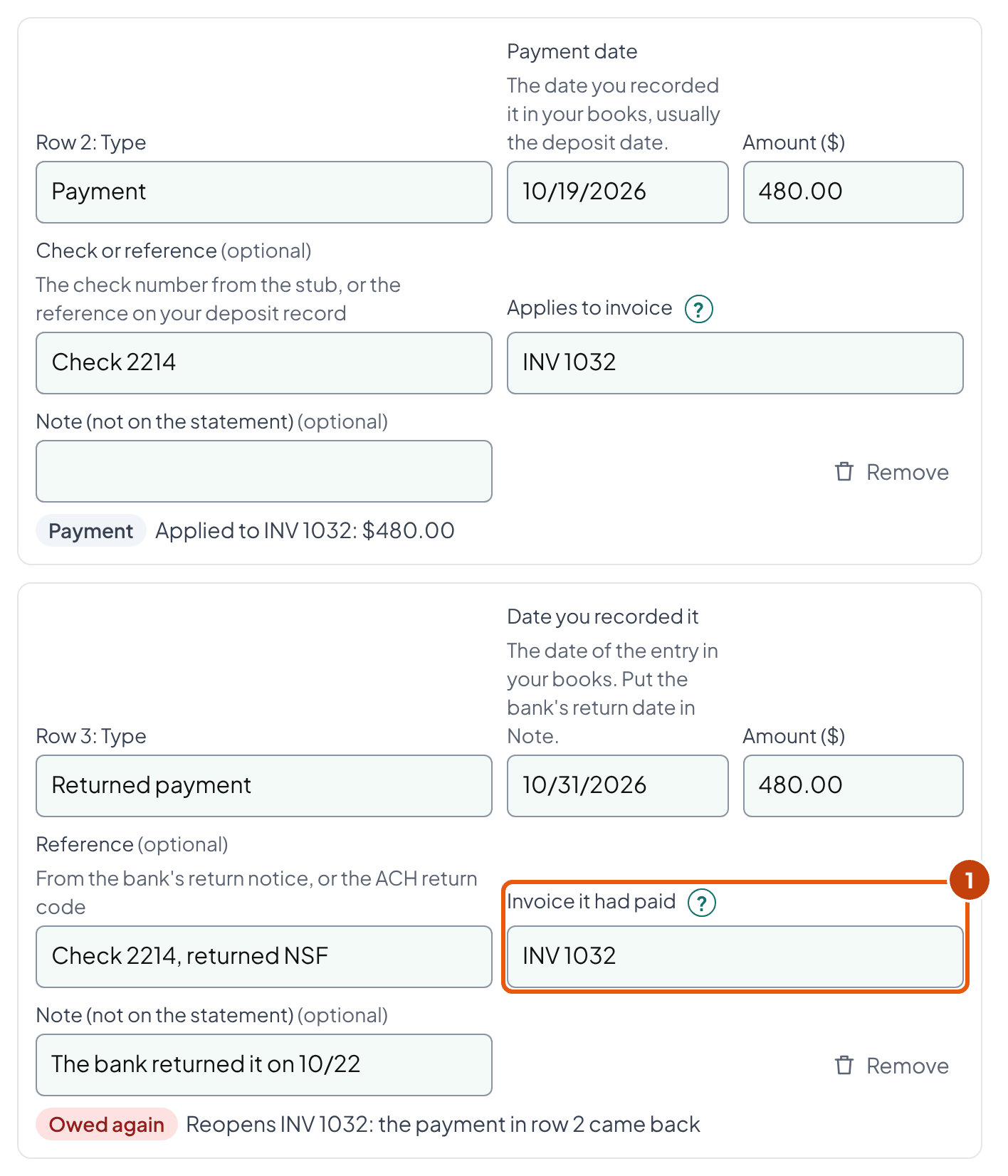
Bayview paid INV 1032 on October 19 with a $480.00 check, and the bank returned it unpaid on October 22. Maria found it on October 31, when she reconciled October's bank statement, and recorded it that day.
Until October 31, her books showed INV 1032 as paid. OpenStax's accounting textbook describes this case: the returned check "is reflected on the bank statement but not in the records" of the business that took it.
Date the returned row the day you record it in your books, October 31 here, so the statement and your AR aging agree (our practice).
QuickBooks Online's bounced-check steps ask for "the date the check bounced" instead, October 22 here. If you book it that way, date the row October 22.
| Invoice dated 09/15/2026, Net 15, due 09/30 | $480.00 |
| Paid by check 10/19/2026 | − $480.00 |
| Check 2214, returned NSF (bank 10/22), recorded 10/31/2026 | + $480.00 |
| Open on 10/31/2026: 31 days past due | $480.00 |
In the tool, enter the returned check as a Returned payment row and pick INV 1032 under Invoice it had paid. Without that link, it shows as its own charge, due the day you recorded it, and Bayview has to work out which invoice it was.
Four cases the example doesn't show:
- If Bayview's replacement check arrives on or before the statement date, enter it as a Payment against INV 1032, and the invoice drops off the statement.
- A replacement dated after the statement date waits for next month's statement, like any row dated after it.
- A check that paid two invoices gets one Returned payment row for each invoice, each with its own amount, so both reopen.
- An ACH payment that comes back is a Returned payment too, with the bank's return code in Reference. It can come back after the statement went out: if you pulled the payment by ACH debit, the customer's bank has two days to return it, but a consumer who says the debit wasn't authorized has up to 60 days (our reading). When a return arrives late, enter the Returned payment row and send a corrected statement (our suggestion).
Nacha's guide for originators puts the windows this way: "Corporate SEC codes allow for standard right of return (two days). Consumer SEC codes allow for extended right of return (60 days)."
The bank also charged Lopez a $12.00 returned-item fee, and it isn't on Bayview's statement. QuickBooks Online's help on bounced checks says "this is up to you" about charging the customer that fee.
If you do charge it, put it on an invoice first, so the statement lists something the customer can match. And check that your signed terms allow it. The entries for your books are in the bank reconciliation form.
When a customer pays too much
The extra is a credit you owe the customer, not income. Harbor Coffee paid $1,600.00 on October 26 against INV 1045, a $1,450.00 invoice. Lopez owes Harbor the $150.00 until it's applied or refunded.
| INV 1045, 10/15/2026, Net 15 | $1,450.00 |
| Paid 10/26/2026 | − $1,600.00 |
| INV 1058, 10/31/2026, Net 15, due 11/15 | $1,450.00 |
| Balance due | $1,300.00 |
The open item statement lists INV 1058 at $1,450.00 and the $150.00 not applied as its own line. Harbor pays $1,300.00 by November 15.
Apply it to INV 1058 in your books, or ask Harbor whether they want it back. Either way the statement shows it, so Harbor sees you know about it.
Can you write an old credit off to income? In New York, not without proof. New York's unclaimed property guidance says a business "cannot write off open customer credit balances" without one of these:
- "a specific written disclaimer from the customer," or
- written documents showing the credit was an error or was applied.
Other states set their own rules, so check yours before a credit gets old. The AR aging guide lists the periods in several states.
A credit memo isn't a payment
A credit memo lowers what the customer owes for a reason: a return, a missed visit, a price mistake. Give it its own line, apart from payments. Then the customer can match each to its document: the credit memo for one, their check or remittance for the other.
Regulation Z's periodic statement lists credits as their own item too, for consumer accounts, and FreshBooks keeps credit notes out of its "Paid" total. Counted as a payment, a credit memo makes your customer look like they sent money they never sent. When they ask for the check number, you have nothing to show them.
How "past due" is counted on a statement
In short: From each invoice's due date, not from its invoice date or the statement date. An invoice is Current until its due date passes.
Bayview's INV 1061 is dated October 31 on Net 15, so it's due November 15. On the October 31 statement it's Current. INV 1032 was due September 30, so on October 31 it's 31 days past due.
QuickBooks Online's help puts it plainly: the "Current column is anything that is not yet due." Treasury's receivables instructions for federal agencies age debts "from the date of delinquency."
| On 10/31/2026 | Current | 1–30 | 31–60 | 61–90 | 91+ | Total |
|---|---|---|---|---|---|---|
| Bayview Dental | 980.00 | 0.00 | 480.00 | 0.00 | 0.00 | 1,460.00 |
The statement turns that row into one line your customer can act on: pay $480.00 now and $980.00 by November 15, 2026. The tool prints it above the payment slip.
Two counting choices are ours. What about an invoice due on the statement date itself? The tool counts it as Current, because the customer can still pay on time that day. And day 1 is the day after the due date.
Don't label the first aging column "0–30 days." A column like that puts an invoice 20 days late next to one that isn't due for two weeks. Keep Current for invoices not yet due.
Check the balance against your books before you send it
In short: The balance due has to equal the customer's balance in your books on the statement date. If it doesn't, your customer may find the difference before you do.
Lopez's books show Bayview at $1,460.00 on October 31, the same as Bayview's line in the AR aging. The statement shows $1,460.00, so the difference is $0.00 and it can go.
Say the books showed $1,940.00 instead. The $480.00 difference equals INV 1032. Start by confirming the books figure is for the same date, then look for INV 1032 entered twice in the books. The tool lists the leads that fit your numbers, quickest first:
- The books figure itself. It has to be this customer's balance on the same date, on the accrual basis. A report for another date can differ even when every invoice is right.
- One item equal to the difference. An invoice in the books twice, or one missing from the statement.
- One item equal to half the difference. A credit entered as an invoice, or the other way round, doubles the gap.
- Rows dated after the statement date. The tool leaves them for next month's statement, and a report run later includes them.
Then keep a copy of what you sent, because a statement you run again can come out different. QuickBooks Online's help puts it this way: "Statements automatically update to reflect changes made to the underlying transactions."
If someone edits an October invoice in November, an October 31 statement run again won't match the one Bayview has. So save the PDF with the date you sent it.
If an invoice you already sent was wrong, issue a credit memo instead of editing it, and send it with a new statement. Then your copy and the customer's keep matching (our practice).
What to do when the customer says the balance is wrong
In short: Get it in writing and acknowledge it within 30 days, then check your side before you argue. Keep billing what isn't in dispute, and close the dispute in writing (our routine).
Differences often come from timing or from how a payment was applied, not from a wrong invoice. Check these first (our order and our reading):
- A payment in transit: the customer mailed a check before the statement date, and you received it after.
- A payment applied to the wrong invoice, or not applied at all.
- A credit memo the customer never received, or one you never issued.
- An invoice the customer never received, or entered under another number.
- A returned payment the customer doesn't know about. Bayview may not know its October 19 check came back.
For the timeline, you can copy one that exists. The University of Virginia's billing office uses this one, and Regulation Z sets similar steps in law for the household open accounts it covers (12 CFR 1026.13).
| Step | University of Virginia (its own policy) | Regulation Z (household open accounts it covers) |
|---|---|---|
| The customer writes | Within 60 days of receiving the first bill; a verbal complaint doesn't count | Within 60 days of the first statement that shows the error |
| You acknowledge it | In writing, within 30 days | Within 30 days |
| You resolve it | Within 90 days: a correction, or a written reason the charge stands | Within two billing cycles, never more than 90 days |
| Meanwhile | Not in the policy text we read | The customer "need not pay (and the creditor may not try to collect)" the disputed part |
Say another Lopez customer, Marina Fitness, disputes INV 1021 ($1,250.00) over two missed visits. Tick The customer disputes this invoice on that row. The invoice stays on Marina's statement, marked, and no finance charge falls on it.
Keep billing everything else, and keep a record of every call and email. Treasury's rules for federal agencies are one model: they ask that "all contact with the debtor be documented in the account files," and that the agency respond "within 30 days" if possible.
Hello, thanks for checking the October 31 statement. We show $1,460.00: INV 1032 for $480.00, because the October 19 check came back unpaid, and INV 1061 for $980.00, due November 15. If your records differ, send us the payments or invoices you have, and we'll match them line by line and reply within a week. Maria Lopez, Lopez Cleaning Co
Once it's settled, send a corrected statement or a short note that the balance stands. Next month's statement then starts from a balance you both accept.
When and how to send statements
In short: Send them on the same day each month, soon after the month's invoices go out, with a short email that gives the balance and what's past due.
Many business customers have a cut-off, such as the 5th, after which invoices wait for the next month's pay run, says one bookkeeping site, Beginner Bookkeeping. So Lopez sends on the last day of the month, right after invoicing.
A fixed day also lets your customer expect it and tells you when to look for payments. Weber State University's receivables policy, for one, mails them "on approximately the 15th of each month."
Who can skip one? The same bookkeeping guide says customers with a zero balance don't need one unless they ask, nor do customers who pay within a short time, such as 7 days. Our suggestion: send everyone else one every month, even when the balance is small (why a sent statement can help).
Hello, attached is your statement for October 2026. The balance is $1,460.00. $480.00 of it, INV 1032, is past due because the October 19 check came back unpaid. Could you send a replacement this week? INV 1061 for $980.00 is due November 15. Questions? Just reply to this email. Maria Lopez, Lopez Cleaning Co
In the tool: Copy as text in the menu gives the statement as plain text for the email body. Open the tool ↑
Mail the statement to customers who pay by check: the PDF prints with a tear-off slip that comes back with the payment.
If a past-due line is still open a few weeks later, send a reminder, then a demand letter if it stays unpaid (our order). Treasury's rules for federal agencies are one model for the timing. Treasury says "One demand letter sent no later than 30 days after delinquency should be sufficient." Except in rare circumstances, agencies "should not send any more than two demand letters, no more than 30 days apart."
A demand letter is a different document from a statement, and this page doesn't cover it. For a household's debt, some of the collection laws below may apply to it (our reading), so have an attorney review your first one.
What a statement means legally, and when you can add interest
In short: A statement your customer keeps without objecting can count as agreement to the balance. It can't add interest or fees they never agreed to, and household customers bring extra rules.
Silence can turn a statement into an agreed balance
Courts call it an account stated: keep a statement too long without objecting, and you may have agreed to its balance. A Minnesota appeals court put the rule this way, quoting the Restatement of Contracts.
“A party's retention without objection for an unreasonably long time of a statement of account rendered by the other party is a manifestation of assent.”
American Druggists Insurance v. Thompson Lumber Co., 349 N.W.2d 569 (Minn. Ct. App. 1984)
In that case a lumber company's monthly invoices stated interest, and the customer "made no complaint" about them. The court let the interest stand but struck the compounding, because the invoices "did not indicate interest was to be compounded."
New York is more careful. Its Appellate Division said "the mere silence and failure to object" isn't agreement on its own. The facts around the account can still make it one when nobody objects within a reasonable time.
So answer a customer's "this is wrong" in writing, and keep sending statements even when every invoice went out. Each one is a dated record that you sent the balance, which can help if the balance is ever questioned. Keep the PDF and the email it went with. How a court weighs it depends on your state.
It affects deadlines too: in California, you have four years to sue on a book account, or on an account stated based on an account in writing (Code of Civil Procedure § 337). If the customer is a household, a debt incurred since July 1, 2024 under a note or written contract isn't a book account there (§ 337a). When the account stated is based on an account of several items, the clock starts at the last one.
Can you add interest or a late fee?
Charge it only at a rate agreed in signed terms, or at one your state's statute sets without an agreement (our advice). Some statutes look for writing: South Dakota's statute, for one, names "an express contract in writing" first, though it also accepts a rate that "clearly appears on the bill, statement, or invoice."
Is the rate or fee agreed in writing (signed terms)?
Yes: agreed in writing
- Business customer: charge the agreed rate, within any limit your state sets.
- Household customer: if you extended household open-account credit subject to a finance charge more than 25 times in the preceding calendar year, Regulation Z makes you a creditor, and you owe a periodic statement this tool doesn't make.
No
- Only a rate your state's statute sets with no agreement: Texas, 6% a year from the 30th day after the due date; Georgia, up to 1 1/2% a month on a commercial account's part due 30 days or more.
- South Dakota: a rate printed on a bill, statement or invoice may not exceed 18%.
- Neither applies: leave interest off, and agree terms before the next sale.
Four statutes show how far apart states are. They're examples, not a survey, so read your own state's statute, or ask an attorney, before you put a rate on a statement.
| State | What the statute says | Source |
|---|---|---|
| Texas | With no agreement on interest, a creditor may charge 6% a year, starting "on the 30th day after the date on which the amount is due" | Finance Code § 302.002 |
| Georgia | A commercial account is due when the statement is sent, unless signed terms say otherwise. The owner may charge up to 1 1/2% a month on the part due 30 days or more | O.C.G.A. § 7-4-16 (Justia's copy, 2025 code) |
| South Dakota | With no written contract fixing a rate and no rate on the bill, interest runs at a rate the state sets in another statute (§ 54-3-16). A rate printed on a bill, statement or invoice "may not exceed eighteen percent" | SDCL 54-3-5 |
| Washington | On our reading, a business customer can't use Washington's usury limit against a rate it agreed to; a household customer still can. The statute bars the usury defense on a deal "primarily for agricultural, commercial, investment, or business purposes," and that "shall not apply to a consumer transaction" | RCW 19.52.080 (Justia's copy) |
In the tool, the finance charge stays off until you tick Add a finance charge and then This rate is in the customer's signed terms. Then it charges your monthly rate, for one month, on balances at least as many days past due as you set, and it leaves disputed invoices out (our method).
| Open balance, 77 days past due | $1,250.00 |
| × 1.5% a month (the example's rate, not a recommendation) | $18.75 |
| With the dispute box ticked | $0.00 |
1.5% a month is the most Georgia's statute allows on the part of a commercial account due 30 days or more, used here only to show the arithmetic. The rate that counts is the one in Marina's signed terms.
Household customers: Regulation Z and state collection laws
If you bill only businesses, take one habit from this part: send statements in your business's own name (our suggestion). The law behind it, in the last paragraph, covers household debts. The rest is for sellers who also bill households.
Regulation Z, the federal Truth in Lending rule, covers you when both of these are true (12 CFR 1026.2(a)(17)):
- You extended consumer credit "more than 25 times" in the preceding calendar year. For open accounts, the CFPB's official commentary counts accounts, not sales.
- That credit was subject to a finance charge, or payable by written agreement in more than four installments.
Credit for a business purpose is exempt (1026.3(a)). So Lopez's Net 15 statements to businesses, with no finance charge, aren't Regulation Z documents (our reading of the rule, not a CFPB ruling).
If both are true for your household open accounts, you owe a periodic statement. It needs items this tool doesn't produce, such as your rates, the balance the charge was figured on, and an address for billing errors (1026.7(b)).
California's and Florida's collection laws are aimed mainly at household debts. On our reading, California's Rosenthal Act can cover a business collecting its own household debts, but generally not a Net 15 business account. It defines a debt collector as anyone who "regularly, on behalf of that person or others, engages in debt collection" in the ordinary course of business, and it leaves trade credit out of the business debt it covers.
Florida's § 559.72 starts "In collecting consumer debts, a person may not." Its list includes telling others about a debt you know is disputed without saying so, and calling between 9 p.m. and 8 a.m. without consent.
The federal Fair Debt Collection Practices Act excludes a creditor's own staff when they collect "in the name of the creditor" for it. A creditor that "uses any name other than his own which would indicate that a third person is collecting" is covered, though. So send statements in your business's own name.
What to get in writing before you sell on account
In short: Signed terms, before the first invoice. The interest and due-date rules above turn on what the customer agreed to, and a signature is your proof.
We found no official US checklist for this. Western Australia's Small Business Development Corporation publishes one. In US terms it comes to five things to get before the first sale on account:
- A credit application the customer signs, confirming they've read your terms.
- Permission to run a credit check.
- A personal guarantee from an owner when the customer is a company (the checklist calls it "a directors' guarantee").
- Terms that state the penalties for late payment, including the interest rate and fees.
- The customer's signed acceptance of those terms before you deliver anything.
For Lopez, that's one page Bayview signs before the first cleaning. It says Net 15, payment by check or ACH, a returned-check fee if Maria wants one, and any finance charge with its rate.
Georgia shows why the signature matters. Without a "writing signed by the obligor" (the customer who owes), its default applies, and the statement date becomes the due date.
Statement of account template in Excel
In short: Download Excel gives you a workbook with three sheets and live formulas. Change a row, and the balance, the aging and the checks recalculate.
- Statement: the document. Your inputs sit at the top: dates, the books balance and the finance charge settings. Below them come the account summary, the aging and a master check that says whether everything agrees.
- Rows: one row per transaction. Amounts are typed positive, and the type decides the sign. Due dates and each row's effect on the balance are formulas.
- Open items: each invoice with what's still owed, its days past due and its aging column, added up with SUMIFS from the Rows sheet.
In a file you download from the tool, each payment is already split by invoice, one row per application. If you add rows in Excel later, fill in Applies to on every payment and credit memo. An empty one stays a credit: the total is right, but the invoice still shows as open.
For next month, change the statement date, add November's rows, and keep the open ones. We built the file for Excel and haven't checked it in Google Sheets.
For paper, Print a blank statement in the menu gives you a form to fill in by hand.
Common mistakes
Check your statement for these seven before you send it. Each one shows up as a balance your customer can't match, or an invoice that looks later than it is.
| Mistake | How it shows | What to do instead |
|---|---|---|
| Counting a credit memo as a payment | The customer "paid" money they never sent | Show credits on their own line |
| Netting an overpayment out of sight | Harbor's $150.00 disappears, and nobody applies or refunds it | List it as a line owed to the customer |
| Aging from the invoice date | INV 1061, dated October 31 and due November 15, looks 0–30 days late | Count from each due date; Current means not yet due |
| Leaving a bounced check off | Bayview's INV 1032 shows as paid, and the books show $480.00 more | Enter it as a returned payment against the invoice it paid |
| Sending without the tie-out | The customer finds a difference first | Match the balance to the books, same date |
| Editing an invoice after the statement went out | Your re-run statement no longer matches the customer's copy | Issue a credit memo, and keep the PDF you sent |
| Adding interest that isn't in the terms | A charge the customer never agreed to, and may not owe | Signed terms first, or your state's statutory rate |
Field details
| Field | Where to find it | Accepts |
|---|---|---|
| What kind of statement | How the customer pays: by invoice (open item) or the balance (balance forward) | One of the two |
| Statement date | The last day of the month you're billing | A date, like 10/31/2026 |
| Period starts (balance forward) | The day after your last statement | A date on or before the statement date; empty means the 1st of the month |
| Your business and how to pay | Your letterhead and bank details | Any text; kept in this browser |
| Who the statement goes to: name, address, account number | Your customer list | Any text; the account number is optional |
| Type | Invoice, payment, credit memo, or a payment that came back | One of the four |
| Date | The invoice, the credit memo, or your books (for a payment, usually the deposit date) | A date; for a returned payment, the date of its entry in your books; after the statement date, the row waits for next month |
| Number or reference | The invoice or credit memo number, or the check number | Any text |
| Terms | The invoice | Net 0 to Net 999, Due on receipt, 2/10 Net 30, N EOM (like 10 EOM), or a day of next month typed like 10th of next month |
| Amount | The invoice, check or credit memo | A positive amount; the type decides the sign |
| Applies to invoice | The check stub, remittance or credit memo | An invoice number in the list; not named means oldest first |
| The customer disputes this invoice | The customer's email or call | Ticked or not; a disputed invoice gets no finance charge |
| Balance in your books (right after the rows) | The customer's line in your AR aging, or a customer balance report, same date | Any amount; a credit balance is negative, like -150.00 |
| Add a finance charge (More options) | The customer's signed terms | A monthly rate over 0% and up to 10%, and 0 to 365 days past due |
| Earlier balance (More options) | Last statement's total, if you can't itemize it | An amount and the date it was due |
Frequently asked questions
How do I create a statement of account?
Start from your records: one customer's open invoices and everything since the last statement (payments, credit memos, returned checks), each with its date and amount. Each invoice's terms give its due date, and what's still owed on the statement date is the balance. Before you send it, check that the balance equals the customer's balance in your books on the same date. The tool on this page does each step from your rows and gives you Excel, PDF and Word.
What is the correct format for a statement of account?
We found no official format for business customers. Put your business, the customer and their account number at the top, then the statement date. Then the lines: each open invoice, or every transaction with a running balance. End with the balance due, an aging row (Current, 1–30, 31–60, 61–90, 91+ days past due), what to pay by when, and how to pay. Household credit is different: if you extended household open-account credit subject to a finance charge more than 25 times in the preceding calendar year, you owe the periodic statement Regulation Z sets out (12 CFR 1026.7).
What is an example of a statement of account?
Lopez Cleaning Co, a fictional cleaning company, sends Bayview Dental a statement on October 31, 2026. INV 1032 for $480.00 was due September 30 and is 31 days past due, because the October 19 check came back unpaid. INV 1061 for $980.00 is due November 15. Balance due $1,460.00: pay $480.00 now and $980.00 by November 15. The guide shows the full statement, and the tool starts with the same rows.
How do I write a statement of accounts?
Use words the person who pays your bills can match to their records (our advice). Name each invoice the way it's printed, like INV 1032, with its date and amount. Call a credit memo a credit memo, never a payment. Say how late a line is in days, like "31 days past due," and why, like "the October 19 check came back unpaid." For a line not yet due, give the date: "due November 15."
How do I make a statement of account in Excel?
Put one row per transaction: type, date, number, terms, amount, and the invoice it applies to. Work out each invoice's due date from its terms, and use SUMIFS to get what's still open on each invoice. Then sort the open amounts into aging columns by days past due, and check that the total equals the balance in your books. The Download Excel button on this page gives you a workbook with those formulas already in it.
Is a statement of account the same as an invoice?
No. An invoice bills one sale and has its own due date. A statement summarizes the invoices you already sent, the payments and credits against them, and the balance due on one date. It doesn't bill anything new, so it shouldn't carry a charge the customer can't find on an invoice.
Is a statement of account a legal document?
It can count as evidence of an agreed balance, which courts call an account stated. A Minnesota appeals court, quoting the Restatement of Contracts, said keeping a statement "without objection for an unreasonably long time" is "a manifestation of assent." New York says silence alone isn't enough, though the facts around the account can make it so. In California a suit on an account stated based on an account in writing has four years (CCP § 337). It isn't a contract, and it can't add terms the customer never agreed to.
How often should I send customer statements?
Once a month on the same day, soon after the month's invoices go out (our suggestion). Beginner Bookkeeping's statement guide notes that many business customers have a cut-off, such as the 5th, after which invoices wait for the next month's pay run. The day itself is your choice: Weber State University's receivables policy mails statements around the 15th of each month.
Can I add interest or a late fee to a statement?
Only at a rate agreed in signed terms (our advice), or one your state's law sets without an agreement. When nothing was agreed, Texas allows 6% a year from the 30th day after the due date (Finance Code § 302.002). Georgia allows up to 1 1/2% a month on the part of a commercial account due 30 days or more (§ 7-4-16). A seller that extended household credit subject to a finance charge more than 25 times in the preceding calendar year falls under Regulation Z.
What should I do if a customer says their statement is wrong?
Ask them to put it in writing, and acknowledge it within 30 days. Then check payments in transit and payments applied to the wrong invoice. Keep billing what isn't in dispute (our advice), and close the dispute in writing. For household open accounts covered by Regulation Z, the timing is law: the customer has 60 days to write, and you resolve it within two billing cycles, never more than 90 days (12 CFR 1026.13).
What's the difference between a balance forward and an open item statement?
A balance forward statement starts from last statement's balance and lists every transaction since, with a running balance. An open item statement lists only the invoices still owed, each with its due date and days past due, plus any payment not applied. From the same records both end at the same balance. Open item suits customers who pay invoice by invoice.
How we built this page
Ledgental Team wrote this guide and built the tool. Ledgental also makes a bookkeeping app that's free during its beta; this tool doesn't connect to it. The rows you enter stay in your browser, and nothing goes into a link, because the rows hold customer names: the menu downloads, prints and copies. How we research, check sources and use AI tools: About Ledgental.
What the numbers rest on
- The statement is arithmetic on your rows: due dates from the terms, days past due from the statement date, each payment and credit applied to an invoice, and the balance added two ways (balance forward and open item), which always agree. The tool, the Excel workbook, the diagrams and this guide use the same engine, checked by known-answer tests built from the Lopez Cleaning example. The Excel file hasn't been recalculated in LibreOffice yet.
- Our conventions, labeled where they're used: open item as the default; day 1 is the day after the due date; an invoice due on the statement date is Current; a payment with no invoice named goes to the oldest open invoice; a returned payment reopens the invoice it paid; the finance charge is simple, one month per statement, on past-due balances not in dispute; and our reading that Net-term business accounts with no finance charge fall outside Regulation Z.
- Rules and quotes (Regulation Z and its commentary, the FDCPA definitions, Treasury's collection chapter and aging workbook, the Minnesota and New York cases, the California, Florida, Texas, Georgia, South Dakota and Washington statutes, New York's unclaimed property guidance, the University of Virginia and Weber State policies, Western Australia's checklist, OpenStax, and the QuickBooks, Xero, Sage, Wave and FreshBooks help pages) were read at the source between October 18 and October 19, 2026, along with the UCC § 3-310 model text and Nacha's guide on ACH returns. Beginner Bookkeeping's statement guide was read the same day and is credited as practitioner advice, not a rule. Washington's statute was read on Justia because the official site didn't open; Georgia's was read on Justia's copy of the 2025 code, and its official portal wasn't opened.
- Not found or not covered: a US standard on which statement type to send, an official US checklist for extending credit, a primary source on charging interest only on the past-due part (Georgia's and Texas's statutes imply it for their cases), an official rule on sending statements for zero or credit balances (we cite one practitioner's practice instead), demand letters, multi-currency, VAT and installment plans.
What changed
- October 19, 2026: first published: the statement tool (open item and balance forward, payments and credits applied to invoices, returned payments, the tie-out, an optional finance charge), the Excel workbook, and this guide.
- October 19, 2026 (later): guide rewritten for easier reading: shorter sentences, each section opening with its answer, the dispute timelines and the four state statutes put in tables, repeats cut, and the tool's inputs reordered (on a computer: what to have ready, the statement type and date, the customer and your business on the left, then the rows, the books balance with its result, and More options; on a phone your business comes after More options). No number changed; the key figures now show Texas's 6% instead of the Regulation Z count.
Cite this page
Copy one of these lines to credit the page. To link to one section, use the link icon beside its heading.
- Plain line
- Ledgental, Statement of Account Template, updated October 2026, https://ledgental.com/tools/statement-of-account-template
- APA
- Ledgental. (2026, October). Statement of Account Template. https://ledgental.com/tools/statement-of-account-template
- Chicago
- Ledgental. “Statement of Account Template.” Last modified October 2026. https://ledgental.com/tools/statement-of-account-template.
Reusing this page: the guide's text, tables and diagrams are licensed under CC BY 4.0. Credit "Ledgental" with a link to this page. Quotations from federal regulations, statutes and agencies are public domain, and quotations from other sources stay under their owners' terms.
Sources
- Regulation Z, 12 CFR 1026.1 and 1026.3 (coverage and the business-purpose exemption), Consumer Financial Protection Bureau
- Regulation Z, 12 CFR 1026.2 ("creditor", "more than 25 times") and its official interpretations, Consumer Financial Protection Bureau
- Regulation Z, 12 CFR 1026.7 (periodic statement items), Consumer Financial Protection Bureau
- Regulation Z, 12 CFR 1026.13 (billing error resolution), Consumer Financial Protection Bureau
- 15 U.S.C. § 1692a, Fair Debt Collection Practices Act definitions, Cornell LII
- Managing Federal Receivables, chapter 6: Delinquent Debt Collection (revised March 2015), Bureau of the Fiscal Service, U.S. Treasury
- Instructional Workbook for Preparing the Treasury Report on Receivables and Debt Collection Activities, Bureau of the Fiscal Service, U.S. Treasury
- American Druggists Insurance v. Thompson Lumber Co., 349 N.W.2d 569 (Minn. Ct. App. 1984), CourtListener
- Auburn Custom Millwork, Inc. v Schmidt & Schmidt, Inc., 148 AD3d 1527 (4th Dept 2017), New York State Law Reporting Bureau
- California Code of Civil Procedure §§ 337 and 337a, California Legislative Information
- California Civil Code § 1788.2 (Rosenthal Fair Debt Collection Practices Act definitions), California Legislative Information
- Florida Statutes §§ 559.55 and 559.72 (2025), The Florida Senate
- Texas Finance Code §§ 302.001 and 302.002, Texas Legislature
- O.C.G.A. § 7-4-16, interest on commercial accounts (2025 code), Justia
- SDCL 54-3-5, interest on bills, statements and invoices, South Dakota Legislature
- RCW 19.52.080, business purpose transactions (2025 code), Justia
- Uniform Commercial Code § 3-310, effect of an instrument on an obligation (model text), Cornell LII
- RMAG Originator Essentials (ACH returns), Nacha
- Unclaimed Property Relating to All Business Entities, reference sheet, Office of the New York State Comptroller
- Customer accounts resources (disputed charges), University of Virginia Finance
- PPM 5-3a, Accounts Receivable, Weber State University
- Statement of Account Sample and Template, Beginner Bookkeeping (Sarah Booysen)
- Providing credit to customers, Small Business Development Corporation, Western Australia
- Principles of Accounting, Volume 1, §8.6 (bank reconciliation, NSF checks), OpenStax
- Create and send customer statements in QuickBooks Online, Intuit QuickBooks help
- Why aging reports have both Current and 1-30, Intuit QuickBooks help
- Record a returned or bounced customer check, Intuit QuickBooks help
- Create and apply credit memos or delayed credits in QuickBooks Online, Intuit QuickBooks help
- View or send a customer statement, Xero Central
- Print monthly statements for customers (Sage 50, 2024), Sage
- Create and send customer statements, Wave help center
- What are Client Account Statements?, FreshBooks support
General information, not legal, tax or accounting advice. The rules were checked at the sources listed on October 18 and 19, 2026; state laws change, and the four states named are examples, not a survey. Lopez Cleaning Co and its customers are fictional. This page isn't affiliated with the IRS, the CFPB, Treasury, any state, Intuit, Xero, Sage, Wave or FreshBooks.