Key takeaways
- Start from the deposit, not the invoice. For each deposit, you check that payments − fees − withholdings (anything else the processor kept, like a loan repayment) equals the bank. Lopez Cleaning Co's October: $19,415.00 of payments − $180.00 of Stripe fees = $19,235.00, its five deposits.
- Apply each payment to the invoices the customer named. If they named none, California, Montana and Georgia law let the business apply it. The tool applies it to the oldest due invoice first (our default), close to Georgia's general rule for when neither side applies a payment (oldest item first).
- A short payment stays open. Only the owner turns it into a discount, an allowance or a write-off, so get that decision in writing.
- An overpayment is the customer's money, not income. Apply it to their next invoice or refund it; New York treats credits unclaimed for three years as abandoned.
- Book card sales at the full amount and the fee as an expense. Form 1099-K reports the gross. The IRS says the fees in it "are not taxable income" and can be deducted from it.
What is payment reconciliation?
In short: Matching each deposit in the bank to the invoices it paid. When you're done, every open invoice shows what's really owed, and every dollar of difference has a name.
One line on a bank statement is rarely one payment. Say your client is Lopez Cleaning Co, a fictional cleaning company, and you're matching its October. On October 27, 2026, the bank shows one deposit of $4,310.00.
That line is four checks from four customers. Together they pay three invoices in full and part of a fourth, and they include $150.00 nobody owed. So you list each check before you match anything.
Your bank reconciliation proves the $4,310.00 reached the bank. But who paid, and for which invoice? Payment reconciliation opens the deposit up and shows you why $4,310.00 of checks leaves $150.00 extra and $900.00 still owed.
The term also covers card sales matched to processor payouts, and some pages use it for the bank reconciliation. This page covers payments and payouts; here's where the neighboring jobs live:
| Job | The question it answers | What you compare | On this site |
|---|---|---|---|
| Payment reconciliation | Which invoices did this deposit pay, and what's the difference? | Each deposit's slip, remittance or payout report against the open invoices | This page |
| Bank reconciliation | Does the book balance match the bank on the statement date? | The statement against the register: deposits in transit, outstanding checks | Bank reconciliation form |
| AR reconciliation | Do the open customer balances add up to Accounts Receivable? | The aging total against the general ledger | AR aging report |
| Customer statement | What does one customer still owe, and for which invoices? | One customer's invoices, payments and credits | Statement of account |
Match payments before you run the aging. A payment on the wrong invoice still lets the bank reconcile and the aging total tie. Nothing in the reports points to it, and Maria Lopez, the owner, may end up calling a customer who already paid.
How do you reconcile payments?
In short: Start from each deposit on the bank statement, not from the invoices. List the payments inside it, apply them, and name any difference before you record anything.
- List the deposits. Take every customer deposit for the month from your client's bank statement or feed. Lopez has five in October, $19,235.00 in all, and each is a card under Deposits in the tool. Do it with the month's bank reconciliation; for a client with many deposits a day, weekly is easier (our practice).
- Open each deposit. Find what's inside: the deposit slip for checks, the check stub or remittance, the processor's payout report, or the ACH detail. List each customer's payment at what they paid, before any fee.
- Apply each payment. First to the invoices the customer named, in that order; if they named none, to their oldest due invoice. Northshore Law Group's $925.00 check had no stub, so it went to INV 1029, due September 30, not INV 1047, due October 30 (why).
- Name the difference. Payments − fees − withholdings has to equal the amount in the bank. Anything else is one of four things, shown in the diagram below.
- Record it. Customer payments at the full amount, the fee as an expense, an overpayment as a credit to that customer. In QuickBooks Online, that's Receive payment for each customer, then one bank deposit for the statement amount.
- Work the leftovers. Invoices still open, credits owed back and anything not explained go to the client as one list, with the decisions you need (wording).
An ACH with no detail? On a business ACH (a CCD or CTX entry), the client's bank has to hand over the payer's "Payment Related Information" text on request. The deadline is the opening of business on the second banking day after settlement (the Federal Reserve's summary of the Nacha rules). Online banking "may or may not" show it, Nacha notes, so have your client ask.
Payments − fees − withholdings ≠ the amount in the bank. Where does the difference go?
It's in the payout report
A fee or a withholding
Fee → an expense. A loan repayment or reserve → its own account.
Example: Deposit 1: Stripe kept $180.00 of fees. More
The customer paid less
Still owed
Leave it open. Only the owner turns it into a discount, an allowance or a write-off.
Example: Seaside Realty paid $50.00 less on INV 1052. More
The customer paid more
Owed back
A credit on the customer's account: apply it to the next invoice or refund it.
Example: Harbor Coffee Co overpaid INV 1045 by $150.00. More
None of these
Not explained
Don't post it. Find it in the deposit's own documents, or ask the client.
Example: A $27.00 gap from a typed 858 for 885. More
In deposit 4, three stubs name an invoice, so you apply them as written. Only Northshore's unmarked check goes to the oldest due invoice (why):
| Harbor Coffee Co, names INV 1045 ($1,450.00) | 1,600.00 |
| Pine Street Clinic, names INV 1050 ($1,800.00) | 900.00 |
| Northshore Law Group, no invoice named → INV 1029 ($925.00) | 925.00 |
| Seaside Realty, names INV 1048 ($885.00) | 885.00 |
| Payments: 1,600.00 + 900.00 + 925.00 + 885.00 | 4,310.00 |
| Fees | 0.00 |
| Bank statement, October 27 | 4,310.00 |
| Not explained | 0.00 |
The deposit adds up and still leaves you three things to act on. Harbor's extra $150.00 is a credit owed back. Pine Street still owes $900.00 on INV 1050; its note says "Half now, half Nov 15." And Northshore's INV 1047 stays open for $885.00.
| Account | Debit | Credit |
|---|---|---|
| Bank | 4,310.00 | |
| Accounts receivable (INV 1045, 1050, 1029, 1048) | 4,160.00 | |
| Accounts receivable: Harbor Coffee Co (credit balance) | 150.00 |
$1,450.00 + $900.00 + $925.00 + $885.00 = $4,160.00 applied to invoices. In QuickBooks Online, record four Receive payment entries into Undeposited Funds and one bank deposit for $4,310.00, so each invoice shows what it was paid. Harbor's $150.00 stays on its account as a credit until it's applied or refunded (what to do with it).
Pine Street's INV 1050 gets $900.00 now and the rest in November, so it stays open after this deposit and closes when the second payment arrives. In the tool, its payment is set to The rest is due later, as agreed, with November 15 as the date, so it isn't listed as a short payment waiting for the client's decision.
What if the payer isn't the customer on the invoice, say a parent company or the owner's personal account? Enter the customer the payment is for under Paid by, and the payer in Note. Otherwise the tool can't find the customer's invoices, and the money waits as not applied (our practice).
When the deposit doesn't add up
Look in the deposit's own papers first. In the tool, a deposit that doesn't add up turns amber. You get hints under it instead of an entry.
Say you typed Seaside's $885.00 as $858.00 (a what-if, not part of the example). Deposit 4's payments now come to $27.00 less than the bank. The tool gives you two hints: INV 1048 is still open for exactly $27.00, and $27.00 divides by 9.
A gap that divides by 9 can mean two swapped digits. Lumen Learning's adaptation of Edwards and Hermanson's Accounting Principles gives this as a trial balance test: such a difference "may" be a transposition (using it on a deposit is our reading). So treat it as the first place to look, not as proof.
When the hints don't fit, the gap's direction narrows it down. More in the bank means money you didn't list; less means something was taken out:
- The bank shows more than your list: a payment you missed, a reserve the processor released, or money that isn't a customer's, like a loan or the owner's cash.
- The bank shows less: a fee, a refund or a chargeback in the payout report, a loan repayment the processor kept, or a payment that's in another deposit.
Don't post a plug to make it balance. It clears your screen and hides the cause, and the same gap comes back next month with no trail.
When a payment comes back
When a payment comes back, you reverse it, so the invoice it paid is open again. Bayview Dental's $480.00 check for INV 1032 went in on October 20 and came back unpaid on October 22.
| Account | Debit | Credit |
|---|---|---|
| Accounts receivable: Bayview Dental | 480.00 | |
| Bank | 480.00 |
OpenStax's bank reconciliation example records a customer's NSF check the same way: debit Accounts Receivable, credit Cash. The bank's returned-item fee is a bank charge, not part of this entry.
In QuickBooks Online, Intuit's steps (Record a returned or bounced customer cheque using a journal entry) include this same entry: debit Accounts Receivable for the customer, credit the bank, dated October 22 for Bayview. Then you unlink the bounced check from the original invoice and link it to the journal entry, and enter the bank's fee as an expense in Bank Charges.
Whether the client bills the bank's fee to the customer is "up to you," Intuit says, so ask Maria.
In the tool, Bayview's payment shows It came back ticked, with the date. INV 1032 shows Open again, so tell Maria to ask Bayview to pay it again.
Stripe, Square and PayPal payouts: why the deposit is less than the invoices
In short: A processor pays out the customers' payments less its fees and anything else it kept. Its payout report lists each piece, so you start from the report, not the bank line.
Lopez's Stripe payout on October 6 was $6,420.00. Stripe's report showed four card payments for $6,600.00 and $180.00 of fees: $6,600.00 − $180.00 = $6,420.00. In the tool, you enter it as one deposit card, with the fee typed from the report:
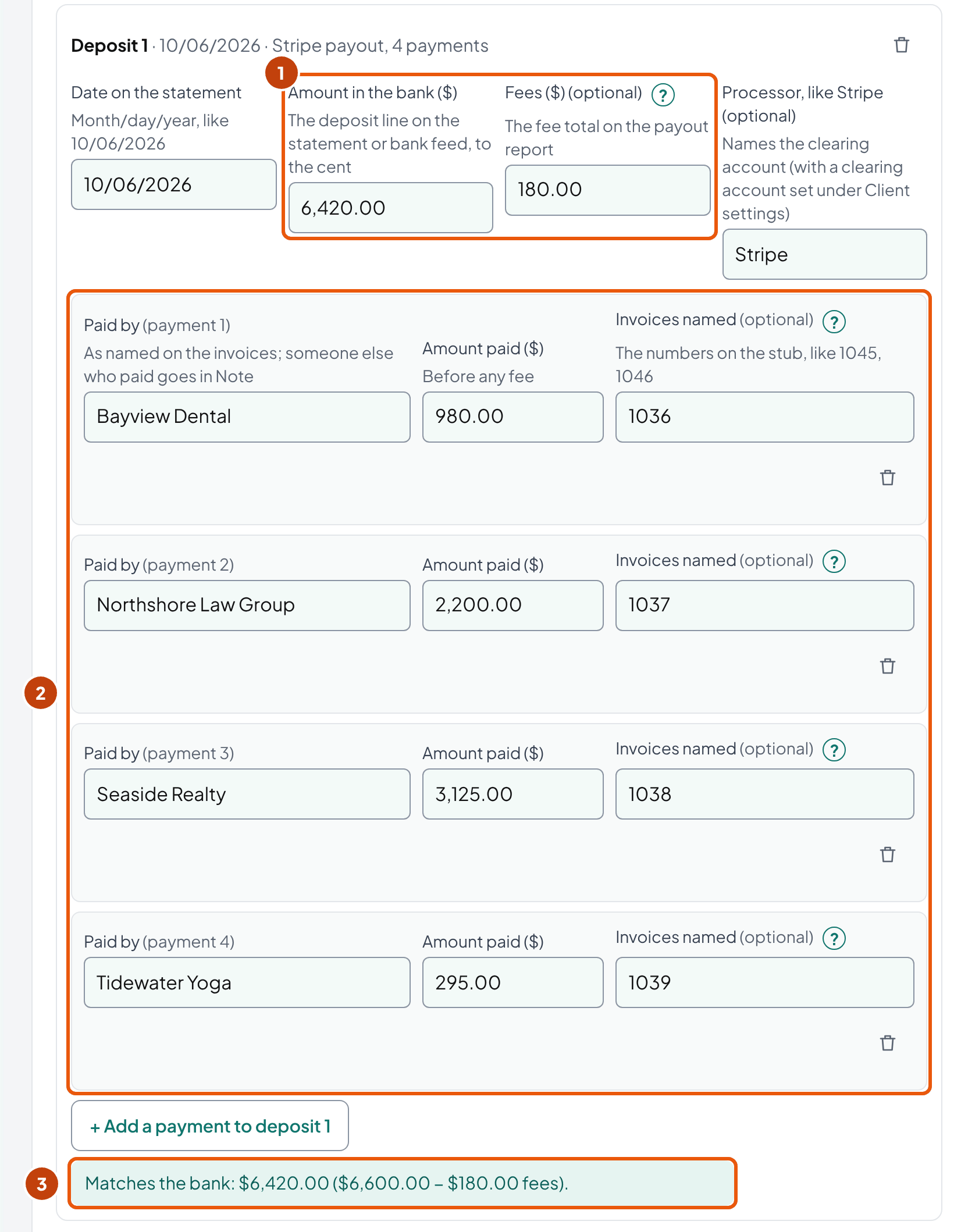
Each processor keeps those numbers in a different report. Here's where you'll find them, from Stripe's, Square's and PayPal's own help pages:
| Stripe | Square | PayPal | |
|---|---|---|---|
| What lists the payout's contents | The payout reconciliation report; its itemized CSV lists "every payment, refund, dispute, fee, and other balance transaction included in the payout" | The transfer detail, with "the individual card payments included in the transfer" | Monthly statements, which PayPal calls "bank-style reports"; each line has Gross, Fee and Net |
| How the net is worked out | From the itemized CSV: each payment, refund, dispute and fee in the payout | "Net total: Total collected minus fees minus other withholdings" | "Net … The difference between gross and fee" |
| What else can come out | A dispute: "the disputed amount plus a dispute fee" | Square Loans repayment, "a fixed percentage of daily card sales" | A reserve hold, and chargebacks |
| Timing | Payouts set for a weekend or holiday "arrive on the next business day" | Use the transfer date in Square's transfer detail; two Square help pages give different weekend rules | A standard transfer "typically" takes 1–3 business days |
| Watch for | With instant payouts, "Stripe can't identify which transactions are included in each payout"; a negative balance can mean a payout that "debits your bank account" | The loan repayment isn't a fee | A PayPal balance works like a bank account: reconcile it as one (our practice) |
You record the payments at $6,600.00 and the fee as an expense. OpenStax's textbook does the same with a card sale: it debits Credit Card Expense for the fee and credits Sales Revenue for the full amount.
Card payments
$6,600.00
INV 1036, 1037, 1038, 1039, paid in full
Stripe clearing
In $6,600.00 − fee $180.00
What Stripe owes the client until the payout
Card processing fees
$180.00 expense
Payout to the bank
$6,420.00
Stripe clearing is back to $0.00
| Account | Debit | Credit |
|---|---|---|
| Stripe clearing | 6,420.00 | |
| Card processing fees | 180.00 | |
| Accounts receivable (INV 1036, 1037, 1038, 1039) | 6,600.00 |
| Account | Debit | Credit |
|---|---|---|
| Bank | 6,420.00 | |
| Stripe clearing | 6,420.00 |
Stripe's docs say its payout reconciliation report is optimized for users "who model their Stripe balance as a temporary clearing account". Held that way, the clearing account is what Stripe owes the client between the sale and the payout.
The clearing account gives you a month-end proof. Lopez's payout landed on October 6, so Stripe clearing is $0.00 on October 31.
Had it landed on November 2 (a what-if), the account would show $6,420.00 on October 31. That's money Stripe still owed the client. You'd check it against Stripe's Balance report, which Stripe says "resembles a bank statement" and has an ending balance reconciliation.
If your client keeps no clearing account, choose Straight to the bank under Client settings. The tool then posts Bank $6,420.00 and fees $180.00 against Accounts Receivable $6,600.00. The totals are the same; what you lose is the place a late payout shows up.
Without a clearing account, the QuickBooks Online way is Intuit's. Don't edit the original payments; enter the fee "as a negative number" in Add funds to this deposit, so the deposit matches the statement "for the exact same amount" (Intuit's steps).
If your client uses Stripe's instant payouts, reconcile the Stripe balance for the whole month instead of payout by payout (our practice). Stripe itself can't say which payments each instant payout holds.
Square can also keep money for a Square Loan: a fixed percentage of daily card sales, until the loan "is repaid in full, even when the minimum payment is met." You put that amount in the tool's Other withholdings (tick Show extra fields in the Deposits card), and the entry debits the loan, not an expense.
Refunds and disputes inside a payout
A refund or a dispute also comes out of the payout before it reaches the bank. Stripe's itemized report lists each one, and for a dispute Stripe "debits your Stripe balance for the disputed amount plus a dispute fee." So the payout is smaller than the payments by more than the fee.
For a refund, type the amount in Other withholdings and name it, for example Sales returns and allowances. The entry then debits that account, the way OpenStax records a partial refund as a sales allowance (applying it to a payout is our reading). The tool doesn't cover dispute accounting: ask the client's accountant how they book a chargeback and its fee.
The customer paid less: what do you record?
In short: Nothing yet. The unpaid part stays open on the invoice until the client decides it isn't owed.
Seaside Realty paid $2,150.00 on INV 1052, a $2,200.00 invoice. Its stub says "less $50, one window skipped." The $50.00 is still owed until Maria agrees it isn't. The textbook keeps the unpaid part of a partial payment in receivables, as in OpenStax's own example (its figures, not Lopez's):
“The remaining $25,000 owed would remain outstanding, reflected in Accounts Receivable.”
OpenStax, Principles of Accounting Vol. 1, §9.1 (a partial payment)
Once the owner decides, each choice has its own entry. Click Record the client's decision on this payment under the short payment, and the choices appear:
| Choice in the tool | When it fits | Entry |
|---|---|---|
| Leave it open and collect it | The customer owes it, or nobody has decided yet | None: the invoice shows the rest open |
| The rest is due later, as agreed (installment) | The client agreed to installments, like Pine Street's | None: the invoice stays open, with the date the rest is due |
| Sales discount the client agreed to | The client offered the discount, or agrees to it now | Dr Sales discounts, Cr Accounts receivable |
| Allowance for a price or quality problem | The client accepts the customer's complaint | Dr Sales returns and allowances, Cr Accounts receivable |
| Small balance under the client's limit | A few dollars, under a limit the client set in writing | Dr an account the client names, Cr Accounts receivable |
| Write it off as a bad debt | The client gives up on collecting it | Dr Bad debt expense (or the allowance), Cr Accounts receivable |
OpenStax's chapter 6 key terms call sales discounts "a contra revenue account," and its §6.4 example records an allowance in Sales Returns and Allowances. On Schedule C, the IRS puts returns and allowances on line 2, as a positive number.
You send Maria the question, and she agrees the skipped window is on Lopez. That's an allowance:
| Account | Debit | Credit |
|---|---|---|
| Sales returns and allowances | 50.00 | |
| Accounts receivable: Seaside Realty | 50.00 |
Pick the allowance on Seaside's payment, and INV 1052 drops off the open list. Pine Street's $900.00 stays open: the client expects it on November 15.
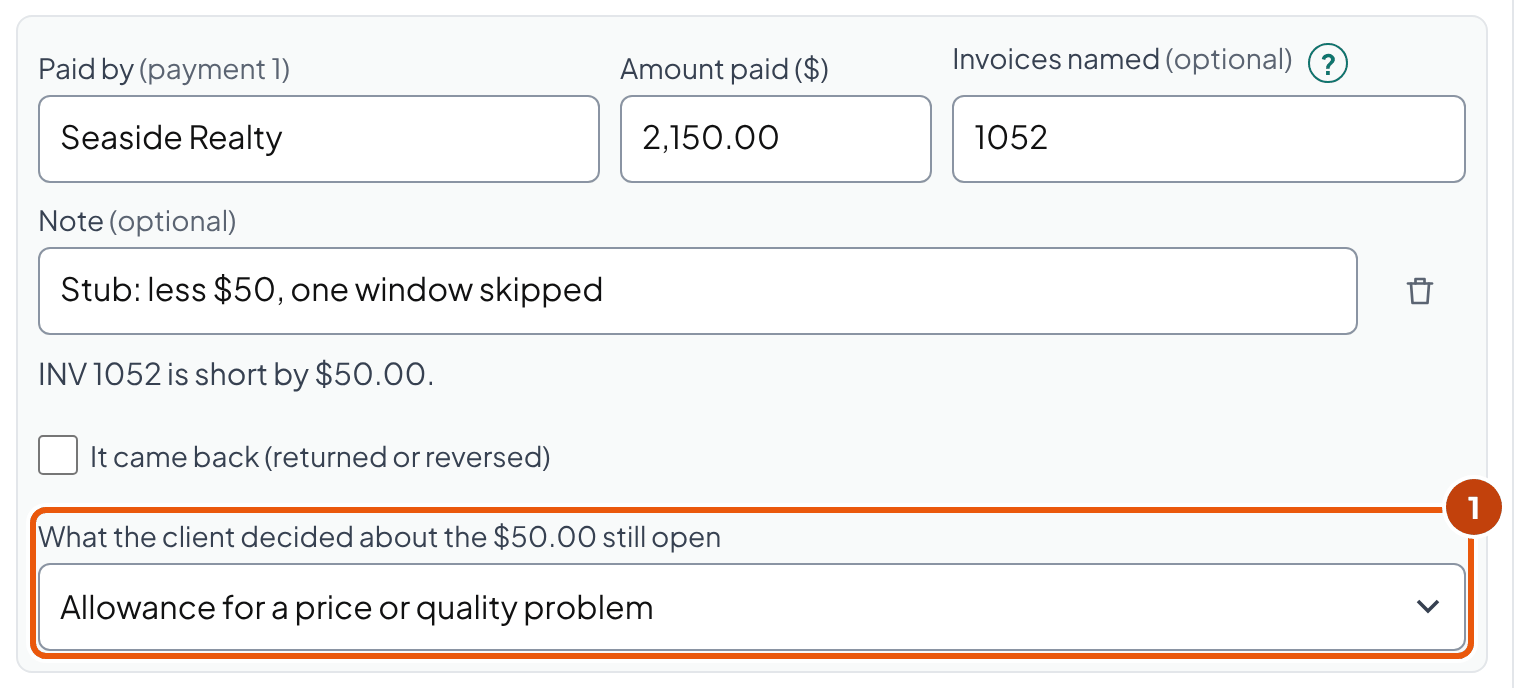
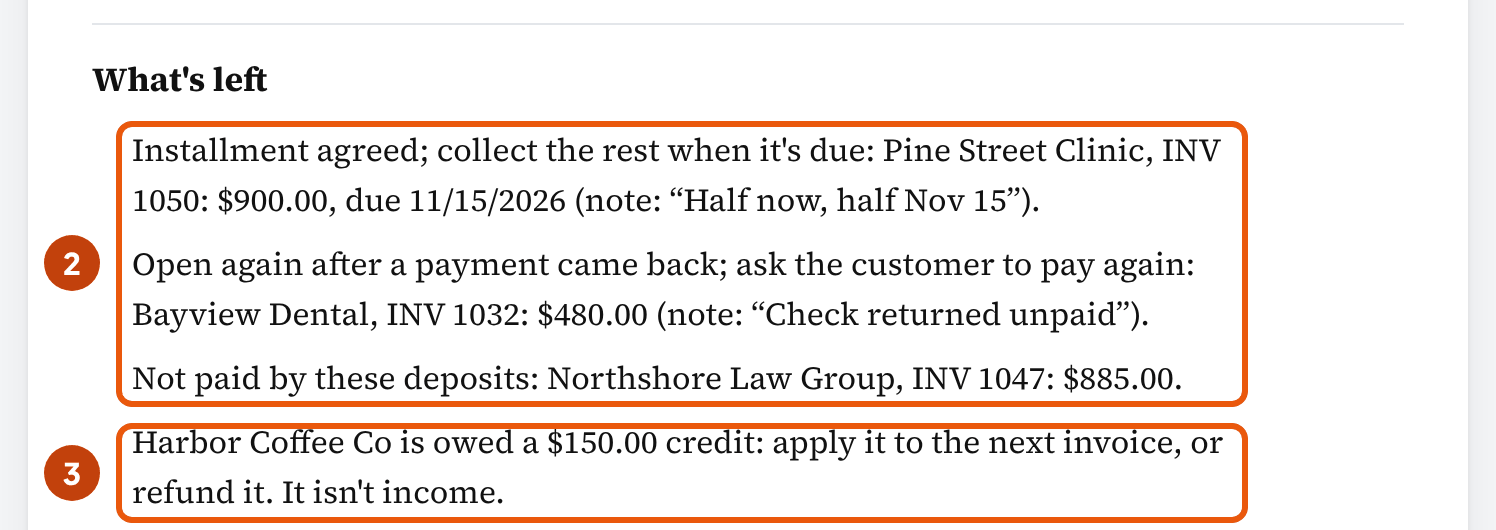
If the customer took an early-payment discount the terms allow, it isn't a dispute: pick Sales discount the client agreed to. OpenStax records it as Cash and Sales Discounts against the full receivable. If the customer paid after the discount window, the chapter 6 summary says to debit Cash and credit Accounts Receivable only. A discount taken late is then an ordinary short payment for the client to decide (our reading).
Who decides, and how to get it in writing
The owner decides, because forgiving a balance is a business decision. We found no rule that sets a dollar limit for a bookkeeper, but universities write their own, and they make a usable model:
- Florida State: "Departments may not authorize their own write-offs," and "A write-off does not discharge a debt."
- Cornell: under $5,000 goes to the unit's senior business officer, and $5,000 or more to the university controller, each with "A brief narrative of the reason for the write-off" and an email confirmation.
Those are internal policies, not law for your client. The pattern they share fits anyway: you prepare the entry, the owner approves it, and the reason goes with the approval (our reading of those policies).
For differences of a few dollars, ask your client for a standing limit in writing, say $5.00 (our example, not a norm). Indiana University clears small balances, such as bank fees taken from wire payments, with a credit memo and a written reason.
Type the limit under Client settings, then pick Small balance under the client's limit on the short payment. Over the limit, or with no limit set, the tool tells you to get the client's approval in writing first.
Safe (our practice): "Seaside's $50.00 on INV 1052 is still open. Do you want to collect it or allow it?" Risky: a credit memo for every gap. It forgives money nobody agreed to forgive, and it hides the customer who short-pays every month.
Before you record a short payment, check three things:
- A check marked "paid in full". UCC § 3-311 is the uniform model for such a check; each state enacts its own version. Under it, cashing the check can settle the whole claim when all three of these are true:
- The customer sent it in good faith "as full satisfaction of the claim."
- The amount was "unliquidated or subject to a bona fide dispute" (the amount wasn't fixed, or was honestly disputed).
- The check, or a note with it, carried "a conspicuous statement" saying so.
The rule has exceptions, such as repaying the amount within 90 days. So if the amount is in dispute, hold the check and ask your client before anyone deposits it. Seaside's stub only explains the $50.00, so its payment is an ordinary short payment.
- The client's method. A cash-basis client never reported the $50.00 as income, so writing it off gives no deduction (our reading of the IRS rule). IRS Topic 453 allows a bad debt "only if the amount you were owed is included in your gross income in the current or prior year." Tick Cash-method client under Client settings, and the tool's note says so.
- Sales tax. This page doesn't cover sales tax on a short payment: we found no official answer to cite, and it's a state rule. Ask the preparer before you adjust the tax.
The customer paid more, or paid twice
In short: It's the customer's money, not income. Keep it as a credit on their account, then apply it to their next invoice or refund it.
Harbor Coffee Co sent $1,600.00 for INV 1045, a $1,450.00 invoice: $1,600.00 − $1,450.00 = $150.00 that Lopez owes Harbor. You keep it on Harbor's account until it's used or refunded.
Florida State's receivables policy says credit balances to be paid back to the customer "are reclassified as liabilities." It also says a credit "may be applied to future orders" when there's "an expectation of an ongoing relationship with the customer." Harbor buys every month, so you'd apply it to the next invoice.
In QuickBooks Online, you can "apply the credit to an invoice, give a refund, or enter the extra payment as a tip." For a refund, you record a check or expense and link it to the customer's credit. Until Maria decides, leave the $150.00 as Harbor's credit in QuickBooks. Where credits owed back go on a year-end balance sheet is the preparer's call.
The tax side points the same way, with a limit. In *SmartHealth, Inc. v. Commissioner* (T.C. Memo 2001-145), the Tax Court held that the company didn't have to report overpayment credits still owed to customers at year-end as income.
The ruling rests on one tax rule (the court's "claim of right doctrine"), and it didn't decide when a credit nobody claims becomes income. That company's unused credits were disposed of under the unclaimed property laws.
A customer who pays the same invoice twice is the same case with a bigger credit. When a payment names an invoice that's already paid, the tool says it "may be a duplicate payment," so you can ask before Maria spends the money.
Money a customer pays before there's an invoice, such as a deposit on future work, is owed too. OpenStax calls an advance payment for work not yet done "a liability (unearned service revenue)." Intuit's retainer steps hold it in an Other Current Liabilities account until it's applied to the invoice.
The tool doesn't post it there. A payment from a customer with no open invoice in the list shows as not applied, and its entry holds it in Accounts receivable. A customer with open invoices gets it applied to the oldest one. So record a true advance outside the tool, in a liability account as Intuit's steps do.
Old credits become unclaimed property
A credit nobody claims can end up with the state. In New York, customer credit balances "are deemed abandoned if unclaimed for three years," whether a business or a person is owed. Before then, the holder must contact the customer in writing (New York's reference sheet).
Other states set their own periods. NAUPA's table for credit memos lists, for example, 1 year in Alabama and 5 in Delaware and Georgia.
North Carolina doesn't treat a credit one business owes another as abandoned. Its statute, § 116B-54(e), excludes "Credit balances as shown on the records of a business association to or for the benefit of another business association," and defines them as "items such as overpayments or underpayments on the sale of goods or services." Lopez's customers are businesses, so in North Carolina that exclusion would cover a credit like Harbor's (our reading). So by our reading, NAUPA's North Carolina period of 5 years (3 for a retail transaction) would apply only to credits owed to people.
So before your client treats an old credit as the state's, check the rule with the treasurer of the state that applies. New York's sheet, for one, says credits are reported "to the State of the last known address of the customer." Either way, send the customer a short notice (sample).
Which invoice does a payment go to when the customer doesn't say?
In short: The one the customer names. If they name none, the business decides, which in practice means you do, and the tool takes the customer's oldest due invoice first.
Northshore Law Group's $925.00 check on October 27 came with no stub. Northshore had two open invoices: INV 1029 for $925.00, due September 30, and INV 1047 for $885.00, due October 30. You apply the check to INV 1029, the oldest due, and so does the tool. INV 1047 stays open.
California, Montana and Georgia write the rule down. All three start the same way: the customer's direction first, then the business's choice. So read the stub before you apply anything. Only when neither side applies the payment does each law set its own order:
| Statute | The customer's direction | If the customer says nothing | If neither applies it |
|---|---|---|---|
| In plain words | The customer names it: that invoice | The customer says nothing: the business picks (California and Montana: within a reasonable time) | Nobody picks: each state's order (Georgia, oldest first; California and Montana, a split within a class) |
| California Civil Code § 1479 | the debtor's intention controls, if shown at the time | the creditor may apply it "within a reasonable time" | interest due, then principal due, then "the obligation earliest in date of maturity"; within a class, "ratably" |
| Montana MCA 28-1-1106 | "the intention or desire of the debtor" controls | the creditor may apply it "within a reasonable time after performance" | ends with "the obligation earliest in date of maturity"; within a class, "ratably" |
| Georgia O.C.G.A. § 13-4-42 | the debtor has "the right to direct the claim" | the creditor applies it "at his election" | as a general rule, "the oldest item in an account shall be paid first" |
California adds that once the business applies a payment, it "cannot be rescinded without the consent of" the debtor. So for a California client, tell the customer how you applied an unmarked check. A later "it was for 1047" is something to agree with them, not to change alone.
These are three states' laws, used as examples, not a survey of all 50. Georgia's annotations say the rule applies "to partial payments as well as payments in full." A loan agreement can change the order too: the same annotations call the rule "inapplicable where loan agreement governed disposition." So check your client's terms or loan agreement first, then its own state's law if it isn't one of these three.
Two parts of the tool's order are ours. Oldest due first is our default, close to Georgia's general rule (oldest item first). When the tool applies a payment that way, that's the business applying it (our reading), which all three states allow (California and Montana: within a reasonable time). California and Montana split a payment ratably within a class, so check those states' rule if neither the customer nor the business applies the payment. And if two invoices fall due the same day, the tool pays the older invoice first, then the lower number.
If the client or the customer wants a payment split between invoices instead, enter it as two rows, each with its share and its invoice.
When a remittance names invoices that don't add up to the check, apply it to the named invoices in order. Leave the rest as a credit or a short, and ask the customer. That's our practice; we found no official rule for it.
Cleaning up months that were never matched
In short: Undo the wrong matches before you add anything. A payment received in QuickBooks and the same deposit added from the bank feed as income put the money in the books twice.
A client on a bank feed doesn't need Undeposited Funds. Intuit: "You don't need to use the Undeposited Funds account if you're downloading transactions directly from your bank" (Intuit). So a large balance there is a list of payments waiting for their deposits.
- Run the Undeposited Funds register for the month you're fixing, and list each payment with its date, customer and amount.
- Find the bank deposit each one belongs to. Intuit says every payment in Undeposited Funds shows up in the Bank Deposit window, so group them until the total matches the statement line.
- Where the bank feed already added that deposit as income, undo it. After Undo, Intuit says, "the original downloaded transaction returns to the Pending tab where you can find the correct match" (Intuit).
- Stop at reconciled items. Intuit's own warning: "If you already reconciled the transaction you want to unmatch or change, reach out to your accountant for advice."
- Clear a negative item with a zero deposit. Intuit: "make a zero value deposit and record the negative value deposit with it."
QuickBooks Payments deposits are the exception. QuickBooks "takes care of invoice payments processed with QuickBooks Payments for you," so they skip Undeposited Funds.
Does your client also use an app that brings Square or Stripe sales into QuickBooks? Then check that one deposit didn't come in twice, from the app and from the bank feed (our suggestion).
Years already filed
A payment posted to the wrong invoice, or a deposit booked twice, is a posting error. Fixing one isn't a change of accounting method: Pub 538 lists "Correction of a math or posting error" among changes that "do not require IRS approval."
Whether to amend the return is the preparer's and the client's call. Send them each correction with its amount and its year. Ask where it goes: back in the filed year (with that year's closing reopened), or as an adjustment in the current year.
Keep the list by year either way. When the IRS examines a return, its manual tells examiners to make an error correction "for the years under examination" whether the adjustment is positive or negative (IRM 4.11.6.7.5.4).
What to get from the client, and what to send
In short: Three things need your client's word: a decision on each short payment, permission to clear small balances, and what to do with each credit. Ask once a month, in one email.
Maria, October's deposits are matched. One payment came in short, and one is an agreed installment. Pine Street Clinic paid $900.00 of INV 1050 ($1,800.00) and says the rest comes November 15, so I'm leaving it open. Seaside Realty paid $2,150.00 of INV 1052 ($2,200.00), less $50.00 for a skipped window: reply "allow" and I'll record a $50.00 allowance, or "collect" to keep it open. Harbor Coffee overpaid INV 1045 by $150.00: should I apply it to their next invoice or refund it?
In the tool, Copy summary (under Print, CSV and more) gives you the same figures as plain text to start the email from.
Thank you for your payment of $2,150.00 on invoice 1052. The invoice was for $2,200.00, so $50.00 is still open. If the difference is for the window we skipped, let us know and we'll adjust the invoice. Otherwise, please add it to your next payment.
Harbor Coffee Co: our records show a credit of $150.00 on your account, from your payment of $1,600.00 on October 27, 2026, against invoice 1045 for $1,450.00. We'll apply it to your next invoice unless you'd rather have it refunded; reply to this email or call [phone] to choose.
That's our wording, and the sent copy is your client's written proof the customer was told. Where a state sets what an unclaimed property notice must contain, that state's list comes first.
Payment differences: we apply customer payments to the invoices the customer names, or otherwise to the oldest open invoice. We don't write off, discount or refund any balance without your written approval, and each month we list short payments and customer credits for your decision.
Add it to the scope section of your engagement letter, so the decisions stay with the client from the first month.
Rules to check: Form 1099-K, card fees and state rules
In short: The IRS reports card payments at the gross amount, so your client's books need the gross too. Ask the preparer which Schedule C line takes the fees. And in Texas, a fee added to the customer's bill can be taxable.
“The gross payment amount isn't adjusted for any: Fees, Credits, Refunds, Shipping, Cash equivalents, Discounts. These items are not taxable income. You can deduct them from the gross amount.”
So for Lopez, deposit 1's $6,600.00 of card payments counts toward a Form 1099-K, not the $6,420.00 payout. Card processors send one "no matter how many payments you got." Payment apps and marketplaces send one for "over $20,000 in more than 200 transactions," per the IRS.
Is your client's 1099-K wrong? The IRS says to contact the filer: "Don't contact the IRS. We can't correct your Form 1099-K." If the client can't get a corrected form, the same FAQ says not to wait to file the return.
The IRS doesn't say which Schedule C line takes card fees. The 2025 instructions never use the words "credit card" or "processing fee"; line 10 is "commissions and fees" in general. Ask the preparer which line they use, and map your fee account to it.
In Texas, a card fee the business adds to the customer's bill is taxable when the item sold is. The Comptroller's STAR memo 202406004M (June 27, 2024) says: "Separately stated credit card processing fees are taxable as part of the total sales price of a taxable item." That's one state, so check your client's state before you add a fee line.
Common mistakes
In short: Your client's bank account can reconcile while the invoices are wrong. On a card client, check the first row first: the net payout booked as the sale.
| Mistake | How it shows | What to do instead |
|---|---|---|
| Booking the payout as the sale | Sales $180.00 below the 1099-K, and no fee expense | Payments at the gross amount, the fee as an expense |
| A credit memo for every short payment | Customers who short-pay every month and are never asked | Leave it open until the owner decides |
| Moving a credit balance to income | Harbor's $150.00 shows up as revenue | Keep it as owed; apply it or refund it |
| Adding the deposit as income from the bank feed | Paid invoices stay open, and income and AR are both too high | Match the deposit to the Receive payment entries |
| Applying an unnamed check to the newest invoice | The oldest invoice looks late, and the customer gets a reminder for a bill they paid | Oldest due first, or ask the customer |
| Changing reconciled items to make a match | Last month's bank reconciliation stops balancing | Stop and ask the client's accountant, as Intuit says |
| Trusting the net payout | Fees, refunds or a loan repayment never reach the books | Open the payout report for every payout |
Field details
In short: You need each invoice's customer, number, due date and open amount; each deposit's date and amount in the bank; and, for each payment, who paid and how much. Everything else is optional, and the extra fields and Client settings can wait.
| Field | Where to find it | Accepts |
|---|---|---|
| Customer, Invoice no., Due date, Open balance ($) | The client's Open Invoices or A/R aging report, before the deposits | Text, a date like 10/30/2026, a dollar amount |
| Invoice date (optional) | The invoice | A date; used only to break a tie between equal due dates |
| Date on the statement, Amount in the bank | The bank statement or feed | A date and a dollar amount |
| Fees, Processor (optional) | The processor's payout or transfer report | $0 or more; no fee rate is assumed |
| Other withholdings (extra fields) | The payout report: a loan repayment, a reserve | $0 or more, with what it is |
| Paid by, Amount paid | The deposit slip, remittance or payout report | A customer name as it appears on the invoices, and the amount before any fee |
| Invoices named (optional) | The check stub, remittance or payment memo | One or more numbers, like 1045, 1046 |
| It came back, Date it came back (extra fields) | The bank statement's returned item | A tick, then a date |
| Decision on a short payment (extra fields) | The client's written answer | One of six choices; for an installment, the date the rest is due |
| Small-balance limit (Client settings) | The client, in writing | $0 or more; empty means none is set |
| How the client books Stripe, Square or PayPal payouts, Cash-method client (Client settings) | How the client's books are set up | One of two choices; a tick |
Frequently asked questions
How do you reconcile payments?
Deposit by deposit. Open each one with its slip, remittance, payout report or ACH detail, and apply each payment to the invoice the customer named, or else to their oldest due invoice. Then check that payments minus fees and withholdings equal the bank amount. Any difference gets a name: a fee, a short payment still owed, an overpayment the client owes back, or a question for your client.
What is the process of reconciliation?
Comparing two records of the same money and explaining every difference. In payment reconciliation the records are the deposits and the invoices they paid; in a bank reconciliation, the statement and the books on the statement date. The steps are the same: list, match, name what's left, record it, and keep the support.
What is payable reconciliation?
The same job on the vendor side: matching what the business paid to the bills it owed, and proving Accounts Payable against vendor statements and the AP aging. This page covers customer payments; the accounts payable template on this site handles bills.
What's the difference between payment reconciliation and bank reconciliation?
A bank reconciliation proves the book balance matches the bank on the statement date. Payment reconciliation opens each deposit and says which invoices it paid. A deposit can pass the first and still sit on the wrong invoices, so you do both.
Is there a payment reconciliation template in Excel?
Yes, the tool above downloads one with no sign-up. Its Deposits sheet checks each deposit against the bank, its Invoices sheet shows what's still open, and a master check on every sheet reads OK when everything adds up.
What do I do when a deposit is less than the invoice?
First find out which kind of less it is. A processor fee in the payout report: record the payment at the full invoice amount and the fee as an expense. A customer who paid less: the rest stays open until your client decides, in writing. In the example, Seaside Realty paid $2,150.00 on a $2,200.00 invoice, and the $50.00 stayed open until the owner allowed it.
Is a customer overpayment income?
No. It's money your client owes the customer until it's applied to another invoice or refunded; in SmartHealth v. Commissioner, the Tax Court held that credits still owed at year-end didn't have to be included in income under the claim of right doctrine. Old credits can become unclaimed property: New York treats them as abandoned after three years.
Which invoice does a payment go to if the customer doesn't say?
The business decides. California Civil Code § 1479, Montana Code 28-1-1106 and Georgia Code § 13-4-42 let the creditor apply an undirected payment. The tool takes the customer's oldest due invoice first (our default), close to Georgia's general rule for when neither side applies a payment (oldest item first). For Northshore Law Group's $925.00 check with no stub, the tool's choice was INV 1029, due September 30.
Why doesn't my Stripe payout match my sales?
A payout is your customers' payments less Stripe's fees, refunds, disputes and anything else on the balance, and it can arrive after the sales it pays. Record the payments gross and the fee as an expense. With instant payouts, Stripe says it can't identify which transactions each payout holds, so you reconcile the month's balance instead.
What should Undeposited Funds be at month-end?
Only payments received and not yet deposited. Intuit says your client doesn't need the account if they download bank transactions, and that QuickBooks Payments deposits don't go through it. So an old balance there is a list of payments still waiting to be matched to their deposits.
Who decides to write off a short payment?
Your client, in writing; we found no rule that sets a dollar limit for a bookkeeper. Florida State's policy says departments "may not authorize their own write-offs", a usable model. For a few dollars at a time, ask your client for a standing small-balance limit.
How we built this page
Ledgental Team wrote this guide and built the tool. Ledgental also makes a bookkeeping app that's free during its beta; this tool doesn't connect to it. The rows you enter stay in your browser, and nothing you enter goes into a link, because the rows hold customer names. How we research, check sources and use AI tools: About Ledgental.
What the numbers rest on
- The matching is addition and subtraction in cents: each payment applied to the invoices named, then the oldest due, and each deposit checked as payments − fees − withholdings against the bank. The tool, the Excel workbook and this guide use the same engine, checked by known-answer tests built from the Lopez Cleaning example. The Excel file hasn't been recalculated in LibreOffice yet.
- Our conventions, labeled where they're used: oldest due date first when no invoice is named, with invoice date and then number as the tie-break; the small-balance limit set by the client; a clearing account for processor deposits by default; the practice for a remittance that doesn't add up.
- Rules (the three state statutes, the IRS pages and instructions, the Federal Reserve and Nacha pages, UCC § 3-311, the Texas memo, New York's unclaimed property sheet and North Carolina's statute, OpenStax, the university policies, the Tax Court case, and the Stripe, Square, PayPal and QuickBooks help pages) were read between October 4 and October 19, 2026 and are quoted or linked in the text. Georgia's code was read in Justia's copy and North Carolina's statute at ncleg.gov; the rest at the source.
- Not covered: vendor payments (see the accounts payable template), more than one currency, chargeback disputes, a payout the processor took back from the bank, lockbox files, and sales tax on a short payment. We found no source that treats processor fees as a reduction of revenue for a small business, and no official rule on when an unclaimed credit becomes income.
What changed
- October 19, 2026: first published: the tool, the Excel workbook and this guide.
- October 19, 2026 (later): guide and tool wording rewritten for easier reading: shorter sentences, each section opening with its answer, the state rules on old credits as one short passage, the "paid in full" conditions as a list, the hints that repeated on every deposit and payment moved to the top of each list, the paste box moved next to the invoices, the switch for extra payment fields moved to the top of the deposits, and the answer split into a verdict and a details line. Later the same day: the tool's actions moved under the answer and its client settings after the deposits, the returned check got a next step, and the guide gained early-payment discounts and refunds inside a payout. Later still: each state's fallback order described as it reads (Georgia oldest first; California and Montana split within a class), Intuit's bounced-check steps for QuickBooks Online, an agreed installment kept apart from a short payment, and the answer naming every open invoice. No figure changed.
Cite this page
Copy one of these lines to credit the page. To link to one section, use the link icon beside its heading.
- Plain line
- Ledgental, Payment Reconciliation Tool, updated October 2026, https://ledgental.com/tools/payment-reconciliation
- APA
- Ledgental. (2026, October). Payment Reconciliation Tool. https://ledgental.com/tools/payment-reconciliation
- Chicago
- Ledgental. “Payment Reconciliation Tool.” Last modified October 2026. https://ledgental.com/tools/payment-reconciliation.
Reusing this page: the guide's text, tables and diagrams are licensed under CC BY 4.0. Credit "Ledgental" with a link to this page. Quotations from the IRS, federal statutes and federal regulations are public domain; quotations from other sources stay under their owners' terms.
Sources
- Civil Code § 1479 (application of performance to several obligations), California Legislative Information
- MCA 28-1-1106, Application of performance where several obligations exist, Montana Legislature
- O.C.G.A. § 13-4-42, Application of payments (2025 Georgia Code), Justia copy of the Georgia Code
- What to do with Form 1099-K, Internal Revenue Service
- Form 1099-K FAQs: what to do if you receive a Form 1099-K, Internal Revenue Service
- Understanding your Form 1099-K, Internal Revenue Service
- 2025 Instructions for Schedule C (Form 1040), Internal Revenue Service
- Topic no. 453, Bad debt deduction, Internal Revenue Service
- Publication 538, Accounting Periods and Methods, Internal Revenue Service
- Internal Revenue Manual 4.11.6, Changes in Accounting Methods, Internal Revenue Service
- FedPayments Reporter Service overview (Nacha remittance information rule), Federal Reserve Financial Services
- Minor Topics Rule Changes (effective January 1, 2026), Nacha
- UCC § 3-311, Accord and satisfaction by use of instrument (uniform model text), Cornell LII
- STAR memo 202406004M, Sales price and credit card processing fees (June 27, 2024), Texas Comptroller of Public Accounts
- Unclaimed Property Relating to All Business Entities, reference sheet, Office of the New York State Comptroller
- Property Type: Credit Memos (dormancy periods by state), National Association of Unclaimed Property Administrators
- Principles of Accounting, Volume 1, §9.1 (card sales and partial payments), OpenStax
- Principles of Accounting, Volume 1, §6.4 (sales discounts and allowances), OpenStax
- Principles of Accounting, Volume 1, §6.1 and chapter 6 summary (sales allowances; payment after the discount window), OpenStax
- Principles of Accounting, Volume 1, §12.1 (unearned revenue), OpenStax
- Principles of Accounting, Volume 1, §8.6 (bank reconciliation and NSF checks), OpenStax
- Accounting Principles: A Business Perspective, Vol. 1 (the divide-by-9 test; its "may" was read in Lumen Learning's adaptation), Hermanson, Edwards & Maher (Global Text)
- Accounts Receivable policy 4-OP-D-2-J, Florida State University
- Accounts receivable write-offs, Cornell University, Division of Financial Affairs
- AR SOP 6.0, Customer invoice adjustment edocs, Indiana University, Office of the University Controller
- SmartHealth, Inc. v. Commissioner, T.C. Memo 2001-145, CourtListener
- Select a report; Payout reconciliation report; How disputes work; Payouts, Stripe documentation
- In-app summaries and reports; Repay your loan; Troubleshoot missing transfers, Square Support Center
- Monthly and custom statements; T-codes, PayPal Developer
- How do I get money out of my PayPal account?, PayPal Help Center
- Record and make bank deposits in QuickBooks Online, Intuit QuickBooks help
- Handle a customer credit or overpayment, Intuit QuickBooks help
- Record a refund for an overpayment or credit, Intuit QuickBooks help
- Record a retainer or deposit, Intuit QuickBooks help
- Record a returned or bounced customer cheque using a journal entry, Intuit QuickBooks help
- Record invoice payments in QuickBooks Online, Intuit QuickBooks help
- Unmatch or move downloaded bank transactions, Intuit QuickBooks help
- Managing your Undeposited Funds account, Intuit QuickBooks help
- Deposit payments into the Undeposited Funds account, Intuit QuickBooks help
- Resolve negative entries from undeposited funds, Intuit QuickBooks help
General information, not tax, legal or accounting advice. The rules were checked at the sources listed between October 4 and October 19, 2026. Lopez Cleaning Co and its customers are fictional. This page isn't affiliated with the IRS, the Federal Reserve, Nacha, Stripe, Square, PayPal, Intuit or Xero.