Key takeaways
- A reconciliation compares each account's balance in the books with a document from somewhere else for the same date, lists the items that explain the difference, and shows what's still not explained.
- Explained isn't reconciled. A bank fee you found but never recorded explains the difference, but the books are still wrong until you post the entry. The template counts those accounts separately.
- Prove each account with the strongest document you can get: a bank, lender, card or payroll provider statement beats a report from the client's own software, which only shows the ledger agrees with itself.
- Age every item. The university policies we checked draw the line at 90 days: Texas A&M sends older items to a supervisor, and Baylor wants a written plan for anything over $10,000 and 60 days old.
- Some balances tie to IRS forms: quarterly 941s to the W-3, and a mortgage's principal to Form 1098 box 2, which only real-property loans to individuals get.
What is a balance sheet account reconciliation?
In short: It's proof that each balance sheet account is right at a date: the balance in the books, compared with the same balance from another source, with every difference listed and explained.
Baylor University's month-end policy puts it in one line: a reconciliation is a "comparison of a balance sheet account balance to a sub-ledger, source system or third-party source document." Texas A&M's says what it's for: it "detects errors, omissions, timing differences, or mis-postings." Income and expense accounts start over each year, but a balance sheet account carries every past mistake forward until someone finds it, which is why these are the accounts you prove.
- In the booksBusiness checking on the trial balance, Sept 30$18,640.25
- On the documentBank statement ending balance, Sept 30$19,390.25
- DifferenceBooks − document−$750.00
- Explained by itemsCheck #1047, deposit in transit, bank fee−$750.00
- Not explainedNothing left, but the $25 fee still needs an entry$0.00
A template turns that comparison into the same few columns for every account, so a reviewer can read twelve accounts in the time it takes to read one. These are the columns in the template above, and the reason for each:
| Column | What goes in it | Why |
|---|---|---|
| Account | The account name as it appears on the trial balance | So each line ties to one balance |
| Proved by | The document you compared it with, and who produced it | A bank statement is stronger evidence than the client's own report (which document) |
| Books | The trial balance amount at the period end | The number you're testing |
| Document | The balance on that document for the same date | The number you test it against |
| Difference | Books − document | The only amount you have to explain |
| Reconciling items | Date, description, amount, timing or error, and the fix | What explains the difference, and what still has to happen |
| Not explained | Difference − the items | The open work: the period closes when it reaches $0.00 |
| Status, preparer, reviewer | Reconciled, entry needed, or not explained; two names, and the dates prepared and reviewed | Who did it, who checked it, how soon after the period end, and what's left |
The next section walks one account through the template in six steps. After that come which document to use for each account, and the worked example, which runs all twelve of one client's accounts through the template.
How do you reconcile a balance sheet account?
In short: Six steps, the same for every account: get the two balances for one date, take the difference, list what explains it, label each item, post the fixes, and have someone else sign.
Jordan Miles, the bookkeeper in the example below, reconciles Lopez Cleaning's business checking account on October 6 for the September 30 close. The steps follow the template's fields in order:
- Pick the date and the account. The period end goes in Period end (September 30, 2026) and the account name, as it reads on the trial balance, in Account name (Business checking). Every balance that follows is at that one date.
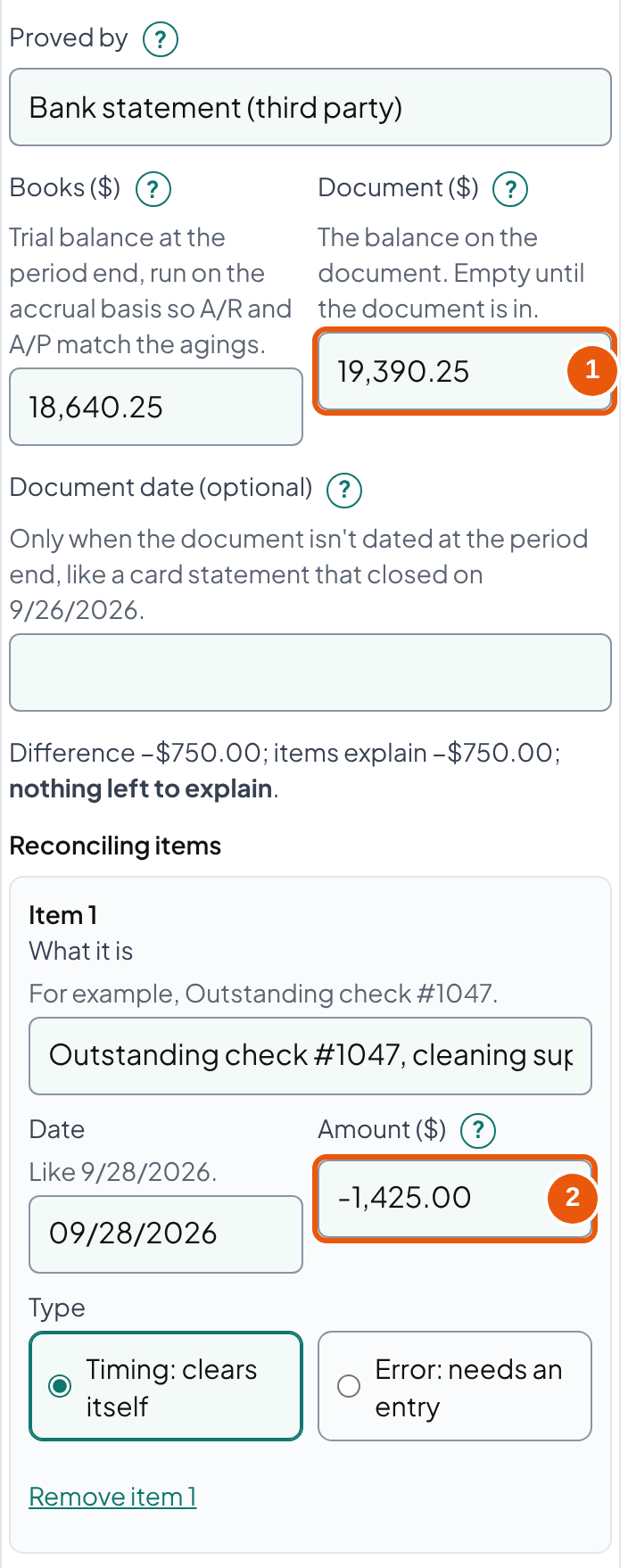
- Enter the balance in the books. Run the trial balance at the period end on the accrual basis, so A/R and A/P agree with their agings, and type the account's balance in Books ($18,640.25).
- Get the document and enter its balance. Choose the document in Proved by (the bank statement; a document from outside the client wherever one exists) and type its balance for the same date in Document ($19,390.25). When the document is dated earlier, like a card statement that closed on the 26th, put that date in Document date, so the workpaper shows the gap. The template takes the difference: books − document = −$750.00.
- List what explains the difference. Add a reconciling item for each cause, with its date, what it is, and its amount: positive when it makes the books higher than the document, negative when lower. Check #1047 for −$1,425.00, the September 30 deposit for +$650.00, and the $25.00 bank fee. The template subtracts the items from the difference and shows what's not explained; the account is explained when that reaches $0.00.
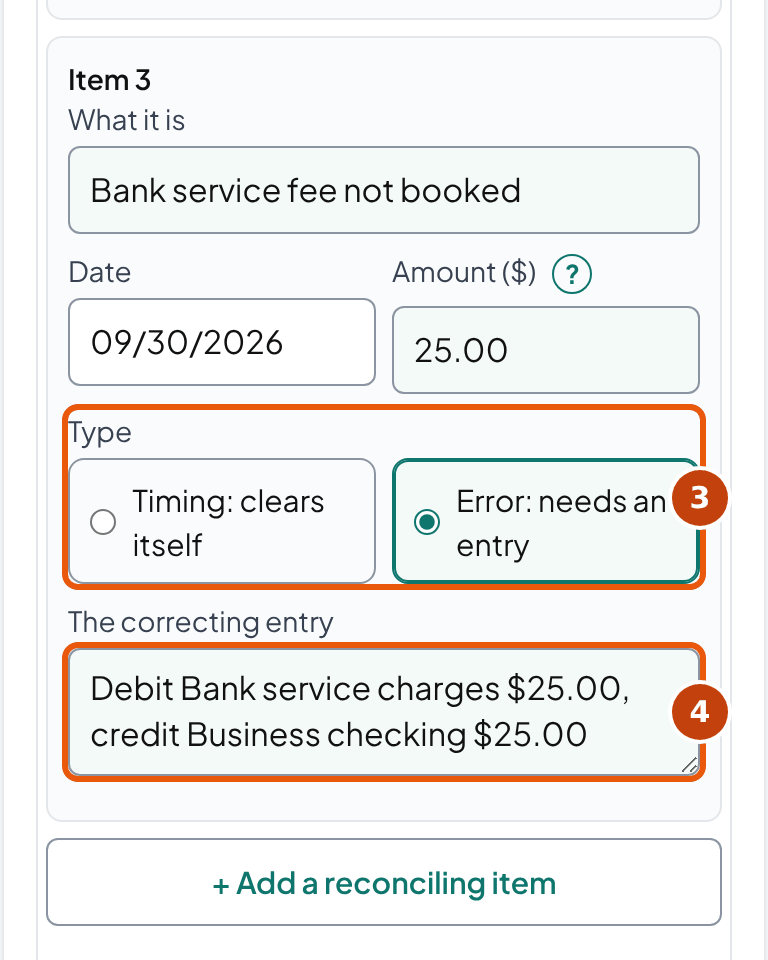
- Label each item timing or error, and write the fix. Mark the check and the deposit Timing, because the October statement clears them. Mark the fee Error and write its entry in The correcting entry (debit Bank service charges $25.00, credit Business checking $25.00). The template lists every fix under Entries to post; the account counts as reconciled once the entries are posted and only timing items remain.
- Date it and have it reviewed. Enter Prepared by and Prepared on, then a second person reads the summary, checks the items marked error or over the age limit, and enters Reviewed by and Reviewed on. The template counts the days from the period end to the prepared-on date against the 30 and 45-day windows in the Texas A&M and University of Washington policies, and warns when the preparer and reviewer are the same name.
Repeat for each account on the balance sheet, then download the workpaper. The next section says which document to use when the account isn't a bank account.
Which document proves each account?
In short: Use a document produced outside the client wherever one exists. A report from the client's own software only proves the ledger agrees with itself.
Auditing standards rank evidence the same way. AICPA's SAS No. 142 says "the reliability of audit evidence increases when it is obtained from external parties," and that "a greater susceptibility to management bias may exist when information is generated from internal sources." You're not auditing the client, but the logic holds for a bookkeeper: a statement the bank produced can catch a mistake in the books, and a report the books produced can't.
- From outside the clientA bank, card issuer, lender, payroll provider, vendor or taxing authority produced it. Examples: Bank and card statements, loan statements, payroll provider reports, vendor statements, filed returns.The strongest evidence you can get
- The client's own record, backed by outside evidenceThe client's software or staff produced it, and you test it against something outside. Examples: A/R aging checked against payments received after period end; a prepaid schedule built from the insurer's invoice.Strong once the test is done
- The client's own record aloneOnly the client's books or lists. Examples: An aging report with nothing behind it, a spreadsheet log, a balance someone typed in.Shows the ledger agrees with itself, not that it's right
The University of Washington's policy makes the point for cash: supporting detail "would include externally prepared bank statements," and reports from its own accounting system "are generally not considered appropriate supporting detail." Here is the document to reach for with the accounts most small businesses have:
| Account | Prove it with | Usually explained by |
|---|---|---|
| Checking and savings | The bank statement's ending balance | Deposits in transit, outstanding checks, fees and interest not booked, a bank-feed transaction added twice |
| Undeposited Funds | The deposits on the next bank statement: each payment still here at the period end appears in one of its first deposits | Old payments left behind when a deposit was added instead of matched |
| Accounts receivable | The A/R aging, then large balances against payments received after the period end | Payments not applied, open credit memos, journal entries posted straight to A/R |
| Prepaid expenses | A schedule built from the invoice or policy | Monthly amortization not posted |
| Fixed assets (cost) | Purchase invoices, bills of sale, titles, less what was sold or scrapped | Repairs capitalized, disposals still on the books |
| Credit cards | The statement balance at its closing date, plus the charges and minus the payments between that date and the period end | Charges after the statement closed, payments booked as an expense |
| Accounts payable | The A/P aging, and vendor statements for the large vendors. The accounts payable template ages the open bills on one date and shows the difference from the books. | Bills paid with an expense instead of a bill payment, duplicate bills |
| Payroll liabilities | The payroll provider's liability report and the deposits it shows; wages earned but not yet paid go through an accrued payroll entry | A tax deposit coded to expense instead of the liability |
| Sales tax payable | The tax on returns filed but not yet paid | Marketplace tax, discounts, payments coded to expense (sales tax reconciliation tool) |
| Loans | The lender's statement for the same date | A payment booked all to interest, or all to principal |
| Customer deposits | The list of deposits for work not yet done | A deposit still sitting there after the job was invoiced |
| Petty cash | The cash in the box plus the receipts not yet booked, which together equal the fund (petty cash log) | Receipts never posted, a replenishment booked to an expense |
| Opening Balance Equity | Nothing: it should be $0.00 | An opening balance never moved to owner's equity |
Bookkeeper tip: When an account has no outside document at all, like an accrual you estimated, Baylor's policy allows a "reasonableness test" instead: show how the number was built and why it makes sense. Mark it that way in the template ("Proved by: Schedule"), so the reviewer knows it's an estimate and not a match.
Worked example: a cleaning company's September close
In short: Twelve accounts at September 30, 2026: four reconcile, seven are explained but need correcting entries, and one has $750.00 nobody can explain yet.
Lopez Cleaning Co LLC is a fictional commercial cleaning company. Its bookkeeper, Jordan Miles, closes September on October 6, before sending the owner her reports, and a colleague, Sam Ortiz, reviews the file on October 8. These are the numbers already loaded in the template above:
| Account | Books | Document | Difference | Result |
|---|---|---|---|---|
| Business checking | $18,640.25 | $19,390.25 (bank) | −$750.00 | Explained; $25.00 fee to book |
| Savings | $10,000.00 | $10,000.83 (bank) | −$0.83 | Explained; interest to book |
| Undeposited Funds | $1,280.00 | $0.00 (October deposits) | $1,280.00 | Explained; income counted twice |
| Accounts receivable | $9,450.00 | $9,450.00 (aging) | $0.00 | Reconciled |
| Prepaid insurance | $2,400.00 | $1,800.00 (schedule) | $600.00 | Explained; 2 months to amortize |
| Vehicles and equipment | $38,500.00 | $38,500.00 (bill of sale) | $0.00 | Reconciled |
| Credit card | $2,316.40 | $2,130.00 (statement dated Sept 26) | $186.40 | Reconciled: timing only |
| Accounts payable | $3,105.00 | $3,105.00 (vendors) | $0.00 | Reconciled |
| Payroll liabilities | $4,212.60 | $3,880.20 (provider) | $332.40 | Explained; deposit miscoded |
| Loan payable | $27,940.00 | $27,412.18 (lender) | $527.82 | Explained; payment not split |
| Customer deposits | $1,950.00 | $1,200.00 (log) | $750.00 | Not explained |
| Opening Balance Equity | $1,500.00 | $0.00 (should be) | $1,500.00 | Explained; move to equity |
Three corrections and the open item, in detail:
Checking: two timing items and one error
| Balance in the books | $18,640.25 |
| Bank statement ending balance | $19,390.25 |
| Difference (books − bank) | −$750.00 |
| Check #1047, Sept 28, not yet paid by the bank (books lower) | −$1,425.00 |
| Sept 30 deposit, on the bank statement Oct 1 (books higher) | + $650.00 |
| Bank service fee, never recorded (books higher) | + $25.00 |
| Explained: −$1,425.00 + $650.00 + $25.00 | −$750.00 |
| Not explained | $0.00 |
Nothing is left to explain, but the account isn't finished: the $25.00 fee is an error, so it needs an entry. After it, the books show $18,615.25, which is also the bank's $19,390.25 − $1,425.00 + $650.00.
| Account | Debit | Credit |
|---|---|---|
| Bank service charges | $25.00 | |
| Business checking | $25.00 |
Undeposited Funds: income counted twice
Undeposited Funds holds payments received in the last few days and not yet taken to the bank, so the document that proves it is the next bank statement: each payment here at September 30 appears in one of October's first deposits. Intuit's help describes it as the account for "payments you haven't deposited at your bank." Lopez's shows $1,280.00 made of two $640.00 customer payments, one from June 20 and one from August 12. Neither is in an October deposit, because both have been in the bank for months, so the document balance is $0.00.
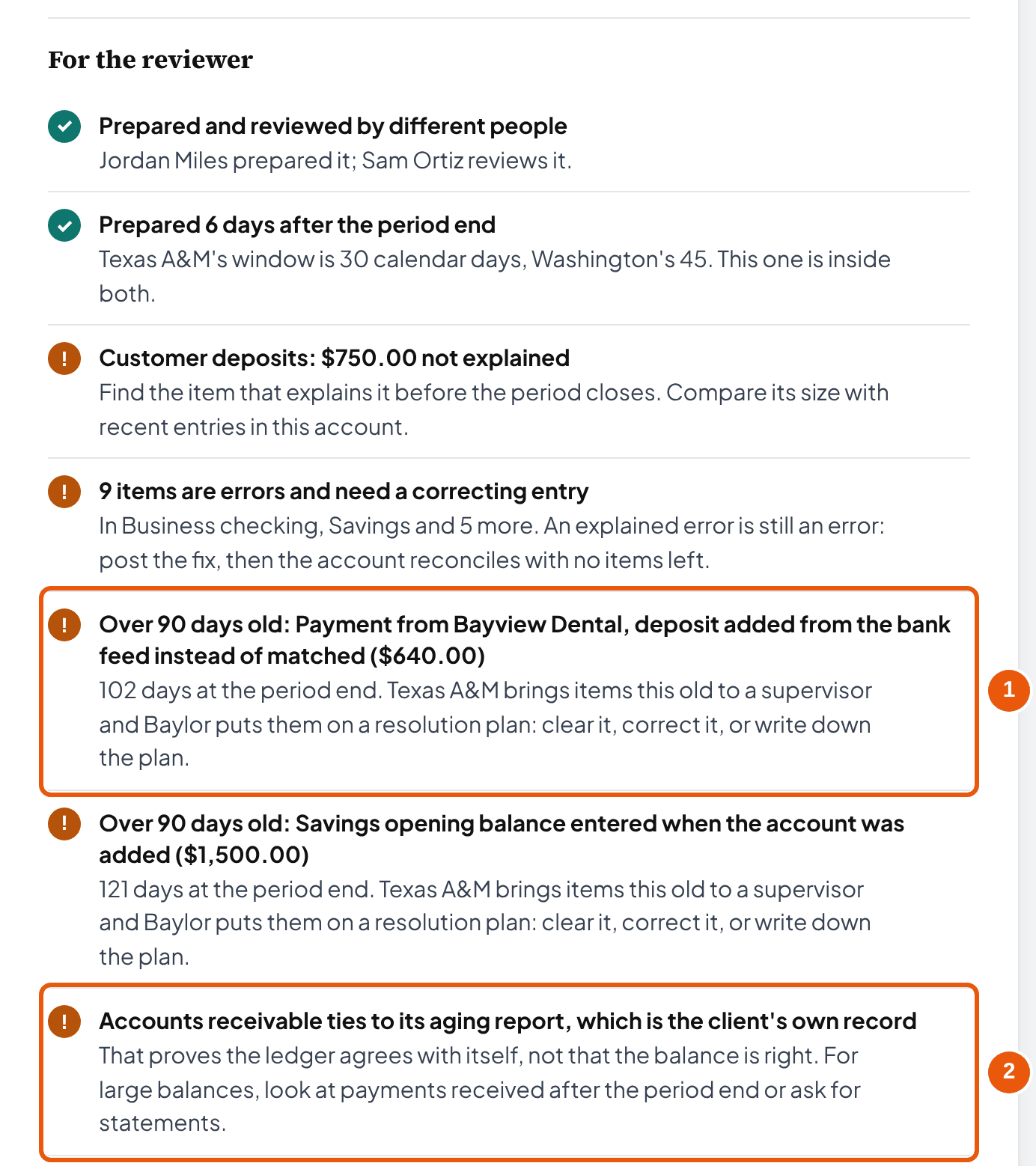
Here is how that happens. The payment was received against the invoice, which put it in Undeposited Funds. Then, when the deposit showed up in the bank feed, someone added it as new income instead of matching it to that payment. The bank balance is right, but each payment now sits in Undeposited Funds forever, and the $640.00 was counted as income twice. The June payment is 102 days old, so the template flags it.
| Account | Debit | Credit |
|---|---|---|
| Cleaning revenue | $640.00 | |
| Undeposited Funds | $640.00 |
Our suggestion: in QuickBooks, it's often cleaner to delete the deposit that was added from the bank feed and match the bank line to the payment instead. Either way, check that the client's revenue for June and August drops by $640.00 each.
The loan: a payment booked all to interest
| Balance in the books | $27,940.00 |
| Lender's statement, principal at Sept 30 | $27,412.18 |
| Difference | $527.82 |
| Sept 15 payment of $689.00 booked all to interest; the lender's statement shows $527.82 of it was principal ($161.18 was interest) | $527.82 |
The principal part of the payment never reduced the loan, so the loan is overstated and interest expense is overstated by the same $527.82.
| Account | Debit | Credit |
|---|---|---|
| Loan payable | $527.82 | |
| Interest expense | $527.82 |
Use the lender's statement for the split, not an amortization schedule you built yourself: the lender's figures include any late fees or rate changes your schedule doesn't know about.
The one that's still open
Customer deposits shows $1,950.00 in the books and $750.00 more than the client's deposit log. No item explains it yet, so the template shows it as not explained and puts $750.00 in the headline. The usual cause is a deposit that stayed in the liability after the job was done and invoiced. So the next step is to compare the deposits received in the last few months with the jobs invoiced since. Until it's found, the reconciliation isn't finished, and the reviewer sees it at the top.
The other four corrections follow the same pattern: interest income of $0.83 on savings, two months of insurance amortization at $300.00 each ($3,600.00 policy ÷ 12), a $332.40 state withholding deposit moved from Payroll tax expense back to the liability, and $1,500.00 moved from Opening Balance Equity to owner's equity after checking the May 31 bank statement. All nine entries are listed in the template's "Entries to post" section and its Excel workbook.
Timing differences vs errors
In short: A timing item clears by itself next period. An error stays until you post an entry. Label every item, because the label decides what happens next.
The test is one question: will this item disappear next month without anyone touching the books? An outstanding check clears when the bank pays it, so it's timing. A bank fee nobody recorded will still be missing next month and the month after, so it's an error. In the checking account above, check #1047 and the September 30 deposit are timing, and the $25.00 fee is the error. The template counts an account as reconciled only when nothing is left to explain and no error items remain, because an explained error still leaves the financial statements wrong.
A few items get mislabeled often enough to call out:
| Easy to get wrong | What it really is |
|---|---|
| A sale on credit listed as a "deposit in transit" | Not a bank reconciling item at all: no money moved. It belongs in accounts receivable. |
| Last month's outstanding check, still outstanding | Timing, but check it. Our suggestion: past 90 days, ask the payee, and look at the state's unclaimed property rules before voiding it |
| Interest or fees on the statement, not in the books | Errors: they need an entry, even when they're small |
| A difference you "plug" to a suspense or miscellaneous account | Not an explanation. It moves the difference somewhere a reviewer won't look. |
| A subledger that ties to the ledger | Agreement, not proof. Test large balances against something outside the books (evidence). |
Bookkeeper tip: Write the fix for every error item at the time you find it, in the same row. The template's "Entries to post" list and the Excel tab of the same name are built from those fixes, so posting them is a checklist instead of a second search.
How old is too old for a reconciling item?
In short: Ninety days, in the policies we checked. Past that, an item goes to a supervisor or onto a written plan to clear it, and a large one gets its plan sooner.
An item that rolls forward month after month is usually an error nobody has fixed. Published university policies put limits on it, and they're a reasonable starting point for a bookkeeping practice that hasn't set its own:
| Policy | The rule |
|---|---|
| Texas A&M (revised Aug 3, 2026) | Outstanding items "resolved within 90 days of the end of the month the transaction occurred in. Any items older than 90 days should be brought to their supervisor's attention." |
| University of Washington (updated July 3, 2025) | Differences "must be cleared, corrected or written-off no later than 90 days from origination"; aging in 0-30, 30-60, 60-90 and 90+ days |
| Baylor University (Jan 2024) | Any item "exceeding $10,000 and outstanding more than 60 days" needs a resolution plan for the controller; all items "more than 90 days old, regardless of size" go on one |
These are internal policies of large institutions, not laws, and nothing requires a small business client to follow them. The template uses them as editable defaults: change the days and the amount under "When an item is too old" to your firm's own rule, and the flags and the Excel workbook follow. In the Lopez example, two items cross 90 days: the June 20 Undeposited Funds payment (102 days) and the June 1 opening balance (121 days).
Writing off what you can't find
The University of Washington allows write-offs "only as a last resort," and any write-off over $10,000 needs approval from its Associate Vice President/Controller. For a small business the same caution applies with fewer people. A write-off changes the client's profit, so get the owner's agreement in writing and record what you tried before writing it off. If the client's tax preparer would want to know about it first, keep it out of the period you're closing.
How do you reconcile balance sheet accounts in QuickBooks?
In short: QuickBooks reconciles bank and card accounts for you. Every other balance sheet account, and the odd balances its own features create, still need the template.
QuickBooks' Reconcile screen ties a bank or card account to its statement, and Intuit's help sets the goal plainly: "the difference between the ending balances should be zero." That proves the cash account. It doesn't touch receivables, prepaid expenses, loans, payroll liabilities or equity, and it can't tell you that an amount in Undeposited Funds is months old. A few QuickBooks features are worth knowing when you work through the rest:
- Undeposited Funds. Payments received but not yet deposited wait here. Intuit's help notes that invoice payments processed with QuickBooks Payments don't go through it, and that the account can be renamed, so look for the Detail type "Undeposited Funds" when you can't find it. Anything older than a few days is the double-counting problem above.
- Opening Balance Equity. QuickBooks puts the other side of opening balances here while accounts are set up. Once setup is done it should be $0.00; move what's left to owner's equity after checking each opening balance against its original statement.
- Closing the books. After the reconciliation is reviewed, set a closing date (QuickBooks Online: Settings, Account and settings, Advanced, Accounting) so nobody changes a period you've proved. Intuit's help says the Exceptions to Closing Date report shows "any changes made after you close your books." Run it before you start the next month.
- When last month's reconciliation stops balancing. In QuickBooks Desktop, the Reconciliation Discrepancy report (Reports, Banking) "shows any transactions that were changed since your last reconciliation." In QuickBooks Online, Intuit's advice is to check the opening and beginning balances first, and to review and categorize all downloaded transactions, because "you can't reconcile them until you do."
Bookkeeper tip: Reconcile the bank in QuickBooks first, then copy its result into the template: the statement balance as the document, and the outstanding checks and deposits in transit as timing items. The template is where the reconciliation of every other account lives, side by side with cash, for the reviewer.
Accounts that tie to tax forms
In short: Payroll liabilities tie to the payroll returns, and the IRS checks them against each other. Loans and sales tax have their own documents too.
The Form 941 instructions say it directly: "The IRS matches amounts reported on your four quarterly Forms 941 with Form W-2 amounts totaled on your yearly Form W-3," and if they don't agree, the client "may be contacted by the IRS or the Social Security Administration." The amounts matched are federal income tax withheld, Social Security wages, Social Security tips, and Medicare wages and tips. A year of payroll liabilities reconciled every month against the provider's reports makes that year-end match uneventful.
| Account | Tax document | What to watch |
|---|---|---|
| Payroll liabilities | Forms 941 (quarterly) and W-3 (yearly) | Withholding and wages on the four 941s should add up to the W-3 |
| Loans | Form 1098, box 2 (principal at January 1), for a mortgage on real property only | Only for interest of $600 or more from an individual, including a sole proprietor; the instructions say no 1098 is required if "the loan is not secured by any real property," so a van loan like Lopez's gets none and the lender's statement is the document |
| Sales tax payable | The state's sales tax returns | What's left should be the tax on returns not yet paid (sales tax reconciliation) |
Our reading of the Form 1098 rule: because the lender files it only for loans to individuals, a corporation or partnership borrower won't get one even for a building loan. So the lender's statement is the document for every business loan you can't tie to a 1098. Keep the reconciliations with the records they support. For payroll, the IRS says to keep employment tax records "for at least 4 years after the tax becomes due or is paid, whichever is later."
How often should you reconcile balance sheet accounts?
In short: Cash every month. Everything else on a schedule set by risk, and for a small client, every month is usually simplest.
| Policy | Cash | Other accounts | Deadline |
|---|---|---|---|
| University of Washington | Monthly | At least quarterly | Within 45 days of the as-of date |
| Texas A&M | Monthly ("accounts with external statements") | Monthly for secondary systems such as QuickBooks or Excel | Within 30 calendar days of month end |
| Baylor University | Monthly | By risk: "monthly, quarterly, or annually"; payroll clearing after each payroll run | Not stated in the version we read |
Our suggestion for a small business client: reconcile every balance sheet account each month before the reports go out. A small client's month has few enough transactions that the second account takes minutes once the first is done. If that isn't practical, reconcile cash, cards and payroll liabilities monthly and the rest quarterly, and every account at year end before the tax preparer gets the books. The template's Prepared on date counts how soon after the period end the work was done against the 30 and 45-day windows above.
Review and sign-off
In short: Someone other than the preparer reviews and signs. If you work alone, build the second look into your calendar instead.
All three policies require it. Texas A&M is the bluntest: "The Reviewer cannot be the same person as the Preparer." The University of Washington and Baylor both require review and approval "by someone other than" the preparer. The reason is practical: the person who built a reconciliation is the one least likely to see what's missing from it.
The reviewer reads rather than redoes. Sam Ortiz reads the summary, checks that each document is for the right date and the right account, looks at every item marked error or over the age limit, and confirms the entries were posted. The template's "For the reviewer" list puts those things first, and it warns when the preparer and reviewer are the same name.
If you're a one-person practice
Our suggestion, not a rule from any source: review your own file on a different day from the one you prepared it, starting from the documents rather than from your worksheet. Ask the client's owner to look at the open items and sign the summary, since they know which customer paid a deposit or which charge was personal. Write who reviewed it and when, even when the answer is "the preparer, two days later," so the file says honestly what was done.
Why reconciliations matter
In short: They find errors before the owner, the lender or the tax preparer does, and sometimes they find fraud. They aren't required by Sarbanes-Oxley for a private client.
In the Association of Certified Fraud Examiners' 2024 report on 1,921 occupational fraud cases, 5% were first detected by account reconciliation. Tips found 43%. The 90 frauds that reconciliations caught had a median loss of $118,000 and ran a median of 9 months before they were found. In companies with fewer than 100 employees, the median loss across all cases was $141,000. These are cases fraud examiners investigated, not a random sample of businesses, but the order of magnitude is the point: a small client's books have fewer people watching them.
Some pages selling reconciliation software say Sarbanes-Oxley requires reconciliations. Section 404 requires public companies to report on "the effectiveness of the internal control structure and procedures," and the text never uses the word reconciliation. The SEC's 2007 guidance lists reconciliations as one example of a control. A private small business isn't subject to Section 404 at all; it reconciles because that's how the numbers are proved.
The template is a spreadsheet, and spreadsheets go wrong: in field audits collected by Raymond Panko, 94% of the operational spreadsheets examined had errors. That's why the Excel workbook keeps every input in a yellow cell, every result in a formula, and a checks block with one master check that says whether everything ties.
Common reconciliation mistakes
| Mistake | Do this instead |
|---|---|
| Comparing the ledger with a report from the same ledger | Use a document from outside the books wherever there is one |
| Using a statement for a different date than the trial balance | Match the dates; for a card, adjust the statement to the period end with the charges after it closed |
| Calling an account done because the difference is explained | Post the correcting entries; only timing items should be left |
| Carrying the same item forward for months | Age it, and escalate anything past 90 days |
| Plugging a small difference to miscellaneous expense | Find it: a small difference can be two large errors that nearly cancel |
| Reconciling after the reports went out | Reconcile first, then send the statements |
| Leaving the period open after it's reviewed | Set a closing date, and check the exceptions report next month |
Ready to do one? Replace the example in the template above with your client's accounts, or download the Excel workbook and work in that: it has spare rows for more accounts and items, and its checks tell you when everything ties.
Frequently asked questions
What is a balance sheet account reconciliation?
It proves each balance sheet account at a date by comparing its balance in the books with a document that shows the same balance from another source, such as a bank statement, a lender statement, or a vendor statement. Every difference is listed as a reconciling item, and anything not explained is investigated before the period closes.
What are the steps in a balance sheet reconciliation?
Six, for each account: fix the date and the account; enter the balance from the trial balance at that date; get the document that proves the balance, from outside the client where one exists, and enter its balance for the same date; list each reconciling item that explains the difference, with its date and amount; label each item timing or error and write the correcting entry for the errors; then post the entries and have someone other than the preparer review and sign. The template on this page has a field for each step.
What is the difference between a bank reconciliation and a balance sheet reconciliation?
A bank reconciliation proves one kind of account, cash, against the bank statement, and accounting software does it for you. A balance sheet reconciliation does the same for every account on the balance sheet: receivables, prepaid expenses, fixed assets, cards, payables, payroll and sales tax liabilities, loans, and equity, each against its own document. The bank reconciliation is one line of it.
What should a balance sheet reconciliation template include?
For each account: the balance in the books, the balance on the supporting document and where it came from, the difference, each reconciling item with its date and amount, whether the item is timing or an error, what is still not explained, and who prepared and reviewed it, with the dates. The template on this page also ages every item and flags the old and large ones.
How often should balance sheet accounts be reconciled?
Cash monthly, and the rest on a schedule set by risk. The university policies we checked agree on that: the University of Washington requires at least quarterly and cash monthly, Baylor sets frequency by risk, and Texas A&M wants monthly for accounts with external statements. For a small business, reconciling every account at month end before the reports go out is the simplest rule.
What is the difference between a timing difference and an error?
A timing difference clears by itself next period, like a check the bank hasn't paid yet or charges after the card statement closed. An error stays until someone posts a correcting entry, like a bank fee never recorded or a loan payment booked entirely to interest. Both explain a difference, but only an account with timing items left is truly reconciled.
How old can a reconciling item get before it's a problem?
The policies we checked use 90 days. Texas A&M says items older than 90 days go to the supervisor, and the University of Washington says differences must be cleared, corrected or written off within 90 days. Baylor also requires a written plan for any item over $10,000 that is more than 60 days old.
Does the Sarbanes-Oxley Act require account reconciliations?
Not in so many words. Section 404 requires public companies to assess their internal control over financial reporting, and the SEC lists reconciliations as one example of a control. The law applies to public companies, so a private small business client has no SOX requirement, though reconciliations are still how the books are proved.
Is a subledger report good enough to prove an account?
It proves the general ledger agrees with the subledger, not that the balance is right, because both come from the client's own software. Auditing standards treat evidence from outside parties as more reliable. For receivables and payables, back up large balances with payments received after the period end or with vendor statements.
Why should Opening Balance Equity be zero?
QuickBooks uses it to hold the other side of opening balances while accounts are being set up. Once the books are set up, each amount belongs in owner's equity or another account, so a balance left there is something to move, after checking the opening balances against the original statements.
What should be in Undeposited Funds at month end?
Only customer payments received in the last few days and not yet deposited, so each one shows up in the first deposits on the next bank statement. Intuit's help describes the account as payments you haven't deposited at your bank yet. Old amounts usually mean the bank deposit was added from the bank feed instead of matched to the payments, which also counts the income twice.
Which payroll and loan accounts tie to IRS forms?
The IRS reconciles the four quarterly Forms 941 with the year's W-2s on Form W-3: federal income tax withheld, Social Security wages and tips, and Medicare wages and tips. For a loan, Form 1098 box 2 shows principal at January 1, but only for loans to individuals secured by real property, so a business vehicle loan or a corporation's loan gets no 1098 and the lender's statement is the document to use.
How we built this page
Ledgental Team wrote this guide and built the template. Ledgental also makes a bookkeeping app that's free during its beta; this template doesn't connect to it. Everything you type stays in your browser.
What the numbers rest on
- The arithmetic is the same for every account: difference = books − document; not explained = difference − the sum of the items; an item's age = calendar days from its date to the period end. It's checked by known-answer tests worked out by hand from the Lopez example, and the Excel workbook was recalculated in LibreOffice to confirm it gives the same results as the screen.
- The age limits (90 days; over $10,000 and 60 days) come from the published policies of Texas A&M, the University of Washington and Baylor University, read on October 4, 2026. They're institutional policies, not law, so the template lets you change them.
- Every quotation (SOX §404, SEC Release 33-8810, SAS 142, the IRS form instructions, the ACFE report, Intuit's help pages) was read at the source on October 4, 2026 and is listed below.
- Not covered: consolidations and intercompany accounts, foreign currency, and how an auditor would test the accounts. Lopez Cleaning Co LLC and everyone in the example are fictional.
What changed
- October 4, 2026: first published: the template with twelve example accounts, aging and reviewer checks, an Excel workbook with formulas and a master check, a CSV export, and this guide. Later the same day: eight more account presets, optional prepared-on, reviewed-on and document dates, and a step-by-step section.
Cite this page
Writing about this? Use one of these lines. To point at one section, use the link icon beside its heading.
- Plain line
- Ledgental, Balance Sheet Reconciliation Template, updated October 2026, https://ledgental.com/tools/balance-sheet-reconciliation-template
- APA
- Ledgental. (2026, October). Balance Sheet Reconciliation Template. https://ledgental.com/tools/balance-sheet-reconciliation-template
- Chicago
- Ledgental. “Balance Sheet Reconciliation Template.” Last modified October 2026. https://ledgental.com/tools/balance-sheet-reconciliation-template.
Reusing this page: the guide's text, tables, and screenshots are licensed under CC BY 4.0. Credit "Ledgental" with a link to this page. Quotations from the IRS and state agencies are public domain, and quotations from other sources stay under their owners' terms.
Sources
- 15 U.S.C. §7262, Management assessment of internal controls (SOX §404), Cornell LII
- Release 33-8810, Management's report on internal control over financial reporting (2007), U.S. Securities and Exchange Commission
- SAS No. 142, Audit Evidence (AU-C 500), paragraphs A6, A13, A22, A32, AICPA
- Instructions for Form 941 (Rev. March 2026), Reconciling Forms 941 with Form W-3, Internal Revenue Service
- Instructions for Form 1098 (Rev. December 2026), Internal Revenue Service
- Topic no. 305, Recordkeeping, Internal Revenue Service
- General Ledger Account Reconciliation Policy (updated July 3, 2025), University of Washington
- Monthly Financial Validation Process (January 2024), Baylor University
- SAP 21.01.01.M0.01, Reconciliation of accounts (revised August 3, 2026), Texas A&M University
- Occupational Fraud 2024: A Report to the Nations, Association of Certified Fraud Examiners
- Panko, What we don't know about spreadsheet errors today (EuSpRIG 2015), arXiv
- Deposit payments into the Undeposited Funds account, Intuit QuickBooks Online help
- Edit your closed books, Intuit QuickBooks Online help
- Fix issues when you're reconciling (QuickBooks Desktop), Intuit QuickBooks help
- Fix issues at the end of a reconciliation, Intuit QuickBooks Online help
General information, not accounting, tax or legal advice. The policies, rules and help pages quoted here were read on October 4, 2026 and can change. Lopez Cleaning Co LLC is fictional. This page isn't affiliated with the IRS, the AICPA, Intuit, or any of the universities quoted.