Key takeaways
- An AP template is one row per unpaid vendor bill. The three columns that do the work are the due date (worked out from the terms), the age on one as-of date, and the open balance, whose total has to match Accounts Payable in the books.
- Terms are calendar days from the invoice date unless they say otherwise: 2/10 Net 30 means 2% off for 10 days, full price by day 30; 10 EOM means the 10th of next month. Skipping a 2/10 Net 30 discount costs about 37.24% a year.
- On accrual books a bill is a payable when the goods or services arrive, not on the date printed on the invoice. Prepaid rent, company card charges and vendor deposits aren't payables at all.
- When the aging report and the balance sheet disagree, check the date and basis first. Then look for the same invoice entered twice: in our example it's $2,450.00, and the books agree only because they have it twice too.
- For tax year 2026 a vendor paid at least $2,000 for services by check, ACH or cash gets a Form 1099-NEC, unless the W-9 says it's a corporation (an LLC taxed as one counts); card payments are reported on Form 1099-K instead. Collect the W-9 when you set the vendor up.
What is an accounts payable template?
In short: A list of what the business owes its vendors right now, one row per invoice. Sorted by due date it's a payment plan; aged on a date it's a report; and its total is a check on the books.
Take Lopez Cleaning Co, a cleaning company with five employees that buys supplies, uniforms and equipment rental on account. Its bookkeeper, Jordan Miles at Northline Bookkeeping, closes October on Friday, October 30, 2026. Maria Lopez wants to know two things before she signs checks: what has to go out this week, and whether anything is already late. Jordan wants a third: whether the unpaid bills add up to the Accounts Payable balance in QuickBooks.
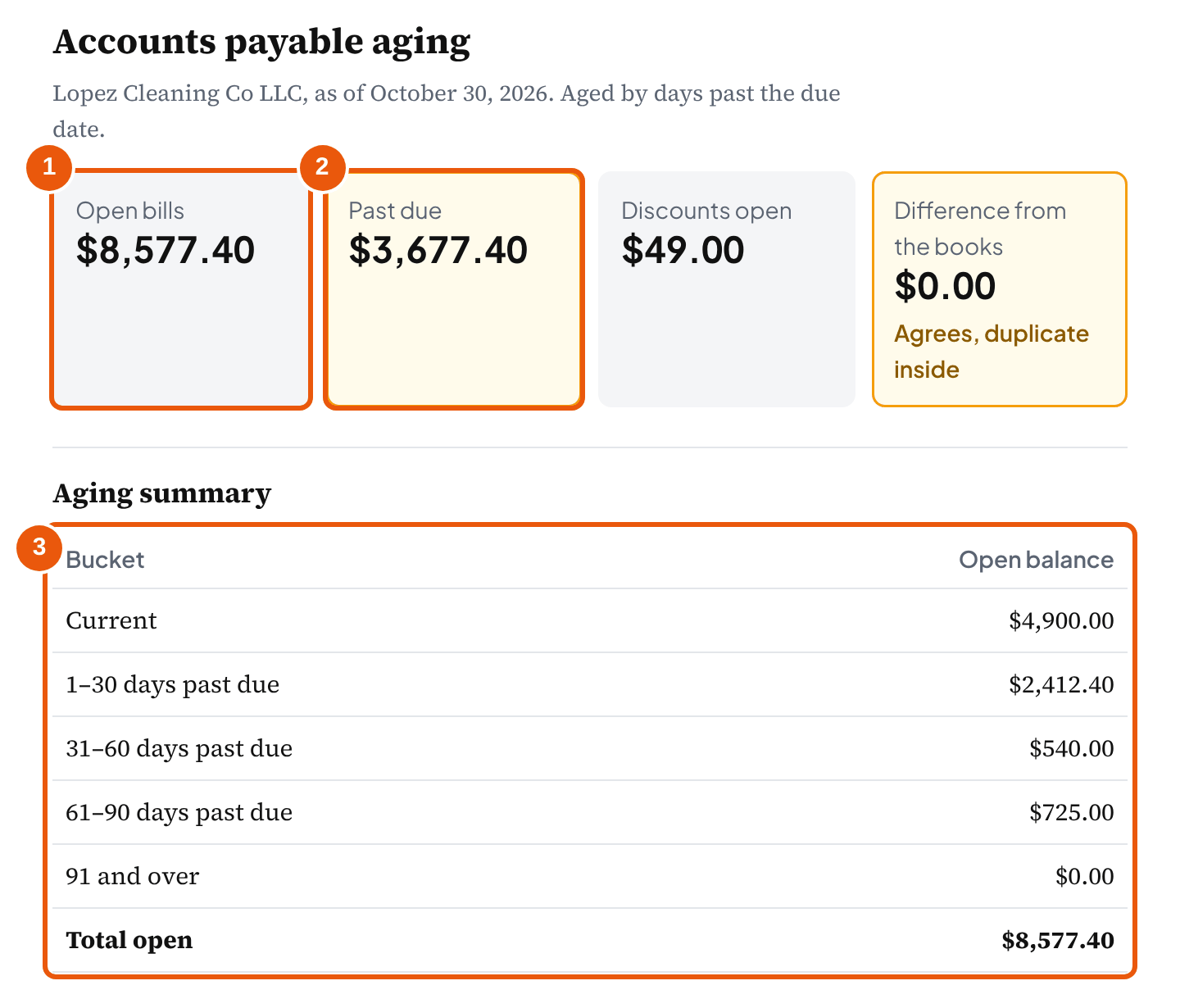
One list answers all three, if it has the right columns and one as-of date. The terms work out the due date, the as-of date turns each due date into an age, and the open balances add up to a number you can compare with the books. Lopez Cleaning's list has seven rows, and the tool above starts with them: six bills still open for $8,577.40, $3,677.40 of it past due, one bill that looks entered twice, and one discount that's still worth taking.
Two words get mixed up here. The accounts payable ledger (or subledger) is the record of bills and payments by vendor. The aging is a report built from it on one date, putting each open bill in a bucket by how late it is. A template like this one keeps the ledger rows and builds the aging from them, so the two can't drift apart.
What should an accounts payable template include?
In short: The vendor, the invoice number, the invoice date, the terms, the amount and what's been paid. Everything else (due date, discount date, open balance, days past due, bucket) is worked out, not typed, so it reads the terms the same way every time.
| Column | Typed or worked out | Why it's there |
|---|---|---|
| Vendor | Typed, the same spelling every time | Totals by vendor, the 1099 watch, and matching the vendor's statement |
| Invoice number | Typed, exactly as on the invoice | The duplicate check: the same vendor and number twice is the commonest AP error |
| Invoice date | Typed | Where the terms start counting |
| Terms | Typed or picked | Net 30, 2/10 Net 30, 10 EOM: the due date and any discount come from here |
| Amount and paid so far | Typed | The open balance is the difference; a partial payment stays visible |
| Due date, discount date | Worked out | Typed due dates are where errors creep in; a formula reads the terms the same way every time |
| Open balance, days past due, bucket | Worked out | The aging and the tie-out |
| 1099 vendor | Typed (from the W-9) | Which payments to total for Form 1099-NEC |
A spreadsheet that gets emailed around is the wrong place for a vendor's full taxpayer identification number or bank account number. Keep those in the accounting software or with the W-9s, and keep only a "W-9 on file" note in the tracker.
The four typed columns that do the work all come off the vendor's invoice. On Bay Supply's invoice to Lopez Cleaning they sit in the usual places:
Bay Supply Co
410 Harbor Road, Suite 2 · (555) 010-0147 · [email protected]
Invoice
Bill to
Lopez Cleaning Co LLC
Attn: Accounts payable
- Invoice #
- BS-4471
- Invoice date
- October 26, 2026
- Terms
- 2/10 Net 30
| Description | Amount |
|---|---|
| Cleaning supplies and paper goods, October delivery | $2,450.00 |
| Total due | $2,450.00 |
Terms 2/10 Net 30: 2% discount ($49.00) if paid by November 5, 2026; otherwise the full $2,450.00 is due November 25, 2026.
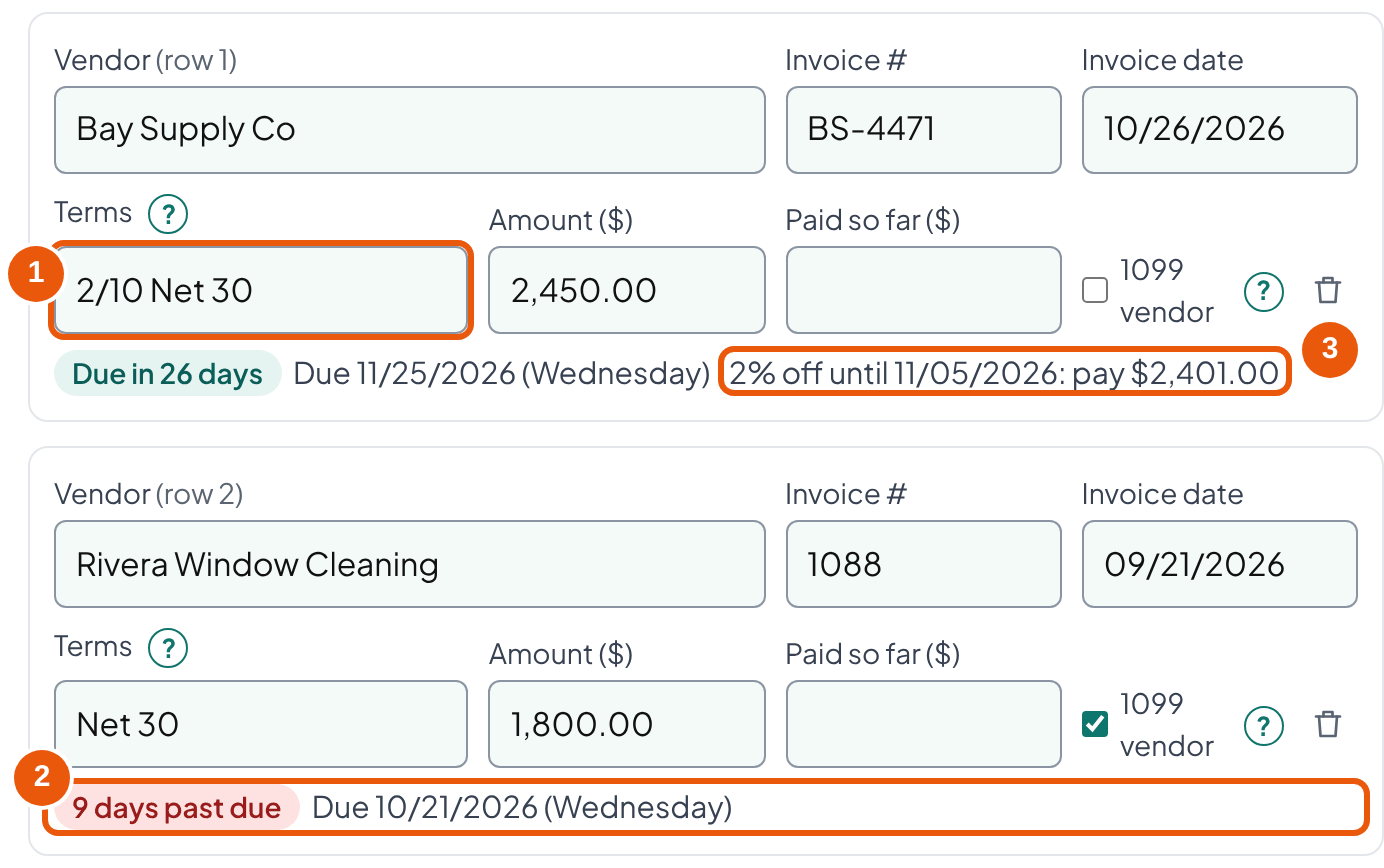
How do you work out a due date from payment terms?
In short: Count calendar days from the invoice date for Net terms, from the end of the invoice month for EOM terms, and use the date itself for "the 15th of next month". The invoice or the contract decides; the tool follows what you enter.
| Terms on the invoice | Means | Lopez Cleaning example |
|---|---|---|
| Net 30 | Due 30 days after the invoice date | Rivera #1088 dated Sept 21 → due Oct 21 |
| Net 15 | Due 15 days after the invoice date | Sunrise SR-118 dated July 20 → due Aug 4 |
| 2/10 Net 30 | 2% off if paid within 10 days; otherwise due in 30 | Bay Supply dated Oct 26 → $2,401 by Nov 5, or $2,450 by Nov 25 |
| 10 EOM | Due 10 days after the end of the invoice month | Any September invoice → due Oct 10 |
| Net 30 EOM | Due 30 days after the end of the invoice month | A Jan 15, 2027 invoice → Jan 31 + 30 = Mar 2 |
| 15th of next month | Due on that date, whatever the invoice day | Metro Gas dated Sept 28 → due Oct 15 |
| Due on receipt, COD | Due the day it's received or delivered | Due date = invoice date in the tool |
Count calendar days, not business days, and don't move a due date off a weekend unless the vendor's terms say so. Bay Supply's Net 30 lands on Wednesday, November 25, but a Net 30 from October 1 would land on Saturday, October 31, and whether Monday is still on time is the vendor's call, not the spreadsheet's.
When does Net 30 start counting?
From the invoice date, in practice, because that's the date on the paper and the one accounting software uses. When the contract is silent, the default rule for sales of goods in most states starts the clock at shipment, and an invoice dated late moves it later:
“where the seller is required or authorized to ship the goods on credit the credit period runs from the time of shipment but post-dating the invoice or delaying its dispatch will correspondingly delay the starting of the credit period.”
UCC § 2-310(d), model text (each state enacts its own version)
So an invoice dated two weeks after the goods shipped gives two more weeks, and terms printed on a purchase order or a signed agreement override all of this. The tool counts from the invoice date because that's what you can see; if a vendor's terms count from delivery, enter the delivery date as the invoice date and note why.
Bookkeeper tip: Type the term as written under Other terms and check the due date it shows.
Should you take an early-payment discount?
In short: Usually yes, if the cash is there: skipping 2/10 Net 30 costs about 37.24% a year. Record the bill at its full amount and the discount when it's taken, and do it the same way every time.
Bay Supply's invoice for $2,450.00 is dated October 26 with terms of 2/10 Net 30. Paid by November 5, it costs $2,401.00; paid on November 25, $2,450.00. The extra 20 days cost $49.00. That's a price for keeping $2,401.00 a little longer, and the way to compare it is as a yearly rate.
Mon, Oct 26
Invoice dated
$2,450.00
Terms 2/10 Net 30
Thu, Nov 5
Last day for 2% off
Pay $2,401.00
Saves $49.00
Wed, Nov 25
Due in full
Pay $2,450.00
20 days later
| Discount: $2,450.00 × 2% | $49.00 |
| Paid on day 10 | $2,401.00 |
| Cost of the 20 extra days: 2 ÷ (100 − 2) = 2 ÷ 98 | 2.0408% |
| Periods of 20 days in a year: 365 ÷ (30 − 10) | 18.25 |
| Yearly rate: 2.0408% × 18.25 | 37.24% |
Unless Lopez Cleaning's cash is earning more than 37% a year, or the payment would push it into an overdraft, paying by November 5 is the better use of the money.
That 37.24% is our arithmetic: the standard trade-credit formula as a simple rate, with a 365-day year. The same idea is how the federal government decides. Treasury's discount calculator tells agencies to take a discount when its "effective annual discount rate is larger than the current value of funds rate", which it showed as 4.00% on October 4, 2026. A small business's alternative is usually the rate on its credit line, not 4%, but 37% beats most of them.
| Terms | Yearly cost of skipping (simple) |
|---|---|
| 1/10 Net 30 | 1 ÷ 99 × 365 ÷ 20 = 18.43% |
| 2/10 Net 30 | 2 ÷ 98 × 365 ÷ 20 = 37.24% |
| 2/10 Net 60 | 2 ÷ 98 × 365 ÷ 50 = 14.90% |
How to record the discount
Enter the bill for what the invoice says, $2,450.00, and record the discount when the payment goes out (the gross method). If the payment misses the discount date, nothing needs fixing. The net method books the bill at $2,401.00 from the start and records a missed discount as an expense; both are accepted ways to do it, as QuickBooks Community members point out when the question comes up.
| Account | Debit | Credit |
|---|---|---|
| Accounts Payable | $2,450.00 | |
| Checking | $2,401.00 | |
| Purchase discounts (or the supplies account the bill went to) | $49.00 |
For a client that keeps inventory, the IRS lets the business either take cash discounts off the cost of the goods or not, as long as it's consistent (quoted below). Pick one treatment and use it every time. The journal entry examples page shows the bill, the payment and the discount as a set.
“the invoice price less trade or other discounts, except strictly cash discounts approximating a fair interest rate, which may be deducted or not at the option of the taxpayer, provided a consistent course is followed.”
Don't count on the accounting software to track discount dates. Asked whether QuickBooks Online can calculate a 3% net 10 vendor discount automatically, an Intuit team member answered that "QuickBooks Online (QBO) doesn't support setting a specific discount rate on a vendor bill". That's a forum answer, not a help article, but it matches what the bill screens offer. The tracker's discount column does it for you: it shows each open discount, what to pay, and the last day.
How do you read an accounts payable aging report?
In short: Every open bill goes in one bucket by how late it is on one date: Current, 1–30, 31–60, 61–90, or 91 and over. The money in the right-hand buckets is what to look at first.
As of October 30, Lopez Cleaning's open bills sort like this. Bay Supply isn't due until November 25, so both its rows are current. Rivera's bill was due October 21 (9 days late) and Metro Gas's October 15 (15 days late), so both are in 1–30. Coastal Uniforms was due September 16, 44 days ago, with $540.00 left after a $400.00 payment. Sunrise Equipment Rental was due August 4, 87 days ago.
| Current (not yet due): Bay Supply $2,450.00 + the same bill again $2,450.00 | $4,900.00 |
| 1–30 days past due: Rivera $1,800.00 + Metro Gas $612.40 | $2,412.40 |
| 31–60 days past due: Coastal Uniforms $940.00 − $400.00 paid | $540.00 |
| 61–90 days past due: Sunrise Equipment Rental | $725.00 |
| 91 and over | $0.00 |
| Total open | $8,577.40 |
$3,677.40 of the $8,577.40 is past due. The $725.00 at 87 days is the one to ask about first: a bill that old is often disputed, already paid some other way, or missing a credit memo.
Due date or invoice date?
Most aging reports count days past the due date, which is how a vendor sees lateness. Some count days since the invoice date, which a lender or a reviewer may ask for. Xero lets you choose: its help says you can "view aged payables based on their Due Date or Invoice Date". The tool has the same switch. On the invoice-date basis Lopez Cleaning's Sunrise bill is 102 days old rather than 87 days late, and it moves to "91 and over".
Why doesn't the aging match the balance sheet?
Usually because the two reports aren't for the same date or basis. Intuit's help article for matching aging reports says mismatches happen "usually because the aging report defaults to current", and the fix is to set the aging to the report date and run the balance sheet "using Accrual as the Accounting method". The article is written for receivables; the same settings exist on the payables report. If the totals still differ after that, the cause is in the transactions, covered in the tie-out.
When does a bill become accounts payable?
In short: On accrual books, when the goods arrive or the service is done, whatever date the invoice carries. Things paid in advance or charged to a card aren't payables at all.
The IRS regulations put the rule plainly for services and property a business receives, and it's the same idea bookkeepers apply at month end:
“if the liability of a taxpayer arises out of the providing of services or property to the taxpayer by another person, economic performance occurs as the services or property is provided.”
So the cutoff test is the delivery, not the invoice date. Supplies that reached Lopez Cleaning on September 29 belong in September's payables even if Bay Supply dates the invoice October 2. A month-end rule that keys on invoice dates ("bills dated in the month belong in the month") gets both cases wrong: it misses goods received but invoiced later, and it pulls in bills dated in the month for things that arrive after it. For a client with audited statements, follow the auditor's cutoff procedure.
| Item, Lopez Cleaning Co | Where it goes at October 31 | Why |
|---|---|---|
| Supplies delivered Sept 29, invoice dated Oct 2 | September's Accounts Payable | The liability follows the delivery, not the date on the invoice |
| Window cleaning done Oct 28, no invoice yet | Accrued expenses | Reverse it on November 1 and enter the bill when it arrives |
| November rent paid on October 25 | Prepaid rent (an asset) | Not a payable, and not October's expense |
| Supplies bought with the company card | Credit card liability | Not Accounts Payable; the card statement is the vendor |
| Deposit sent with a cash-in-advance order | Vendor deposit (an asset) | It becomes the cost when the goods arrive |
Work done but not yet billed is an accrual, not a bill. If Rivera cleans the windows on October 28 and won't invoice until November, record the estimated cost as an accrued expense on October 31, reverse it on November 1, and enter the bill when it arrives. The reversal keeps the expense from being counted twice. Wages the five employees have earned by October 31 but are paid in November work the same way, with their own entry: the accrued payroll journal entry page walks through it.
What if the client's books are on a cash basis?
Then the expense is recorded when it's paid. The regulations say that under the cash method, deductions "shall, as a general rule, be taken into account for the taxable year in which paid." Most small clients can use it: for 2026 a corporation or partnership meets the gross receipts test if its average annual gross receipts for the three prior years don't exceed $32,000,000 (Rev. Proc. 2025-32). The unpaid bills still need a list, because the bills still come due. Don't expect the tracker's total to appear on a cash-basis balance sheet; compare it with an accrual-basis report instead.
How do you reconcile accounts payable at month end?
In short: Add up the open bills on the last day of the month and compare the total with Accounts Payable on an accrual balance sheet for the same day. Any difference is a bill, a payment or a duplicate that's in one place and not the other.
- Run the balance sheet for the month-end date on the accrual basis, and note Accounts Payable.
- Age the open bills as of the same date (the tool's as-of date) and take the total.
- Enter the books' balance in the tool. A difference of $0.00 is the goal.
- If there's a difference, compare its size with the obvious suspects: a payment recorded as an expense instead of against the bill (the books are higher by that payment), a bill entered as a journal entry or with no vendor, a vendor credit not applied, or a bill in one list and not the other.
- Check the duplicate flags even when the totals agree.
- Match the larger vendors to their statements: anything on the statement and not in the list is a missing bill or an unapplied payment.
This is the same check for every balance sheet account: a list of what makes up the balance, compared with the books on one date. The balance sheet reconciliation template runs it account by account, with Accounts Payable as one line.
Lopez Cleaning's books show $8,577.40 and so does the tracker, so the tie-out says $0.00. It still isn't right. Rows 1 and 6 are the same Bay Supply invoice: "BS-4471" from the emailed copy and "BS4471" from the paper one, for the same $2,450.00 on the same date. The books agree because the bill was entered twice there too. Paid both times, it's a $2,450.00 overpayment that only comes back if someone asks for it.
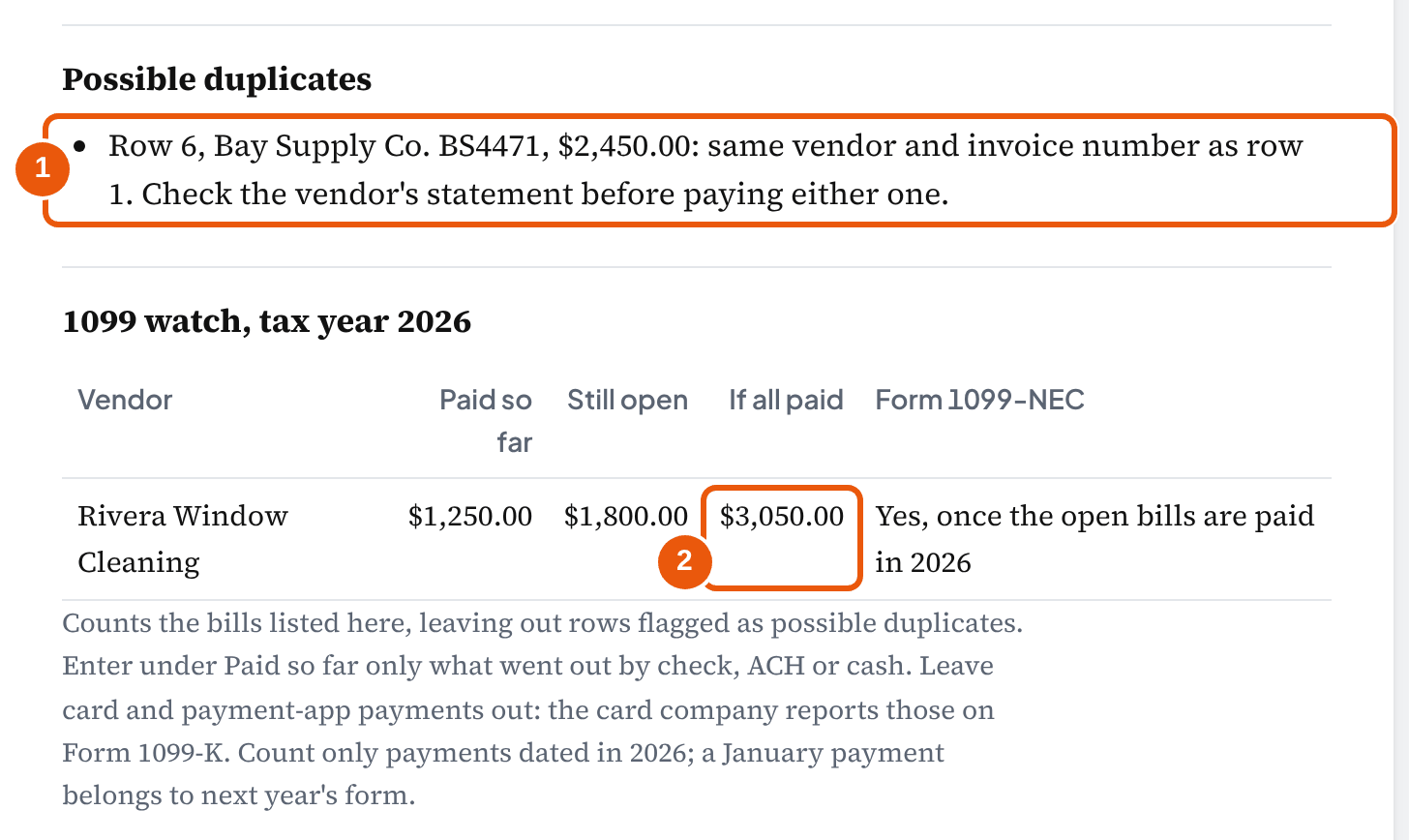
The fix is to delete or void the second bill in the books, since no payment has gone out on it. Accounts Payable drops to $6,127.40 in both places, and the tie-out stays at $0.00. The tool flags a later row as a possible duplicate when its vendor and invoice number match an earlier one after ignoring case, spaces, dots, dashes and endings like Inc, LLC and Co. When one of the two has no invoice number, it also flags the same vendor, date and amount. Treat each flag as a question to answer against the vendor's statement, not an automatic deletion.
| Risky | Safer |
|---|---|
| Typing due dates by hand | Working them out from the terms with a formula |
| Entering a bill from an email and again from the mailed copy | Checking the vendor and invoice number before entering any bill |
| Plugging a difference to an expense so AP ties | Leaving it open until the bill or payment behind it is found |
| Recording a vendor payment as an expense in the bank feed | Applying it to the open bill, so the bill closes |
| Aging as of today and comparing with last month's balance sheet | Running both for the same date, on the accrual basis |
How do you keep duplicate and fraudulent payments out?
In short: Check every bill against what was ordered and received, pay each one once, and never change a vendor's bank details on the strength of an email. The losses from getting this wrong are large and well documented.
On November 3, two days before Bay Supply's discount runs out, an email arrives at Lopez Cleaning from what looks like Bay Supply's billing address: the company has changed banks, and the $2,401.00 payment goes to the new account below. Jordan has the bill, the amount is right, and the deadline is real. Everything about the request is plausible except its source, and the only way to know is to call Bay Supply at the number on last year's invoices.
That request is business email compromise, and the FBI's Internet Crime Complaint Center received 24,768 complaints of it in 2025, with $3,046,598,558 in reported losses, the second-largest loss of any category. Across all categories it received 1,008,597 complaints with $20.877 billion in reported losses. Those are reported complaints only, so the real total is higher.
Other surveys point the same way, each with its own limits. In the 2026 AFP Payments Fraud and Control Survey, 76% of organizations had attempted or actual payments fraud in 2025, 74% were affected by business email compromise, and 58% said checks were subject to fraud. The respondents were 465 treasury professionals, so the sample is organizations large enough to have a treasury team, not small businesses. The ACFE's 2024 Report to the Nations, built from 1,921 cases reported by fraud examiners worldwide, found billing schemes in 22% of cases with a median loss of $100,000. It also found a median loss of $141,000 at organizations with fewer than 100 employees, which it found had fewer anti-fraud controls in place.
- Bank details change only by a phone call you place. Call the vendor at a number from your records (not from the email asking for the change), confirm the change, and note who confirmed it and when.
- One person enters bills, another approves payments, where the client has two people. For a one-person office, the owner approves the payment run and the bookkeeper enters bills.
- Match before paying: the bill against the order and the delivery or the work done. A bill for something nobody remembers ordering is the billing scheme the ACFE counts.
- Keep the duplicate check on: same vendor and invoice number, before the bill is entered and again before it's paid.
- Pay from the bill list, not from emails: a payment that isn't against an open bill in the books is the one to question.
What should you collect from vendors for 1099s?
In short: A Form W-9 before the first payment. For tax year 2026, a vendor who isn't an employee and is paid at least $2,000 for services by check, ACH or cash gets a Form 1099-NEC.
The threshold moved this year. IRS Publication 1099 for 2026 says it "increased to $2,000 and will be adjusted for inflation beginning in calendar year 2027. Previously, the threshold amount was $600." Gross proceeds paid to an attorney stay at $600. Payments made by credit card or through a payment app don't go on the 1099-NEC at all: the card company or app reports them on Form 1099-K. And payments to a corporation, including an LLC taxed as a C or S corporation, generally don't need one, which is what the W-9 tells you.
| Invoice #1042, paid in August | $1,250.00 |
| Invoice #1088, still open | $1,800.00 |
| Paid in 2026 once #1088 is paid | $3,050.00 |
| 2026 threshold | $2,000.00 |
Rivera crosses $2,000 when #1088 is paid, so Lopez Cleaning files a 1099-NEC for 2026. The tool's 1099 watch adds up paid and open bills for every vendor marked 1099. Enter under Paid so far only what went out by check, ACH or cash. Leave card and payment-app payments out: the card company reports those on Form 1099-K. Count only payments dated in 2026; a January payment belongs to next year's form.
The due date is January 31, and Publication 1099 says that when a due date "falls on a Saturday, Sunday, or legal holiday … the actual due date is the next business day." January 31, 2027 is a Sunday, so on our reading of that rule the 2026 forms are due Monday, February 1, 2027. Payments to a vendor who hasn't given a taxpayer identification number may be subject to backup withholding at 24%, reported on Form 945. A payer that files these forms can check names and numbers against IRS records first through the IRS TIN Matching program.
Bookkeeper tip: Ask for the W-9 when you set up the vendor, not in January. The tool's 1099 box on each row is where you note what the W-9 says; the full taxpayer identification number belongs with the W-9, not in a shared spreadsheet. Cash paid to a person from the petty cash box counts too: the petty cash log tracks it the same way.
How do you make an accounts payable tracker in Excel?
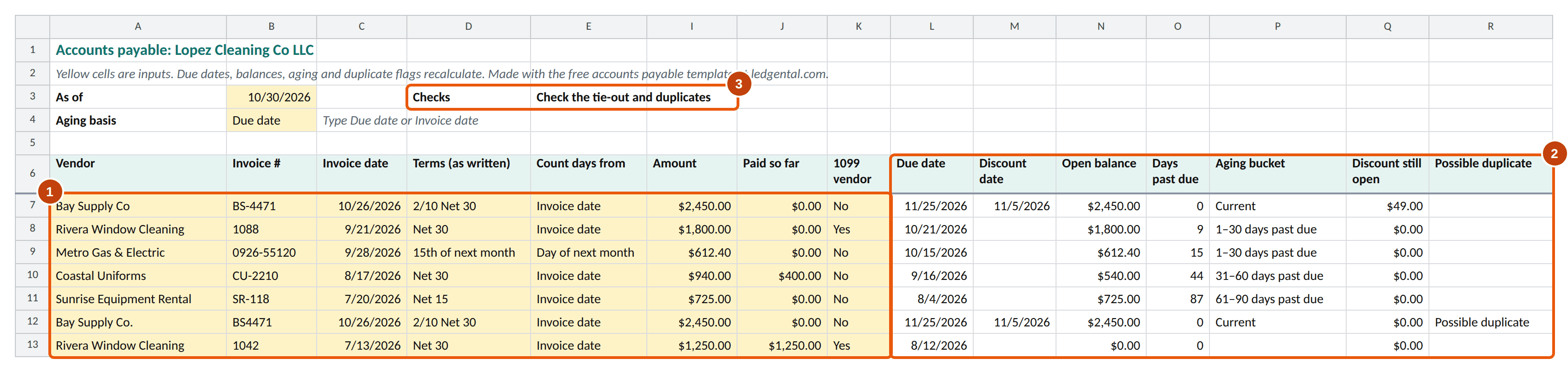
In short: One row per bill with eleven yellow columns to type (vendor, invoice number, invoice date, the terms as written and their three parts, amount, paid so far, the 1099 flag), and formulas for everything else. These are the formulas the workbook from the tool uses; the as-of date sits in B3, the invoice date in C, how the terms count in E and the net days in F.
=IF(C7="","",IF(E7="End of month",EOMONTH(C7,0)+F7,IF(E7="Day of next month",MIN(EOMONTH(C7,0)+F7,EOMONTH(C7,1)),C7+F7)))=I7-J7=IF(N7<=0, 0, MAX(0, $B$3-L7))=IF(O7=0,"Current",IF(O7<=30,"1–30 days past due",IF(O7<=60,"31–60 days past due",IF(O7<=90,"61–90 days past due","91 and over"))))=SUMIF($P$7:$P$40,"1–30 days past due",$N$7:$N$40)=IF(COUNTIF($S$7:S7,S7)>1,"Possible duplicate","")EOMONTH does the month-end arithmetic: Microsoft describes it as the function to "calculate maturity dates or due dates that fall on the last day of the month". Google Sheets has the same function. Store dates as real dates rather than text, or every formula above returns an error.
The downloaded workbook goes further than these six formulas. Its inputs are yellow, the 1099 threshold and the bucket edges live on an Inputs sheet instead of inside formulas, and a master check at the top of the Bills sheet says "OK" only when the tie-out is zero and nothing looks duplicated. It also leaves 25 spare rows with the formulas already in place. Spreadsheet errors are common enough that this matters: Raymond Panko's research found errors in 94% of the operational spreadsheets audited in the studies he reviewed.
When is a spreadsheet no longer enough?
In short: When the bills need approval by more than one person, when payments should go out from the same system that holds the bills, or when the list is long enough that nobody opens it every week. That's our judgment, not a survey finding.
A tracker like this one works well for a client with a few dozen bills a month, one person approving payments, and a bookkeeper who ties it to the books at month end. QuickBooks Online and Xero both hold bills, terms, payments and an aging report, so a client already on one of them can use the software's bill list as the ledger and this tracker for what the software doesn't do: the discount dates, the duplicate check across an emailed and a mailed copy, and a quick 1099 total.
Whatever holds the bills, the month-end routine is the same: age the open bills as of the last day, compare the total with Accounts Payable on an accrual balance sheet, clear every duplicate flag, and keep the aging with the month's workpapers. IRS Topic 305 says records generally need keeping for at least three years, longer in some cases; scanned invoices count as records only if the scanning system meets Rev. Proc. 97-22's controls for integrity, accuracy and retrieval.
Frequently asked questions
What is an accounts payable template?
A list of the bills a business owes its vendors, one row per invoice: vendor, invoice number, invoice date, terms, due date, amount, what's been paid, and the open balance. The owner reads it to decide what to pay this week. The bookkeeper ages it on the last day of the month and compares the total with Accounts Payable on the balance sheet, because a difference means a bill or payment is missing from one of the two.
How do I make an accounts payable tracker in Excel?
Put one bill per row with the vendor, invoice number, invoice date, net days, amount and amount paid. Add formulas for the due date (invoice date + net days, or EOMONTH(invoice date,0) + days for EOM terms), the open balance (amount − paid), and days past due (MAX(0, as-of date − due date)). Then total the open balances by aging bucket with SUMIF and compare the total with Accounts Payable in the books. The Excel file on this page has all of this built in.
Is there an accounts payable template in Excel?
Yes. The tool on this page downloads one as an Excel workbook: a Bills sheet with live formulas for due dates, aging, discounts and duplicate checks, a summary with the tie-out to the books, a 1099 watch, and the constants on their own sheet. It opens in Excel, Google Sheets and Numbers, with no sign-up.
How do you do accounts payable for beginners?
Enter each bill when the goods or services arrive, not when you pay it. Check it against what was ordered and received, note the terms, and file it by due date. Pay by the due date (or the discount date when the discount is worth it), record the payment against the bill, and once a month make sure the unpaid bills add up to Accounts Payable on the balance sheet.
What are the golden rules of accounts payable?
There's no official list; the phrase is borrowed from the "golden rules of accounting" taught in some countries. In practice the rules that prevent most AP problems are: record a bill when the goods or services are received; match it to the order and the delivery before paying; pay each bill once, by its due date; never change a vendor's bank details on the strength of an email alone; and reconcile the unpaid bills to the books every month.
What does 2/10 Net 30 mean?
2% off if the bill is paid within 10 days of the invoice date; otherwise the full amount is due in 30 days. On a $2,450 invoice that's $49 off, so you pay $2,401 by day 10 or $2,450 by day 30. Waiting the extra 20 days costs about 37.24% a year as a simple rate (2 ÷ 98 × 365 ÷ 20), so the discount is usually worth taking when the cash is there.
What does 10 EOM mean on an invoice?
Due 10 days after the end of the month the invoice is dated in, so any invoice dated in September is due October 10. Net 30 EOM works the same way: 30 days after the end of the invoice month. A term like "due the 15th of next month" is set by the date, not a count of days.
Why doesn't my AP aging report match the balance sheet?
Most often the aging report and the balance sheet aren't run for the same date or on the same basis. QuickBooks' own help says aging reports usually default to the current date, so set the aging to the report date and run the balance sheet on the accrual basis. If they still differ, look for a bill or payment entered as a journal entry or with no vendor, a duplicate bill, or a payment recorded as an expense instead of against the bill.
Do I record a bill on the invoice date or when the goods arrive?
On accrual books, when the goods arrive or the service is done. The IRS regulations say that when a liability comes from someone providing services or property, "economic performance occurs as the services or property is provided." So supplies delivered September 29 belong in September's payables even if the invoice is dated October 2. Cash-basis books record the expense when it's paid.
Is a credit card bill accounts payable?
No. A purchase charged to the company card is owed to the card issuer, so it goes to the credit card liability account, not Accounts Payable, and the vendor is already paid. Vendor deposits and prepayments aren't payables either: they're assets until the goods or services arrive.
Do I send a 1099-NEC to a vendor I paid by credit card?
No. The IRS instructions say payments made with a credit card or payment card are reported on Form 1099-K by the card company, not on Form 1099-NEC. For 2026, file a 1099-NEC for a non-employee you paid at least $2,000 for services by check, ACH or cash. Payments to a corporation, including an LLC taxed as a C or S corporation, generally don't need one; the vendor's Form W-9 tells you which it is, so collect it before the first payment.
Does a cash-basis business have accounts payable?
Its unpaid bills are real and still need tracking, but cash-basis books record the expense when it's paid, so Accounts Payable may not appear on its balance sheet. Accounting software can still show an A/P balance on an accrual-basis report. The tracker is useful either way: it shows what's due and what's past due.
How we built this page
Ledgental Team wrote this guide and built the tracker. Ledgental also makes a bookkeeping app that's free during its beta; this tool doesn't connect to it. The bills you enter stay in your browser. No share link: the bills hold vendor names, so nothing goes in the address bar.
What the numbers rest on
- Due dates, aging and discounts are calendar arithmetic and the formulas shown in Building it in Excel. The tool, the Excel workbook and this guide use the same rules, checked by known-answer tests built from the Lopez Cleaning example and by recalculating the workbook in LibreOffice.
- Our conventions, labeled where they're used: counting from the invoice date, no weekend shift, 30-day aging bands, a discount lost after a partial payment, and the 37.24% yearly cost of skipping a 2/10 Net 30 discount (the standard trade-credit formula, as a simple rate).
- Rules and figures (the cash-method and economic-performance regulations, the inventory discount rule, the $32,000,000 gross receipts test, the $2,000 1099-NEC threshold, backup withholding, the due-date rule, UCC 2-310, the fraud figures) were read at the primary source on October 4, 2026 and are quoted in the text.
- Not covered: purchase orders and three-way matching, approval workflows, multi-currency bills, sales and use tax on purchases, and 1099 filing itself. Lopez Cleaning Co and its vendors are fictional.
What changed
- October 4, 2026: first published: the tracker (terms parser, aging on two bases, discount dates and cost, duplicate check, 1099 watch, tie-out), the Excel workbook with live formulas, and this guide.
Cite this page
Writing about this? Use one of these lines. To point at one section, use the link icon beside its heading.
- Plain line
- Ledgental, Accounts Payable Template, updated October 2026, https://ledgental.com/tools/accounts-payable-template
- APA
- Ledgental. (2026, October). Accounts Payable Template. https://ledgental.com/tools/accounts-payable-template
- Chicago
- Ledgental. “Accounts Payable Template.” Last modified October 2026. https://ledgental.com/tools/accounts-payable-template.
Reusing this page: the guide's text, tables, diagrams and screenshots are licensed under CC BY 4.0. Credit "Ledgental" with a link to this page. Quotations from the IRS, federal regulations and Treasury are public domain, and quotations from other sources stay under their owners' terms.
Sources
- 26 CFR 1.461-1, General rule for taxable year of deduction, Cornell LII copy of the eCFR
- 26 CFR 1.461-4, Economic performance, Cornell LII copy of the eCFR
- 26 CFR 1.461-5, Recurring item exception, Cornell LII copy of the eCFR
- 26 CFR 1.471-3, Inventories at cost, Cornell LII copy of the eCFR
- Rev. Proc. 2025-32, inflation adjustments for 2026 (§448(c) gross receipts test, $32,000,000), Internal Revenue Service
- Publication 1099 (2026), General Instructions for Certain Information Returns, Internal Revenue Service
- Instructions for Forms 1099-MISC and 1099-NEC (Rev. December 2026), Internal Revenue Service
- General Instructions for Certain Information Returns, Form W-9 requests, Internal Revenue Service
- Topic no. 305, Recordkeeping, Internal Revenue Service
- Rev. Proc. 97-22, electronic storage of books and records, Internal Revenue Service
- UCC § 2-310, Open time for payment or running of credit, Cornell LII (model text)
- Formula and calculator for discounts; Prompt Payment interest rates, Bureau of the Fiscal Service, U.S. Treasury
- 2025 Internet Crime Report, FBI Internet Crime Complaint Center (IC3)
- Match your aging reports (updated 8/4/2026), Intuit QuickBooks help
- Community thread: early pay discounts such as 3% net 10 in QBO, QuickBooks Community
- Aged Payables Summary report, Xero Central
- EOMONTH function, Microsoft Support
- 2026 AFP Payments Fraud and Control Survey, press release (April 14, 2026), Association for Financial Professionals
- Occupational Fraud 2024: A Report to the Nations, Association of Certified Fraud Examiners
- The Facts and Fallacies of Spreadsheet Error Rates (Panko, 2015), arXiv
General information, not tax, legal or accounting advice. The rules and figures were checked on October 4, 2026 at the sources listed; tax thresholds change each year, so check the current IRS instructions before filing. Lopez Cleaning Co and its vendors are fictional. This page isn't affiliated with the IRS, the FBI, Treasury, Intuit or Xero.