Key takeaways
- Sort each item by which record doesn't know about it yet. If the bank doesn't, it goes on the bank side and needs no entry. If your books don't, it goes on the book side, and you post an entry for it.
- Both sides have to meet to the cent. In the example below, Lopez Cleaning Co's October meets at $18,382.36 after eleven items: one deposit in transit, four open checks and six book-side lines.
- When it doesn't tie, read the difference first. Find the side, then test the amount: does it divide by 9, or does half of it equal one item? Each test points at a different mistake.
- Don't plug it. Intuit calls QuickBooks' adjusting entry "a last resort". The public policies we read set time limits for open items (90 days in Utah's). Only one, a policy an Illinois village signed in February 2026, names a dollar amount: $200 or less may be treated as immaterial, and only if there's no sign of fraud and an official approves it in writing first.
- An old check is still money owed. After six months the bank may refuse it (UCC § 4-404), but the debt survives. After the state's dormancy period, 1 to 5 years in the states we read, it goes to the state, not to income.
What is a bank reconciliation form?
In short: It's a one-page proof that the cash in your books agrees with the bank statement on one date. You list every item that explains the gap, until two adjusted balances match to the cent.
On November 6, Jordan Miles of Northline Bookkeeping opens Lopez Cleaning Co LLC's October statement. The bank says $18,412.36 on October 31. The books say $19,074.74 for the same day.
That's $662.38 apart, and a gap like it is normal at month end. Some checks haven't cleared, and the bank's charges aren't in the books yet. The form above opens on this example.
Your two numbers differ because of two kinds of items. Some are in your books but haven't reached the bank, like a check the payee hasn't cashed. Others are on the statement but not in your books yet, like the monthly service charge.
So the form has two halves, as in OpenStax's accounting textbook. Each half starts from one record and adds or subtracts what that record is missing:
- Bank side: the statement's ending balance + deposits in transit − outstanding checks ± bank errors.
- Book side: the balance in your books + interest, money the bank collected and deposits not in the books − fees, returned checks and payments nobody entered ± errors in the books.
The results are the adjusted bank balance and the adjusted book balance. When they're equal, you've reconciled the account.
How it differs from the forms next to it
| Form | What it proves | Where |
|---|---|---|
| Bank reconciliation | Cash in the books against one bank statement | This page |
| Checkbook reconciliation (balancing a checkbook) | The same proof for a personal or small account: the check register against the statement | Use this form: the register is the book side |
| Cash reconciliation | The name is used loosely. On this page it means this form, for a bank account | For a cash box, the petty cash log |
| Proof of cash | The month's receipts and payments as well as the ending balance | Proof of cash, below |
| Balance sheet reconciliation | Every other balance sheet account against its own source document | Balance sheet reconciliation template |
| Three-way trust reconciliation | A lawyer's trust account: the bank, the trust ledger and each client's ledger | Law firm bookkeeping |
Which side does each item go on?
In short: Put each item on the side whose record is missing it, and post entries for the book side only. When you can't tell, ask whether the item will clear by itself next month (our rule of thumb): if it will, it's a bank-side item. A bank error is the exception: it stays on the bank side until the bank corrects it.
“the transactions that the bank is aware of but the company is not must be journalized in the entity's records.”
| Item | Side | Direction | Entry? |
|---|---|---|---|
| Deposit in transit: in the books, not on the statement yet | Bank | Add | No |
| Outstanding check or withdrawal: in the books, not cleared yet | Bank | Subtract | No |
| Bank error: the statement is wrong | Bank | Either way | No: ask the bank to correct it |
| Interest earned | Book | Add | Yes |
| Money the bank collected for you, such as a note | Book | Add | Yes |
| Deposit not in the books: a direct deposit or transfer in | Book | Add | Yes |
| Bank fee or service charge | Book | Subtract | Yes |
| Customer check returned (NSF, bounced) | Book | Subtract | Yes |
| The bank's returned-item fee | Book | Subtract | Yes |
| Payment not in the books: an autopay, ACH or card draft | Book | Subtract | Yes |
| Error in the books: recorded at the wrong amount | Book | Either way | Yes |
A bank error is the one bank-side item that isn't timing. The Washington State Auditor puts the rule in two sentences: "If it is an error in the accounting records, it should be corrected. If it is a bank error, it should be communicated and resolved with the bank."
Lopez Cleaning's October, side by side
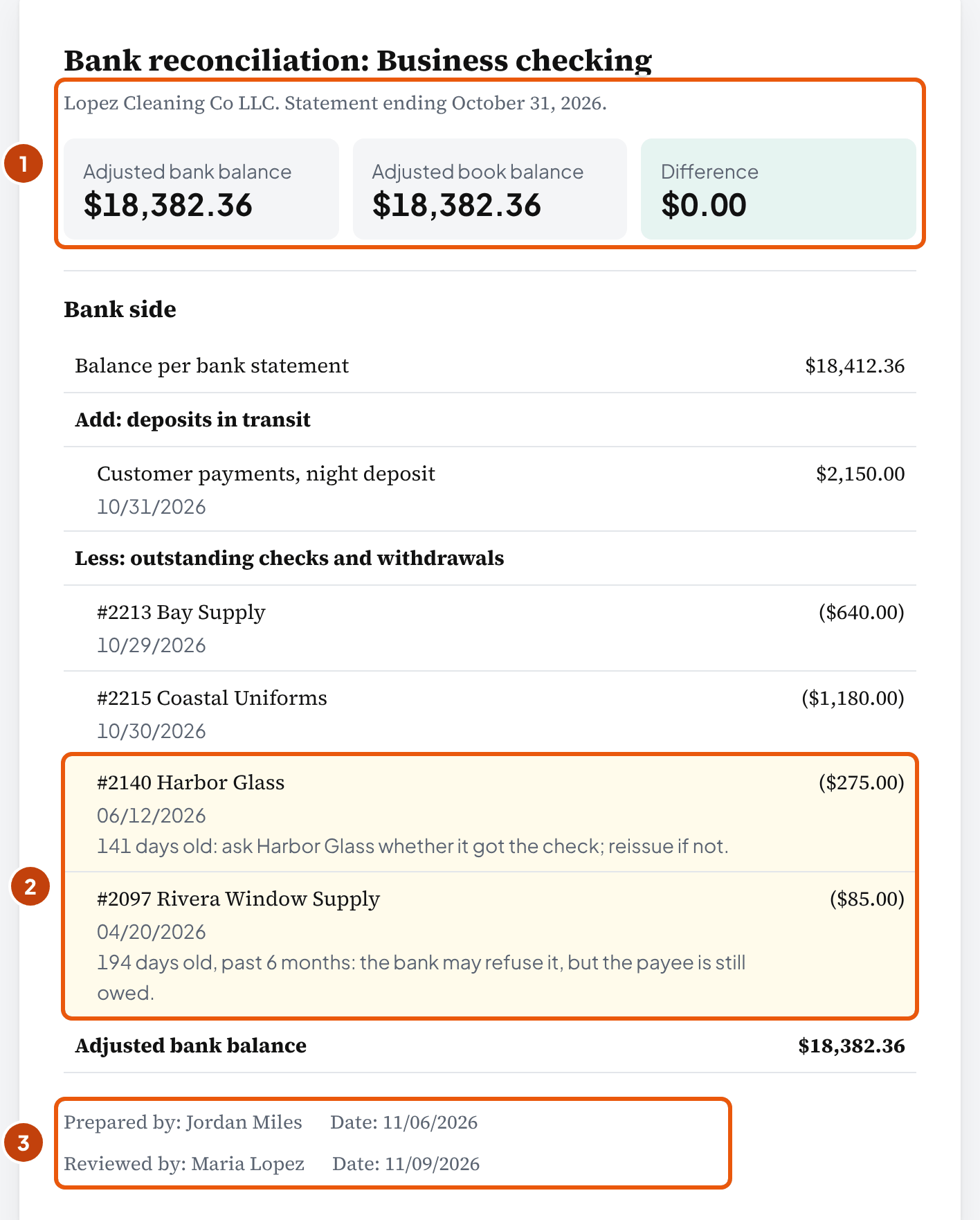
| Balance per bank statement | $18,412.36 |
| Add: night deposit of customer payments, Oct 31 | + $2,150.00 |
| Less: check #2213, Bay Supply, Oct 29 | − $640.00 |
| Less: check #2215, Coastal Uniforms, Oct 30 | − $1,180.00 |
| Less: check #2140, Harbor Glass, June 12 | − $275.00 |
| Less: check #2097, Rivera Window Supply, April 20 | − $85.00 |
| Adjusted bank balance | $18,382.36 |
$18,412.36 + $2,150.00 − $2,180.00 = $18,382.36.
| Balance per books | $19,074.74 |
| Add: interest earned | + $3.12 |
| Less: monthly service charge | − $25.00 |
| Less: returned check from Bayview Dental | − $480.00 |
| Less: returned-item fee | − $12.00 |
| Less: insurance autopay nobody entered | − $214.50 |
| Add: check #2209, recorded as $95.00, cleared as $59.00 | + $36.00 |
| Adjusted book balance | $18,382.36 |
The six items net to −$692.38, and $19,074.74 − $692.38 = $18,382.36. Both sides agree, so October is done once you post the six entries.
Why is the $36.00 on the book side? The bank paid check #2209 at $59.00, its real amount, but the books took out $95.00. So your books are $36.00 too low, and you add it back. How Jordan found it is in why it doesn't balance.
Bookkeeper tip: The April and June checks stay on the bank side until you see them clear. Don't delete them to tidy the list: old checks that never clear says what to do instead.
How do you fill in a bank reconciliation form?
In short: Start from two balances for the same date. Tick off everything that's in both records, and put each leftover line on the side whose record is missing it.
- Get both balances for the same date. Take the statement's ending balance, and the account's balance in the books on the statement's last day, before this month's adjusting entries. In double-entry books that's the last line on the Cash page of the general ledger. Both go in step 1 of the form.
- Check last month first. The beginning balance your software shows when you start reconciling has to equal the ending balance you reconciled last month. For Lopez Cleaning both are $14,813.94. Type both in step 1 of the form; if they differ, fix that first (history problems).
- Tick off what's in both records. Mark each statement line that's also in your books at the same amount. Or paste both lists at the top of step 2, and the form matches them (how).
- List what the bank hasn't seen yet: checks the payees haven't cashed, and deposits made after the bank's cut-off. In the form, use + Outstanding check, or + Other item and pick Deposit in transit.
- List what only the bank knows: fees, interest, returned checks, autopays nobody entered, and anything recorded at the wrong amount. In the form, use + Other item, then pick the type.
- Compare the adjusted balances. At $0.00, post the journal entries the form lists. At anything else, the form says where to look first (why it doesn't balance).
- Post the entries, then sign it. Fill in Prepared by, have someone else review and sign it, and keep the printed form or PDF with the statement. Open items carry to next month's form, so chase the oldest ones before then.
Most months repeat the last one: the same fees and autopays, plus whatever checks are still open. Start next month carries the outstanding checks, deposits in transit and bank errors forward, with their dates; remove any bank error the bank has corrected since. It also enters this statement's ending balance ($18,412.36 in the example) as next month's last reconciled balance. You add the month's fees, interest, autopays and anything new. Download Excel first to keep this month.
What you need: the month's statement, the account's balance in your books on the same date, and last month's reconciliation if there is one. The form isn't built for credit card accounts, client trust accounts that need a three-way reconciliation, investment accounts, or several accounts at once.
What journal entries come out of a bank reconciliation?
In short: One entry for each book-side item, and none for the bank side. If the item added to the book side, debit cash; if it subtracted, credit cash. The other line goes to the account the item belongs to.
“If we added to the book side in the bank reconciliation, we will DEBIT cash. If we subtracted to the book side in the bank reconciliation, we will CREDIT cash.”
Here are Lopez Cleaning's six entries, each dated October 31, 2026, the statement date:
| Item | Debit | Credit | Amount |
|---|---|---|---|
| Interest earned | Checking | Interest income | $3.12 |
| Monthly service charge | Bank service charges | Checking | $25.00 |
| Returned check, Bayview Dental | Accounts receivable (Bayview Dental) | Checking | $480.00 |
| Returned-item fee | Bank service charges | Checking | $12.00 |
| Insurance autopay | Insurance expense | Checking | $214.50 |
| Check #2209, recorded as $95.00, cleared as $59.00 | Checking | Supplies expense | $36.00 |
Together they take $692.38 out of Checking: $39.12 in ($3.12 + $36.00) and $731.50 out ($25.00 + $480.00 + $12.00 + $214.50). After you post them, Checking goes from $19,074.74 to $18,382.36, the adjusted balance on the form.
Where each account comes from
- Bank fee: Bank service charges, as in OpenStax's worked example: "Debit Bank Service Charges and credit Cash".
- Interest: an income account. Lumen and Hermanson's textbook call it Interest Revenue; use your client's own name for it.
- Returned customer check: Accounts receivable, because the customer owes the money again. OpenStax debits Accounts Receivable for the full $2,200 in its example. It isn't an expense. So the invoice goes back on the client's accounts receivable aging, and shows as open on the customer's next statement of account.
- Returned-item fee: bank charges, in Intuit's help for QuickBooks Online. Billing the customer for it is, in Intuit's words, "up to you".
- Payment not in the books: the expense it paid, in the account your client's chart already uses for that cost. That account is our choice: no source we read names one.
- A check recorded at the wrong amount: the account on the original entry. OpenStax fixes a $2,000 check recorded as $1,760 with a $240 debit to Dues expense. Ours is the mirror image: too much was recorded, so you credit the expense.
- A note the bank collected: Notes receivable, with a fee line if the bank took one. Lumen's example debits Cash $3,000 and Collection Fee $500 and credits Notes Receivable $3,500.
What date goes on the entries?
The form uses the statement date, and the sources differ. The New York State Comptroller has unrecorded charges and credits posted "as of the date of the reconciliation". That could mean the statement date or the day you reconcile.
Intuit's help for a bounced check says "Enter the date the check bounced", the day it happened. The form dates all six October 31, so they land in October. If your client's file dates each item the day it happened, change the dates before you post.
Bookkeeper tip (our suggestion): In accounting software, you can fix the $36.00 with an edit instead of an entry. Open check #2209 and change $95.00 to $59.00 while October is still open. Once the month is closed, or a return relies on it, post the entry, so the closed month doesn't move.
Entries (CSV) in the form's menu downloads the same six entries in the columns of Intuit's journal import help page. We haven't tested the import in a live QuickBooks account. For the entries around these, see the journal entry examples.
Why doesn't my bank reconciliation balance?
In short: Read the difference before you reopen every line. Check the three numbers you typed, then find the side. Then test the amount: does it divide by 9, does half of it equal one item, does one item equal all of it?
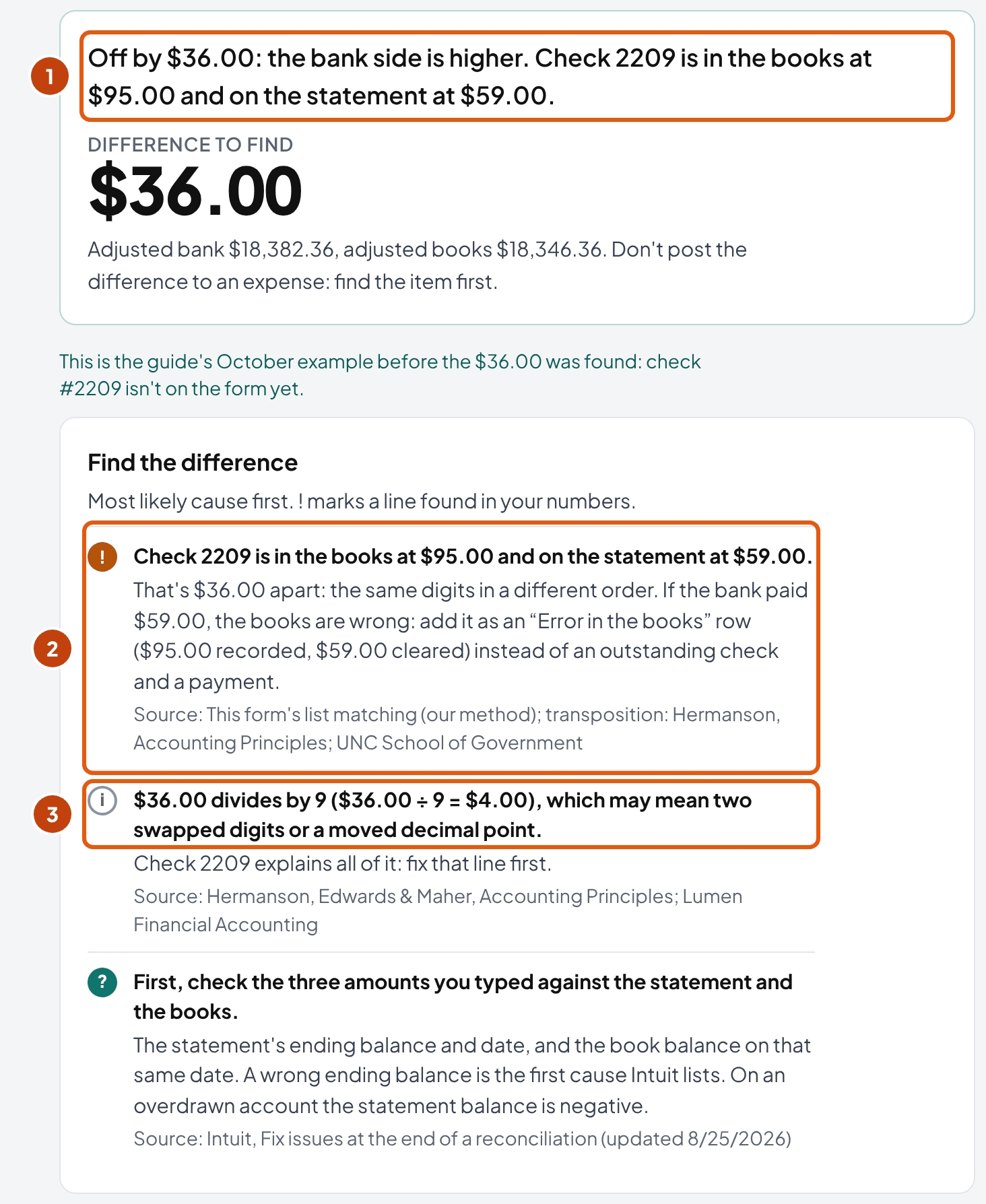
Go back to before Jordan found check #2209. Without that line, the book side comes to $18,346.36, and the bank side stays at $18,382.36. The form is off by $36.00, with the bank side higher.
A higher bank side means your books are too low. Did a payment go in too high, or did the books miss a deposit? Look there first.
When one line explains the whole difference, like a check at two amounts, the form names it and shows the ÷9 result. After that it runs these checks in order (the side check only when no line explains it all):
- The numbers you typed. Intuit's first step is to "verify that your beginning balance, ending balance, and ending date are all correct". A statement balance typed as $18,421.36 instead of $18,412.36 leaves $9.00 that no item explains.
- The side. Compare the month's total deposits and total withdrawals in your books with the statement's. The total that's off holds the problem. With both lists pasted, the form compares them for you.
- Divisible by 9. Two swapped digits, or a decimal point in the wrong place, always leave a difference that divides by 9. A textbook chapter on trial balances, adapted from Hermanson's: "If the difference is divisible by 9, you may have made a transposition error … or a slide error."
- Half the difference. An item entered with the wrong sign moves the balance by twice its amount. The same chapter says to "look for an amount in the trial balance that is equal to one-half of the difference". Off by $480.00? Look for a $240.00 item.
- One item equal to all of it. A check left off the form, or listed twice, moves the difference by exactly its amount. No textbook we read names this test, so it's our method.
- The last days of the month. A deposit made on the 31st may reach the bank on the 1st. Hermanson's textbook: "Immediately investigate any deposit made during the month but missing from the bank statement (unless it involves a deposit made at the end of the period)." The form flags unmatched lines within 3 days of the statement date, our starting assumption.
- Last month. If the beginning balance your software shows isn't last month's reconciled ending balance, something already reconciled has changed. That's a history problem, not this month's.
- Duplicates. The same amount on the same date twice in the books, and once on the statement. Indiana's State Board of Accounts lists "Double postings" among the errors to correct. In the r/Bookkeeping threads we read (our observation, not a count), the usual cause was a bank-feed line added again instead of matched.
| Adjusted bank balance | $18,382.36 |
| Adjusted book balance, without the #2209 line | $18,346.36 |
| Difference | $36.00 |
| $36.00 ÷ 9 | $4.00 |
| Check #2209: $95.00 in the books, $59.00 on the statement | $36.00 |
The ÷9 test fits: 9 − 5 = 4, the gap between the two swapped digits. With both lists pasted, the form names the line itself: "Check 2209 is in the books at $95.00 and on the statement at $59.00." Jordan adds it as an error in the books, and the difference goes to $0.00. Load this version into the form to try the finder; if you've typed your own numbers, the link leaves them alone.
Bookkeeper tip: If no test fits, two mistakes may net to one odd amount. Match your lists line by line from the first day of the month, or paste them at the top of the form's step 2. It pairs check numbers first, then the same amount within 7 days. A check at two amounts goes on as one error in the books.
Find it before you start the next month. Each month's ending balance is the next one's beginning, so a difference you carry into November turns up again there.
A tie doesn't show you everything, though. Money that leaves the account and comes back within the month leaves both balances right on the 31st. The proof of cash is the test for that.
How do you reconcile Stripe, Square and PayPal deposits?
In short: Record the gross sales and the processor's fee, so the deposit in your books equals the payout on the statement. The processor's payout report shows the fee in each payout.
A processor pays out the sales minus its fees, so the bank shows one net amount. If you record the sales at full price as the deposit, every payout looks short by the fee.
Intuit's help for QuickBooks Online says "Don't edit the original transactions". In the deposit, you add the fee "as a negative number", so the deposit comes to the exact amount on the statement.
Each processor's own report gives you the figures. Match one payout to one bank deposit, then take the gross and the fee from it:
- Stripe: the Payout reconciliation report, with an itemized CSV to download. It's "only available for users with automatic payouts enabled".
- Square: its in-app summaries and reports give the "Net total: Total collected minus fees minus other withholdings". Match the net total to the deposit; total collected is the sale, and the fees and any other withholdings are the negative lines.
- PayPal: money can stay in the PayPal balance instead of going to the bank, so treat PayPal as an account of its own. Its monthly statements are "bank-style reports", available "after the 2nd of the month". Reconcile the PayPal account against that statement with the same two-sided form, and each transfer to the bank becomes a transfer between the two accounts.
So if a deposit in the books is higher than the payout by exactly the fee, the usual cause (our reading) is a sale recorded at full price without the fee line. Add the fee to that deposit as a negative line.
When one payout pays several invoices, the payment reconciliation tool splits it: which invoice each card payment paid, the fee, and anything left unexplained. It uses the same October deposits as this form.
Can you write off a small difference?
In short: Sometimes: after you've run the tests, with your client's written approval, and with a memo that says what you checked. QuickBooks will post it for you, but we found no law or standard that sets a dollar amount that's safe to write off.
In one r/Bookkeeping thread we read, a reconciliation was off by $2. Posting it to office supplies drew more votes than the warning that $2 can hide two mistakes, of $1,000 and $998.
If you'd rather agree a tolerance up front, put the amount and the approval step in the engagement letter (our suggestion; the poster in that thread writes a ±$9 variance into their client contracts). Here's what the written sources allow:
| Source | What it says | Its limit |
|---|---|---|
| Intuit, QuickBooks Online help | Use an adjusting entry only when "there's only a small difference"; "Adjusting entries should be a last resort". It posts an expense or an income transaction, memo Reconcile Adjustment | Software help, not a rule |
| Intuit, QuickBooks Desktop help | The adjustment posts to an account called Reconciliation Discrepancies | Same |
| U.S. Department of State, 4 FAH-2 | "Do not make unsupported entries." An account is current with "no unmatched items over 90 days old" | One federal department's handbook |
| State of Utah, FIACCT 19-01_01 | "Resolve any reconciling items within 90 days or by fiscal year closeout." | Utah state agencies |
| Ulster County, NY | Items "corrected within 120 days of the reconciled month" | One county |
| Village of Thornton, IL | "An unresolved reconciling difference of $200 or less may be considered immaterial", if there are no signs of fraud and the Finance Director or Treasurer approves it in writing before posting | One village, signed Feb 11, 2026. The only written dollar tolerance we found |
So the public rules we read set deadlines for finding an item. Only one, a policy one village signed, names an amount you may stop looking for. It has two conditions: no sign of fraud, and a named official's written approval first.
What can a write-off hide? Two mistakes can net to a few dollars. Had Jordan written off Lopez Cleaning's $36.00, Supplies expense would have stayed $36.00 too high, and check #2209 would still be wrong in the register.
If you do post one, post it after the tests above, in the current month, with a memo. Get your client's approval in writing first.
The village's signed policy asks an official to approve before posting. Asking your client instead is our adaptation, and the wording below is ours, not from any professional standard:
Sample approval request (our wording)
Business checking, October 2026: a difference of $3.40 is still unexplained after we checked the statement balance, every deposit and withdrawal, and last month's reconciliation. We propose posting it to Bank service charges with the memo "Unexplained reconciliation difference, Oct 2026". Reply to approve it, or ask us to keep looking.
Bookkeeper tip: Watch the pattern. A few cents once tells you little. A difference that comes back every month, or grows, needs more work. The Washington State Auditor's advice is to "isolate and observe it during your next reconciliation", with more attention "if the amount increases or changes dramatically".
What do you do with old checks that never clear?
In short: Keep them on the bank side, and ask about any over 90 days old. After six months the bank may refuse one, but your client still owes the money. Once the state's dormancy period ends, it goes to the state as unclaimed property, not to income.
Lopez Cleaning has two. Check #2140 to Harbor Glass is 141 days old on October 31, past the 90-day review point. Check #2097 to Rivera Window Supply is 194 days old, past six months as well, so the bank may refuse it.
Ninety days is a policy example, not a law. The State of Utah tells its agencies to "Resolve any reconciling items within 90 days or by fiscal year closeout." The State Department's handbook uses the same 90 days. For your client, it's the point to ask: did Harbor Glass ever get its check?
Six months comes from bank law. UCC § 4-404, the model text each state adapts, says a bank "is under no obligation" to pay a check "presented more than six months after its date".
April 20 plus six months is October 20, so #2097 crossed that line 11 days before the statement date. The bank may still pay it in good faith; it just doesn't have to.
And the debt doesn't go away. Under UCC § 3-310, the debt is only on hold until the check is paid, certified or bounced. § 3-118(c) gives the payee three years after the check bounces, or ten years from its date, whichever ends first, to sue on it. So, on our reading, your client still owes Rivera Window Supply $85.00.
So what goes in the books?
- Ask the payee. Was the check lost, never received, or deposited and bounced? The answer decides which step comes next.
- If you reissue it, void the old check in the books and write a new one. The old line leaves the bank side, and the new check goes on next month's form if it hasn't cleared by then.
- If you can't find the payee, take it off the outstanding list: debit cash and credit a liability, not income. Georgia's State Accounting Office does this for checks over 180 days: "debit the cash account, and credit account #262002, Funds Held for Other- Checks Uncashed/Unclaimed."
- When the state's dormancy period ends, report it and pay it to the state as unclaimed property, by that state's due date.
| Account | Debit | Credit |
|---|---|---|
| Checking | $85.00 | |
| Uncashed checks payable | $85.00 |
#2097 comes off the bank side, and the $85.00 stays a liability until Rivera Window Supply cashes a new check or the state receives it.
Writing it off to income doesn't end the duty. Pennsylvania's Treasury says it plainly: "Writing dormant accounts off into income does not negate the obligation to report and deliver unclaimed property."
Uncashed checks in the ten largest states
Each state sets its own dormancy periods and due dates. Here are the ten most populous states, read on October 18, 2026. Find your client's state, and look at the payroll column first: 1 year in eight of the ten states. New York gives 3 years for both.
| State | Vendor checks | Payroll checks | Business-to-business exemption | Report due |
|---|---|---|---|---|
| California | 3 years (code CK13) | 1 year | None found in the law we read | Before November 1; the remittance follows June 1–15 |
| Texas | 3 years (all other property) | 1 year (code MS01) | None found in what we read | July 1 |
| Florida | 5 years (code CK13) | 1 year | Not checked | Before May 1 |
| New York | 3 years (code CK13) | 3 years (code MS01; NAUPA's list: 1 year for Department of Labor wages) | No: the state says it has no business-to-business exemption | March 10 |
| Pennsylvania | 3 years (vendor payments and accounts payable) | 2 years | None found in what we read | April 15 |
| Illinois | 3 years (vendor checks) | 1 year | No: the 2018 act doesn't exempt business-to-business transactions | Before May 1 (business associations) |
| Ohio | Not checked | 1 year; wages under $50 exempt (NAUPA list) | An exemption, with a purchase order or invoice as support | Not checked |
| Georgia | 5 years (vendor checks) | 1 year | No: the state says it has none | November 1 |
| North Carolina | 5 years (accounts payable) | 1 year | The statute exempts business-to-business credit balances; it doesn't name checks | Before November 1 |
| Michigan | 3 years (code CK13) | 1 year | None found in what we read | July 1 |
Each state's name links to the document we read. Dormancy is how long the check stays uncashed before it's reportable. Rules change; check the state's current instructions before you file.
- Payroll checks usually come due first. Pennsylvania's period is two years; New York's wage code says three, though NAUPA's list marks an exception to it: 1 year for Department of Labor wages.
- Some states want a notice to the payee first. California asks for one on $50 or more, 6 to 12 months before the property is reportable; Michigan, 60 to 365 days before filing.
- New York has no business-to-business exemption, and leaving an item off its report needs "a signed confirmation from the payee".
- Ohio's report form says to leave off a check that "cleared the bank without being removed from the bank reconciliation". It was never outstanding.
Bookkeeper tip: Before you list your client's old checks for the state, compare them with the checks the bank actually paid. One that cleared but stayed on the outstanding list is the cheapest fix there is. Take it off, and find the month the books missed it.
For Lopez Cleaning, that means two calls this week. Ask Harbor Glass whether it got #2140. If Rivera Window Supply can't be reached about #2097, move the $85.00 to a liability (we call it Uncashed checks payable), as in the entry above. Don't write it off to income.
How do you fix a reconciliation in QuickBooks?
In short: If the beginning balance doesn't match your last reconciliation, a transaction that was already reconciled has changed. Find it and put it back before you reconcile the next month. Undo a reconciliation only once you know what undoing deletes.
Intuit's help for QuickBooks Online says the beginning balance "should match the ending balance of your last reconciliation". When it doesn't, a reconciled transaction was "edited, deleted, voided, moved, or unreconciled". Its first step: "Make a note of the exact amount your beginning balance is off by".
That amount is a clue, the way the $36.00 was. Compare your last reconciliation report with the account as it is now, and look for a line of that amount.
You'll find the reports under History by account. In the register, R marks a reconciled line and C a cleared one.
- Never reconciled before? Then "the opening balance is the only entry that is reconciled", so the cause is usually the opening balance.
- Who can fix it: "You need admin access to view and edit reconciliations". The Primary Admin can undo a whole reconciliation (Intuit's page updated September 29, 2026). Older forum answers saying only QuickBooks Online Accountant can do it are out of date.
- What undoing deletes: undoing a reconciliation "permanently deletes" its report, and the reconciliations completed after it are undone too. Save each report as a PDF before you start.
- Past adjustments: an accepted adjustment has Reconcile Adjustment in its memo. Search memos for "Reconcile", and you'll find every one in the file.
- Subaccounts: "you only need to reconcile the parent account".
QuickBooks Desktop
In Desktop you get other tools. Intuit's Desktop help pages name three reports: Reconciliation Discrepancy and Missing Checks, and Previous Reconciliation. While you reconcile, you also get Locate Discrepancies and Undo Last Reconciliation. Desktop posts its adjustments to an account called Reconciliation Discrepancies.
One trap in QuickBooks Pro: "you can only access the last reconciliation report. To keep a copy of the other reports, save a PDF copy".
So save each month's report as you go. The form's Print or save as PDF gives you that copy, whatever software your client uses.
How do you reconcile months that were never done?
In short: Start from the last month that reconciled cleanly, or the first statement if none did, and go forward one month at a time. Each month's ending balance is the next month's beginning, so a mistake you leave behind moves every month after it.
“Always start with your oldest bank statement, or where you last left off reconciling. Then reconcile each month, one at a time. The order matters. If there's an issue with an earlier reconciliation, it affects all reconciliations going forward.”
The Ohio Auditor of State says the same in its 2024 training: "start at the last reconciled month with no issues and move forward".
Say Lopez Cleaning's checking had gone unreconciled since January. Jordan would bring January to $0.00 first, then carry its open items into February.
How do you find that month when nobody knows? Work backward, for that one question. For an account that was never reconciled, Xero's public guide says to "start with your most recent bank statement and work backward until you find a matching balance". Then reconcile forward from there.
Some bookkeepers on r/Bookkeeping tie the opening balances to the last filed tax return before anything else. We found no official source for that step, so treat it as practice, not a rule. If you'd have to change a balance a filed return relied on, ask your client's tax preparer first.
- All the accounts, month by month. Reconcile checking, savings and cards for January before any of them for February. A transfer between two accounts only matches when you have both months open.
- Unknown items wait in a holding account. The Washington State Auditor sends unidentified deposits "to a suspense fund until they can be investigated and resolved". A dated list you send the client clears it faster than guessing.
- Price it separately. Catch-up is a one-time project; the proposal template puts it on its own line, away from the monthly fee.
Bookkeeper tip: Once a month ties, Start next month in the form carries its open items forward (what it carries).
What proves an account is reconciled?
In short: The reconciliation for the statement date, with its list of open items, signed by you and reviewed by someone who didn't prepare it. A $0.00 on screen proves less: only that the two balances agreed that day.
Say an owner or a CPA asks whether the books are reconciled. Show them four things: the statement date (the last month-end, if you're current), the ending balance against the statement, the open items with their dates, and a reviewer's signature. The form you print carries all four.
Georgia's State Accounting Office lists the minimum. Among it: "Calculations to illustrate the general ledger balance, as adjusted by the above bullets, agrees with the bank balance". It also asks for "Documented approval (preferably via signature), by a fiscal officer (or their designee) who did not perform the reconciliation".
UNC's School of Government gives local governments the same advice: "Have a second person review and approve/sign off on the reconciliation."
What a reconciliation doesn't prove
It doesn't prove your client's categories are right, and it isn't a fraud examination. CAMICO, which writes risk guidance for CPA firms, describes the risk of an undefined scope:
“Since the CPA's engagement letter does not define the scope and limits of bank reconciliations, the client appears to be justified in the expectation that the CPA was examining the bookkeeping and bank records for fraud.”
CAMICO's fix is to say it in writing. The standard service, it says, "is not designed or intended to deter or discover fraud, and the engagement letter should clearly communicate that."
Its risk management tips also suggest that the owner open every bank statement: "If the client declines, obtain the declination in writing."
CAMICO writes for CPA firms, but our reading is that the same line protects you as a bookkeeper. So put it in your engagement letter, next to how often you reconcile.
What is a proof of cash?
In short: A bank reconciliation for the whole month, not only its last day. It ties four numbers, bank against books: the beginning balance, the receipts, the payments and the ending balance. So it catches money that left and came back within the month.
The Ohio Auditor of State calls it "a roll forward of each line item in a bank reconciliation".
Its reason: "if an unauthorized amount of $10,000 is withdrawn … and then the funds were replaced before the end of the month, the issue would not appear in a normal bank reconciliation".
Here's Lopez Cleaning's October as a proof of cash, built from the statement and register lines in the form's example. Read each column down: the bank half and the book half adjust to the same figure. The layout is Ohio's; the arithmetic is ours.
$14,813.94 is September's statement balance, and $14,453.94 is September's adjusted balance, after the two checks still open then.
| Sept 30 | Receipts | Payments | Oct 31 | |
|---|---|---|---|---|
| Per bank statement | $14,813.94 | $17,088.12 | $13,489.70 | $18,412.36 |
| Deposit in transit | + $2,150.00 | + $2,150.00 | ||
| Written before October 1, still open (#2140, #2097) | − $360.00 | − $360.00 | ||
| Checks outstanding on Oct 31 | + $2,180.00 | − $2,180.00 | ||
| Adjusted bank | $14,453.94 | $19,238.12 | $15,309.70 | $18,382.36 |
| Per books | $14,453.94 | $19,235.00 | $14,614.20 | $19,074.74 |
| Interest | + $3.12 | + $3.12 | ||
| Fees, returned check and fee, autopay | + $731.50 | − $731.50 | ||
| Check #2209 recorded $36.00 too high | − $36.00 | + $36.00 | ||
| Adjusted books | $14,453.94 | $19,238.12 | $15,309.70 | $18,382.36 |
#2140 and #2097 were outstanding on both dates, so they come off September's balance and October's payments alike, and net out. So add all four open checks ($2,180.00) and take out the two already counted in September ($360.00), which leaves #2213 and #2215, $1,820.00.
You'll find Bayview Dental's $480.00 in both columns. It's in the receipts on October 20, and in the payments on the 22nd, when the check came back. A month-end reconciliation shows only the effect on the balance; the proof of cash shows both movements.
Run one when your client's account ties but the activity looks wrong. Year end is a good time too, and so is any month when the person who reconciles also handles the cash. The form doesn't build a proof of cash yet; start from the items in its Excel file.
How often should you reconcile, and is it required by law?
In short: Monthly, soon after the statement arrives, in the policies we read that set a frequency, and Washington's State Auditor tells governments to consider daily reconciliations for busy accounts or those at higher risk for fraud. No law we found makes a private business reconcile. But bank law gives your client deadlines for reporting forged or unauthorized items. Only someone reading the statement can meet them.
The IRS asks for records "sufficient to establish the amount of gross income, deductions, credits, or other matters required to be shown" (26 CFR 1.6001-1). It never mentions reconciling. The top-ranking pages we read that call it "required by law" don't name the law.
Public bodies set their own rules. Georgia's state agencies reconcile "within 30 days upon receipt of the bank statement", and New York's "within 5-7 days of each month-end".
These are the deadlines that bank law and the ACH rules set, and one rule that doesn't apply to a business:
| Deadline | What it says | Applies to |
|---|---|---|
| UCC § 4-406(c) | The customer "must exercise reasonable promptness in examining the statement" | Checking accounts, under each state's version of the UCC |
| UCC § 4-406(d)(2) | After a reasonable time, "not exceeding 30 days", the customer can't claim further forgeries "by the same wrongdoer"; § 4-406(e) splits the loss if the bank failed to use ordinary care | The same |
| UCC § 4-406(f) | One year after the statement or items are made available, a claim for an unauthorized signature or alteration is barred | The same |
| Nacha rules | The client's bank has a standard two-day right to return an unauthorized business (corporate) ACH debit; consumer entries get 60 days | ACH debits |
| Regulation E | 60 days to report, but only for accounts "established primarily for personal, family, or household purposes" | Consumer accounts, not a business's |
So reconcile soon after the statement arrives, within 30 days at the latest, and tell the bank about anything unauthorized right away (our suggestion). The 30 days is a ceiling: the reasonable period can be shorter.
What if you reconcile January in March? Your client may already be past it for a repeat forger. You're also long past Nacha's standard two-day return window for a business ACH debit.
We read the model text. Each state's version, and the banks' deposit agreements, weren't checked.
Where your client has more risk, reconcile more often. The Federal Reserve's check-fraud toolkit for businesses says "Reconcile bank accounts daily", and says itself it creates no requirement.
The Washington State Auditor suggests daily reconciliations for accounts with "a large amount of activity or that are at higher risk for fraud".
How do you do a bank reconciliation in Excel?
In short: Use one sheet for the form and one for the items, with SUMIFS adding the items by type. Or download ours: Download Excel gives the filled workbook, and Blank Excel template the same formulas, empty.
These are the formulas you get in the downloaded example. Its item rows run from 5 to 55; with more items, the ranges grow.
| Cell | Formula | What it does |
|---|---|---|
| Reconciliation B8 | =SUMIFS('Items'!$H$5:$H$55,'Items'!$C$5:$C$55,"Deposit in transit") | Adds the deposits in transit |
| Reconciliation B9 | =SUMIFS('Items'!$H$5:$H$55,'Items'!$C$5:$C$55,"Outstanding") | Adds the outstanding checks, already negative on the Items sheet |
| Reconciliation B11 | =B7+B8+B9+B10 | The adjusted bank balance |
| Reconciliation B16 | =B13+B14+B15 | The adjusted book balance |
| Reconciliation B17 | =ROUND(B11-B16,2) | The difference, rounded to the cent |
| Items, column H | The type's sign × the amount; for an error, the difference between its two amounts | Each item's effect on its side |
| Items, column L (simplified) | =IF(EDATE(A5,6)<Reconciliation!$B$5,"Over 6 months",IF(Reconciliation!$B$5-A5>90,"Over 90 days","")) | Flags checks over six months and items over 90 days |
Matching two lists with COUNTIFS
To find statement lines that aren't in your books, put both lists in one workbook. Then count each amount's matches on the other list. With the amounts in column C, =COUNTIFS(Books!C:C,C2) returns 0 for a line with no match.
If an amount counts fewer times on one list than on the other, one of a pair is missing. That's the line to look up.
Microsoft's own help warns: "If the criteria argument is a reference to an empty cell, the COUNTIFS function treats the empty cell as a 0 value."
So a blank amount matches every $0.00 line. Skip blank rows, or wrap the formula: =IF(C2="","",COUNTIFS(Books!C:C,C2)).
If you converted a PDF statement to a CSV, check it before you match (our suggestion). Its lines have to take the statement's beginning balance to its ending balance. A converter that drops a line, or reads a balance-forward line as a transaction, breaks that sum.
Or skip the formulas: paste both lists at the top of the form's step 2, and it matches them for you (how).
Who should reconcile a church or nonprofit's bank account?
In short: Someone who doesn't sign the checks, working from a statement nobody opened first. For charities, California's Attorney General also recommends that the board review the monthly statements periodically.
The Diocese of Owensboro's policy has the statement "reconciled by someone other than a check signer", within 15 days. The Archdiocese of St. Paul and Minneapolis has the reconciler "receive the bank statement unopened". Each is one diocese's rule, not law.
California's Attorney General, in its Guide for Charities: "a dual-signature requirement on all charity bank accounts, periodic review of monthly statements by the board, and an annual independent audit are highly recommended."
If you're a volunteer treasurer, the form's Reviewed by line is where a board member signs. Fill it in under step 3 of the form, or print the form and sign it by hand.
Common bank reconciliation mistakes
In short: Most come from making the two balances agree instead of finding out why they don't.
| Risky | Safer |
|---|---|
| Booking the difference to an expense or equity account so it ties | The tests in find the difference first; a write-off only with the client's written approval and a memo |
| Taking a fully matched bank feed as a reconciliation | Reconcile to the statement's ending balance. A feed can be fully matched and still count a hand-entered invoice twice |
| Recording a deposit in transit as income again, or posting entries for outstanding checks | Entries for book-side items only; the bank side clears by itself next month |
| Booking a bank error in the books | Asking the bank to correct it, and listing it on the bank side until it does |
| Booking a returned customer check as an expense | Back to Accounts receivable: the customer still owes it |
| Deleting old outstanding checks to clean up the list | Asking the payee, then a liability, then the state (old checks) |
| Changing an old opening balance to clear a difference | Finding the reconciled transaction that changed, and fixing that |
| Recording a processor payout as the sale | The gross sale and the fee, so the deposit equals the payout |
If you recognize several of these, start with last month. Check that the beginning balance your software shows equals the last reconciled ending balance, in step 1 of the form.
What goes in each field?
In short: Three fields are required: the statement's ending date, its ending balance, and the balance in the books on that date. Each item needs a type and an amount. Everything else is optional, and the form holds up to 300 items.
1. The statement and the books
| Field | What to enter | Where to find it | Range and example |
|---|---|---|---|
| Statement ending date | The last day the statement covers | The top of the statement | Month/day/year; example 10/31/2026 |
| Statement ending balance | The bank's ending balance, before anything you adjust | The statement's summary | −$1,000,000,000 to $1,000,000,000; negative if overdrawn. Example $18,412.36 |
| Balance in the books on that date | The account's balance on the statement date, before this month's adjusting entries | The register, or the balance sheet dated the statement date | The same range. Example $19,074.74 |
| Account, Client or business | Labels for the top of the form and the Excel file | Any names; optional | Example: Business checking, Lopez Cleaning Co LLC |
| Cash account in the books | The account the entries debit or credit | The chart of accounts | Example: Checking |
| Last month's reconciled ending balance, Beginning balance in your software | Both, to check that nothing already reconciled has changed (optional) | The ending balance on last month's reconciliation report, and the beginning balance your software shows when you start reconciling | Example: $14,813.94 and $14,813.94 |
2. Items
| Field | What to enter | Where to find it | Range and example |
|---|---|---|---|
| Statement lines, Book lines | Date, description and amount, withdrawals negative; or Debit and Credit columns (optional) | The bank's CSV download and the register report | Up to 2,000 lines each |
| Match dates up to this many days apart | How far apart two lines' dates can be and still match | Your judgment; checks with the same number match first | 0 to 60 days; empty uses 7, our starting assumption |
| Item type | The type, which sets the side and the direction | The table above | One of 11 types: 3 on the bank side, 8 on the book side |
| Date | For a check, the day it was written; for a deposit in transit, the day you deposited it; for an error in the books, the date in your books; otherwise the day it hit the statement | The register or the statement | Month/day/year; it drives the flags for items over 90 days and checks over six months |
| Amount | The amount, always positive: the type says which way it goes | The register or the statement | Up to $1,000,000,000. Example $640.00 |
| Check number or description | As on the statement or in the register; for a returned check, the customer's name | The statement | Example: #2213 Bay Supply |
| In the books as, Cleared the bank as | For an error in the books: both amounts, and whether it was a payment or a deposit | The register and the statement | Example: $95.00 and $59.00, a payment |
| The statement shows, It should be | For a bank error: both amounts, and whether it was a payment or a deposit | The statement and your deposit slip or check | From the two amounts and the kind of line, the form works out whether to add or subtract the difference |
| Account for the entry | The account on the entry's other line | The client's chart of accounts | Example: Insurance expense. Left empty, the entry says to name the account before posting |
3. Sign-off
| Field | What to enter | Where to find it | Range and example |
|---|---|---|---|
| Prepared by, Reviewed by, and their dates | Names and dates for the sign-off lines | The reviewer is someone other than the preparer | Printed on the form and in the Excel file |
Frequently asked questions
How do you prepare a bank reconciliation report?
Start from the statement's ending balance and your book balance on the same date. On the bank side, add deposits in transit and subtract outstanding checks. On the book side, add interest and money the bank collected, and subtract fees, returned checks and payments nobody entered. Both adjusted balances must match to the cent; in this page's example they come to $18,382.36. Then post an entry for each book-side item, sign the report, and have someone else review it.
What is the 5-step reconciliation process?
No standard fixes the number of steps; this grouping is ours. 1. Get the statement and your book balance for the same date, and check that the beginning balance your software shows equals last month's reconciled ending balance. 2. Tick off the deposits and withdrawals that appear in both. 3. List what the bank hasn't seen yet: deposits in transit and outstanding checks. 4. List what only the bank knows: fees, interest, returned checks, unrecorded payments and errors. 5. Compare the adjusted balances, and post entries for the book-side items.
Is there free software to reconcile bank accounts?
Yes. The form on this page is free, needs no sign-up, and runs in your browser. It does both sides and points to where a difference is. It also writes the journal entries, and downloads an Excel workbook with live formulas or a printable form. Accounting software such as QuickBooks Online has a reconcile screen built in, and a spreadsheet works too; the guide's Excel section has the formulas.
Can ChatGPT do a bank reconciliation?
It can explain the steps and check arithmetic you give it, but check its numbers yourself. Think about what you paste, too: a bank statement holds your client's account details and transactions. In its June 24, 2026 alert (Issue 2026-19), the IRS Office of Professional Responsibility wrote that "Practitioners must strictly handle all client data using only secure, enterprise-approved AI." That guidance is written for Circular 230 practitioners and doesn't address bookkeepers, but the risk is the same. The form on this page does the arithmetic in your browser, and nothing you type leaves it.
Is a cash reconciliation the same as a bank reconciliation?
It can be; the name is used loosely. On this page it means comparing the books with the bank statement for a checking account. Counting a petty cash box against its record is a different job, and the petty cash log on this site does it. A proof of cash is a fuller bank reconciliation that also ties the month's receipts and payments.
How do you calculate a bank reconciliation?
Adjusted bank balance = statement ending balance + deposits in transit − outstanding checks ± bank errors. Adjusted book balance = book balance + interest, collections and deposits not in the books − fees, returned checks and unrecorded payments ± errors in the books. In this page's example both come to $18,382.36. When they differ, read the difference: if it divides by 9, look for two swapped digits.
How do you do a bank reconciliation in Excel?
Use one sheet for the form and one for the items, and add the items by type with SUMIFS. For example, =SUMIFS(Items!H:H,Items!C:C,"Outstanding") adds the outstanding checks. The guide's Excel section lists every formula, and the free download has them built in, with a master check and the journal entries.
Does a reconciliation that balances prove the books are right?
No. It proves your cash balance agrees with the bank on one date. Transactions can still sit in the wrong accounts. An invoice entered by hand and again from the bank feed counts twice. Money taken out and put back within the month leaves both balances right too; the Ohio Auditor of State's example is $10,000. A proof of cash, a second person's review, and a written scope saying the work isn't a fraud examination cover more of the gap.
Is a bank reconciliation required by law?
Not for a private business, as far as we found. The IRS requires records that establish income and deductions (26 CFR 1.6001-1), but it doesn't mention reconciling. Bank law does set deadlines that only someone reading the statement can meet. Under the Uniform Commercial Code's model text, a customer must examine statements with reasonable promptness. After a reasonable time, at most 30 days, the customer can't claim further forgeries by the same wrongdoer. Claims for an unauthorized signature or alteration are barred after one year. Some government bodies and grant programs set their own rules, such as reconciling monthly within 30 days of receiving the statement.
What happens to checks that are never cashed?
They stay on the bank side as outstanding. After six months the bank may refuse to pay one (UCC § 4-404), but the payee is still owed the money. Ask the payee, reissue the check, or move the amount to a liability; don't write it off to income. After the state's dormancy period, it's reported and paid to the state as unclaimed property. In the ten largest states, that's 3 or 5 years for a vendor check (Ohio's we didn't read) and 1 to 3 years for a payroll check. Each state sets its own report date.
How we built this page
Ledgental Team wrote this guide and built the form. Ledgental also makes a bookkeeping app that's free during its beta; this form doesn't connect to it. Everything you type stays in your browser.
What the numbers rest on
- The form's arithmetic is OpenStax's two-sided layout: statement balance + deposits in transit − outstanding checks ± bank errors on one side, book balance ± the items only the bank knew about on the other. Entries follow Lumen's rule (added to the book side: debit cash). Amounts are added in cents and rounded half away from zero.
- Known-answer tests, worked by hand: 34 for the engine and 6 for the Excel file, plus 3 for the state table. They include OpenStax's Feeter Plumbing example ($92,040 on both sides), this page's running example and its $36.00 version, the 9 and 2 tests (95 and 59, 753 and 573, $1,500 against $15.00), item ages at 90 and 91 days and a check at exactly six months, list matching, a line in the books twice, a check at two amounts on the two lists, a changed beginning balance, and an empty form that must not say "reconciles".
- One finding along the way: the Department of Justice's Bank Reconciliation Guide Sheet doesn't add up on the book side. $97,600 + $2,000 + $50 − $745 − $45 = $98,860, while the sheet prints an adjusted cash balance of $99,000 (its bank side is $99,000). Our test keeps the $140.00 difference.
- A textbook slip we found: OpenStax's note-collection entry doesn't balance as printed (Cash $61,000 against credits of $60,000 + $1,800, where $61,800 would), so we used Lumen's version of that entry.
- Our own choices, labeled where they appear: the 7-day match window and the 3-day cut-off, the item-equal-to-the-difference test, the debit to the expense for a payment nobody entered, the liability account name for a stale check, and the approval wording for a small write-off.
- The rules (UCC, Regulation E, Nacha, the IRS records rule, the state unclaimed property rules, and the government and church policies) were read on October 18, 2026, at the source where we could open it; the state table names the few cells read from an archived copy or a national list. The policies are those bodies' own rules, not law for a private business.
- No QuickBooks screenshots: menus move between releases, so the QuickBooks section quotes Intuit's own help pages instead, read October 18, 2026.
- Not covered: credit card accounts, client trust accounts (three-way reconciliation), investment accounts, foreign currency, several accounts in one form, and reading a PDF statement. Lopez Cleaning Co LLC, Northline Bookkeeping and everyone in the example are fictional.
What changed
- October 18, 2026: first published: the form with both sides, the difference finder, the journal entries and their CSV, matching two pasted lists, the age flags, an Excel workbook with live formulas, a printed form, a blank form and a blank workbook; and the guide, with the ten-state table of uncashed checks.
- October 19, 2026: guide and tool rewritten for easier reading: each section opens with its answer, the example's $36.00 told once, a check for converted PDF statements added. In the form, pasting both lists moved to the top of step 2, last month's check to step 1, the actions under the answer, a check found at two amounts on the lists now goes on as one error in the books, the last-month check compares your software's beginning balance (Intuit's test), and Start next month also carries uncorrected bank errors. No figure, rule or source changed.
Cite this page
Copy one of these lines to credit the page. To link to one section, use the link icon beside its heading.
- Plain line
- Ledgental, Bank Reconciliation Form, updated October 2026, https://ledgental.com/tools/bank-reconciliation-form
- APA
- Ledgental. (2026, October). Bank Reconciliation Form. https://ledgental.com/tools/bank-reconciliation-form
- Chicago
- Ledgental. “Bank Reconciliation Form.” Last modified October 2026. https://ledgental.com/tools/bank-reconciliation-form.
Reusing this page: the guide's text, tables and the ten-state table are licensed under CC BY 4.0. Credit "Ledgental" with a link to this page. Quotations from federal sources are public domain, and quotations from other sources stay under their owners' terms.
Sources
- UCC § 4-404, Bank not obliged to pay check more than six months old, Cornell LII (model text)
- UCC § 4-406, Customer's duty to discover and report unauthorized signature or alteration, Cornell LII (model text)
- UCC § 3-310, Effect of instrument on obligation for which taken, Cornell LII (model text)
- UCC § 3-118, Statute of limitations, Cornell LII (model text)
- 12 CFR 1005.6, Liability of consumer for unauthorized transfers (Regulation E), Cornell LII
- 12 CFR 1005.2, Definitions (Regulation E), Cornell LII
- 26 CFR 1.6001-1, Records, Cornell LII
- RMAG Originator Essentials (unauthorized returns, right of return), Nacha
- Preventing Check Fraud: A Resource for Businesses, Federal Reserve, FedPaymentsImprovement.org
- Bank Reconciliation Guide Sheet, U.S. Department of Justice, Office of Justice Programs
- BARS GAAP Manual 3.1.9, Bank Reconciliations, Washington State Auditor's Office
- Best Practices for Bank Reconciliations (January 2020), Washington State Auditor's Office
- Guide to Financial Operations XIV.4.C, Bank Account Reporting and Reconciliations, New York State Comptroller
- Statewide Business Process Policy: Bank Reconciliation (rev. 08/09/2018), Georgia State Accounting Office
- Remittance Process for Outstanding and Unclaimed Checks (rev. 10/08/2018), Georgia State Accounting Office
- FIACCT 19-01_01, Bank reconciliations, State of Utah, Division of Finance
- 4 FAH-2 H-620, Bank account reconciliations, U.S. Department of State
- Interdepartmental Bank Reconciliation Procedure (Res. 546, Exhibit A), Ulster County, NY
- Immaterial Variance and Bank Reconciliation Tolerance Policy, Village of Thornton, IL
- Reconciling (2023 Annual Treasurers Conference), Indiana State Board of Accounts
- Reconciliations and Proof of Cash (2023), Ohio Auditor of State
- Reconciliations, Banking and Proof of Cash (2024), Ohio Auditor of State
- The Bank Reconciliation: A Key Internal Control in Financial Management (Rebecca Badgett, April 8, 2024), UNC School of Government, Coates' Canons
- Principles of Accounting, Volume 1, 8.6: Bank reconciliation and its journal entries, OpenStax, Rice University (CC BY-NC-SA 4.0)
- Financial Accounting, 9.3: Preparing a Bank Reconciliation, Lumen Learning, LibreTexts copy
- Preparing a Trial Balance (the ÷2 and ÷9 tests; San Jacinto College, adapted from Edwards & Hermanson; the page now redirects to a study site), Lumen Learning
- Accounting Principles: A Business Perspective, Volume 1 (Hermanson, Edwards & Maher; CC BY 3.0), Textbook Equity
- Reconcile an account in QuickBooks Online, Intuit
- Fix beginning balance issues (QuickBooks Online), Intuit
- Enter an adjusting entry for a reconciliation, Intuit
- Fix issues the first time you reconcile an account, Intuit
- Undo a client's entire reconciliation, Intuit
- Fix issues at the end of a reconciliation (cited in the form's difference finder), Intuit
- Find previous reconciled adjustments, Intuit
- Tips for year-end reconciliation, Intuit
- Import journal entries (QuickBooks Online), Intuit
- Record a returned or bounced customer check, Intuit
- Record and make bank deposits in QuickBooks Online, Intuit
- About bank or credit card subaccount setup, Intuit
- Reconcile an account in QuickBooks Desktop, Intuit
- Fix beginning balance issues in QuickBooks Desktop, Intuit
- Fix issues when you're reconciling in QuickBooks Desktop, Intuit
- How to do a bank reconciliation (Jotika Teli, CPA, July 24, 2026), Xero
- COUNTIFS function, Microsoft
- In-app summaries and reports, Square
- Monthly statement, PayPal Developer
- Payout reconciliation report, Stripe
- Advise and Warn Clients of Embezzlement Risks (May 26, 2020), CAMICO
- 35 Risk Management Tips (2022), CAMICO
- Holder reporting book (unclaimed property), Pennsylvania Treasury
- Property Type: Vendor-Vendor Payments; Property Type: Wages, National Association of Unclaimed Property Administrators
- Bank Accounts/Reconciliations (eff. 7/1/2017), Diocese of Owensboro
- Parish Finance Manual, Archdiocese of St. Paul and Minneapolis
- Guide for Charities, California Attorney General
- Issue 2026-19: Introductory Guidelines for Responsible AI Use in Federal Tax Practice (June 24, 2026), IRS Office of Professional Responsibility
General information, not legal, tax or accounting advice. The rules and sources were read on October 18, 2026, and they change; check the current text before relying on one. Lopez Cleaning Co LLC and the people in its example are fictional. This page isn't affiliated with the IRS, Intuit, Xero, any bank, state or processor named here.