Key takeaways
- Build the chart from the client's return. Schedule C, Form 1065 and Form 1120-S each need their own equity and owner-pay accounts, and they put several expenses on different lines.
- Don't import what QuickBooks already has. Leave out the accounts it creates on its own, such as Accounts Receivable and Retained Earnings (our practice), and rename its Owner's Equity and Services accounts instead of importing twins.
- Give each line of the return its own expense account. Then split out meals, generally 50% deductible, and government fines and penalties, which Pub 334 lists among expenses you can't deduct on Schedule C.
- Number by group, with gaps. Use one range per group, such as Intuit's 10000s for assets through 80000s for other expenses, leave gaps, and number once, at setup.
- On a chart in use, rename first, move balances with dated entries, and merge last. A QuickBooks merge can't be undone, and a balance sheet account made inactive with a balance sends that balance to Opening Balance Equity.
What goes in a chart of accounts?
In short: Every account you'll record your client's transactions in, in the order the financial statements read: assets, liabilities, equity, income and expenses. A business that sells products adds cost of goods sold. Each account has a number, a type and a side its balance normally sits on.
OpenStax's textbook lists the accounts "in the order in which they appear on the financial statements," balance sheet first. So when you read your chart top to bottom, you read the balance sheet, then the profit and loss.
| Group | Grows with | In Lopez Cleaning Co's chart | Builder's numbers |
|---|---|---|---|
| Assets | Debit | 1000 Business checking, 1400 Vehicles | 1000s |
| Liabilities | Credit | 2100 Business credit card, 2400 Loan payable | 2000s |
| Equity | Credit (draws: debit) | 3000 Owner's investment, 3100 Owner's draws | 3000s |
| Income | Credit | 4000 Cleaning revenue | 4000s |
| Cost of goods sold | Debit | None: Lopez sells services | 5000s |
| Expenses | Debit | 6000 Advertising to 6950 Uniforms | 6000s |
| Other income, other expense | Credit, debit | 7000 Interest income, 8000 Government fines and penalties | 7000s, 8000s |
Two of Lopez's accounts run against their group. Accumulated depreciation sits with the assets but carries a credit, because it reduces Vehicles and Equipment. Refunds and discounts given sits with income but carries a debit, because it reduces sales.
A textbook list stops at the number, the group and the normal balance. Your client's books also need each account's type in the software and, for income and expenses, its line on the return. The builder adds both, plus a QuickBooks detail type wherever Intuit publishes the name.
How to use the builder
In short: Answer three questions about the client: which return it files, what it sells and what it has. Each answer adds or changes accounts. Then you edit the chart itself.
Have your client's last return open. The form at the top answers your first question, and its expense lines show you how the preparer splits the costs. No return yet? Ask the client how the business is taxed before you build anything, because the whole equity section depends on the answer.
| You tick | What the builder adds (Lopez's numbers) |
|---|---|
| Employees on payroll | 2200 Payroll liabilities, 6800 Wages, 6550 Payroll taxes, 6200 Employee benefit programs |
| A business credit card | 2100 Business credit card. Add a row for each card, so each reconciles to its own statement |
| A loan | 2300 and 2400, the loan split at 12 months, and 6300 Interest on loans |
| Vehicles | 1400 Vehicles, 6050 Car and truck expenses, 6150 Depreciation and 1600 Accumulated depreciation |
| Equipment or machinery | 1500 Equipment, with the same two depreciation accounts |
| Collects sales tax | Sales tax payable, which QuickBooks creates once you turn sales tax on, so it isn't in the import file |
| Sells products | Inventory asset and four cost of goods sold accounts, from Schedule C Part III or Form 1125-A |
Lopez Cleaning Co sells services and ticks the first five boxes. That gives 40 accounts, counting one the example adds by hand: Uniforms, numbered 6950, right after the last standard expense.
From there the chart is yours. Type over a name or a number, remove a row with the ×, or add an account in the box under the chart. The import files follow every change.
Some clients need accounts the builder doesn't add. A nonprofit uses net assets instead of owner's equity, and C corporations, trust accounting, construction job costing and multicurrency books each need their own. For those, start from the closest result and expect to rework the equity and the costs.
If your client is new to QuickBooks, import before anyone enters a transaction. Intuit says importing a chart "is best done when first setting up your company."
How should you number a chart of accounts?
In short: Pick one scheme and leave gaps between accounts. The numbers group and sort the accounts; they don't change a figure on the return. The builder uses Intuit's ranges with one digit fewer: the 1000s for assets through the 8000s for other expenses.
| Group | OpenStax, large company | Intuit's recommended ranges | The builder (four digits) |
|---|---|---|---|
| Assets | 1000–1999 | 10000–19999 | 1000–1999 |
| Liabilities | 2000–2999 | 20000–29999 | 2000–2999 |
| Equity | Starts with 3 | 30000–39999 | 3000–3999 |
| Income | Starts with 4 | 40000–49999 | 4000–4999 |
| Cost of goods sold | Not separate | 50000–59999 | 5000–5999 |
| Expenses | 5000–5999 | 60000–69999 | 6000–6999 |
| Other income | Not separate | 70000–79999 | 7000–7999 |
| Other expenses | Not separate | 80000–89999 | 8000–8999 |
Intuit heads its ranges "Recommended Number Ranges (GAAP)", but we haven't found a GAAP standard that assigns account numbers. Treat them as Intuit's convention. The five-digit version is under More options.
Gaps matter more than the scheme, because you'll add accounts later. Lopez has 20 expenses, so the builder spaces them 50 apart, from 6000 to 6950, and 6951 to 6999 stay free. Add a 21st in the builder before you import, and they respace to 25 apart.
That rule is ours: each group gets the widest gap of 100, 50, 25 or 10 that still leaves room for one more account at the end.
QuickBooks Online hides the numbers until you turn them on. Intuit: "By default, the account numbers feature is disabled." So before you import, turn on Enable account numbers under Settings, Account and settings, Advanced, Chart of accounts (our practice; we haven't tested an import with it off).
In Xero the number is the account code: up to 10 characters, unique, and not starting with a symbol. Don't start your codes with a zero either. Xero warns that "Microsoft Excel removes the leading zeros from account codes in an exported chart of accounts CSV file."
Change a code later, and Xero "moves the old data under the new code for all new reports. Published reports won't reflect this change in code." Your client's old and new reports would show two numbers for one account.
Which accounts does each type of business need?
In short: The return decides three things: your equity accounts, how you record what the owners take, and the line each expense lands on. With the same facts, Lopez Cleaning Co needs 40 accounts on Schedule C, 46 as a partnership of two and 44 as an S corporation with one shareholder.
| Return | Accounts | What changes from Schedule C |
|---|---|---|
| Schedule C | 40 | The base: Owner's investment and Owner's draws |
| Form 1065, two partners | 46 | Equity: 6 accounts in place of 2 (+4): capital, contributions and distributions for each partner; +2 guaranteed payments accounts |
| Form 1120-S, one shareholder | 44 | Equity: 3 accounts in place of 2 (+1): Capital stock, Additional paid-in capital, distributions; +1 shareholder loan; +2 expenses (Officer compensation, shareholder health insurance) |
Schedule C
Maria Lopez alone, paid through draws · 40 accounts in all
- 3000 Owner's investmentNo balance sheet on Schedule C
- 3100 Owner's drawsNot an expense
- 6800 WagesSchedule C line 26, Wages (never the owner's own pay)
Form 1065
Two partners, three equity accounts each · 46 accounts in all
- 3000 Partner 1 capitalSchedule L line 21, Partners' capital accounts
- 3100 Partner 2 capitalSchedule L line 21, Partners' capital accounts
- 3200 Partner 1 contributionsSchedule L line 21 (and Schedule M-2)
- 3300 Partner 2 contributionsSchedule L line 21 (and Schedule M-2)
- 3400 Partner 1 distributionsSchedule L line 21 (and Schedule M-2)
- 3500 Partner 2 distributionsSchedule L line 21 (and Schedule M-2)
- 6400 Guaranteed payments to partners: services1065 line 10, Guaranteed payments to partners (for services)
- 6425 Guaranteed payments to partners: capital1065 line 10, Guaranteed payments to partners (for the use of capital)
- 6450 Salaries and wages (other than to partners)1065 line 9, Salaries and wages
Form 1120-S
One shareholder, paid as an officer · 44 accounts in all
- 2500 Loan from Shareholder 1Schedule L line 19, Loans from shareholders
- 3000 Capital stockSchedule L line 22, Capital stock
- 3100 Additional paid-in capitalSchedule L line 23, Additional paid-in capital
- 3200 Shareholder 1 distributionsReduces retained earnings, Schedule L line 24 (our reading)
- 6400 Officer compensation1120-S line 7, Compensation of officers
- 6425 Shareholder health insurance (more than 2%)1120-S line 7 (officer) or line 8 (not an officer; our reading); also W-2 box 1
- 6450 Salaries and wages (other than officers)1120-S line 8, Salaries and wages
Schedule C: the owner's investment and draws
Maria Lopez owns the LLC alone, so it files Schedule C. Her equity is two accounts: Owner's investment for what she puts in, and Owner's draws for what she takes out.
QuickBooks lists both as other names for its Owner's Equity account. No IRS publication we read names a sole proprietor's equity accounts, so keep the client's own names if they're clear.
Her draws never go through wages. For line 26, the Schedule C instructions say: "Do not include salaries and wages deducted elsewhere on your return or amounts paid to yourself." And since Schedule C has no balance sheet, the builder shows no Schedule L column. You still reconcile the asset and liability accounts every month.
Form 1065: three accounts per partner, and no wages for partners
Now say Maria runs the business with a partner. Pick Form 1065, and each partner gets a capital, a contributions and a distributions account, so two partners need six. That split is ours, built from Schedule L line 21 ("Partners' capital accounts") and Schedule M-2; the IRS doesn't say how many accounts to keep. The first partner's capital account is QuickBooks' Owner's Equity, renamed, so it stays out of the import file, as on Schedule C.
Partners aren't paid through wages. Form 1065 line 9 is "Salaries and wages (other than to partners)". Guaranteed payments go on line 10, and the 1065 instructions define them:
“Deduct payments or credits to a partner for services or for the use of capital if the payments or credits are determined without regard to partnership income.”
So the builder adds two guaranteed payments accounts, one for services and one for the use of capital, and no wage account for partners.
Form 1120-S: officer pay apart from wages
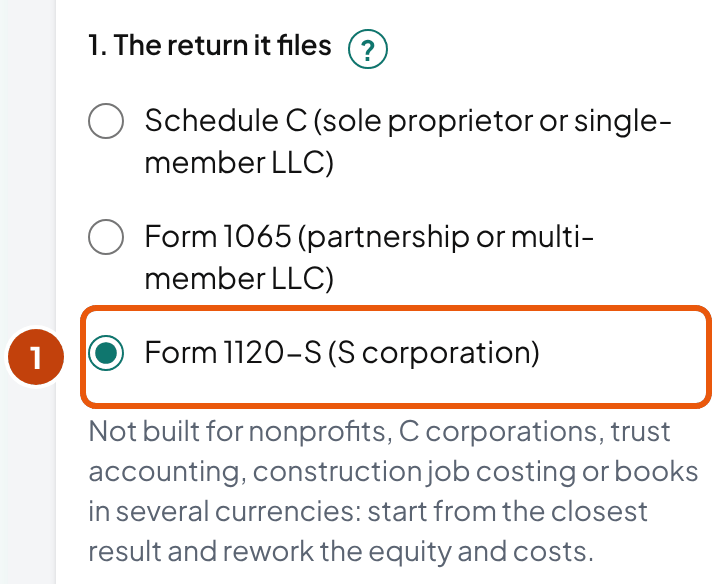
As an S corporation, the equity becomes Capital stock (QuickBooks' Owner's Equity, renamed), Additional paid-in capital, and one distributions account per shareholder.
Each shareholder's loans to the business get an account too. The 1120-S instructions say Schedule L line 19 generally "should reconcile to the sum of all amounts reported on Schedules K-1," and separate loan accounts give you the balances to compare with the K-1s.
Officers' pay goes on line 7 and other employees' pay on line 8. So the builder splits Wages into Officer compensation and Salaries and wages.
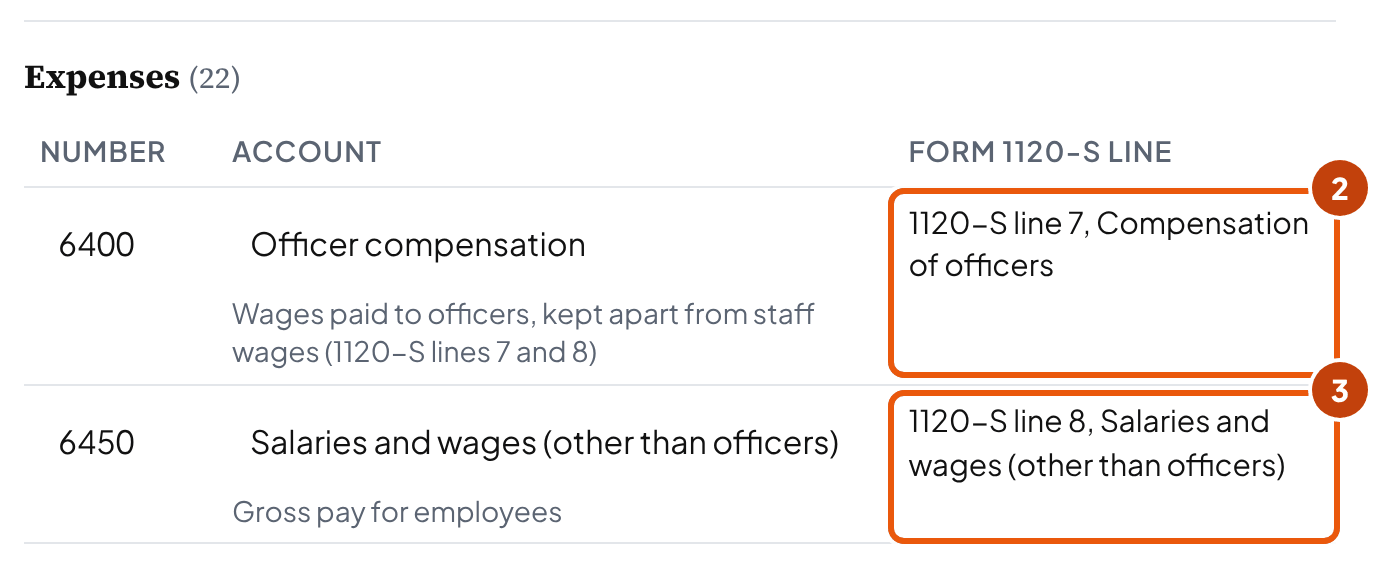
The builder also adds an account for a more-than-2% shareholder's health insurance, because those premiums don't go with the other employee benefits on line 18. The instruction sits under line 7, Compensation of officers:
“Include fringe benefit expenditures made on behalf of officers and employees owning more than 2% of the corporation's stock. Also report these fringe benefits as wages in box 1 of Form W-2.”
So the builder maps it to line 7 for an officer. A more-than-2% shareholder who isn't an officer goes on line 8 with wages; that's our reading of the same instruction.
Does an S corporation with no other staff need payroll accounts? Yes. The IRS says payments to a shareholder who works in the business "must be treated as wages to the extent the amounts are reasonable compensation." So the builder keeps Officer compensation, Salaries and wages, Payroll taxes and Payroll liabilities even with the Employees box off.
Partnerships and S corporations: keep the accounts even without Schedule L
A small partnership or S corporation may not have to fill in Schedule L. The 1065 instructions excuse Schedules L, M-1 and M-2 when the partnership answers yes to Schedule B question 4. Its four tests include total receipts under $250,000 and total assets under $1 million. Form 1120-S Schedule B question 11 excuses Schedules L and M-1 when total receipts and total assets are both under $250,000.
Keep the per-owner accounts anyway. Each owner's money in and out still needs its own balance, whether or not the return asks for it.
One expense account for each line of the return
Give each line of the return its own expense account, and your client's preparer reads the totals straight off the profit and loss. The table lists every income and expense account the builder can add, with its line on each 2025 return; read across a row to your client's form.
For example, Advertising is Schedule C line 8 and 1120-S line 16, but Form 1065 has no advertising line, so there it's one of the Other deductions.
| Account | Schedule C (2025) | Form 1120-S (2025) | Form 1065 (2025) |
|---|---|---|---|
| Service revenue (Lopez: Cleaning revenue) | Line 1, Gross receipts or sales | Line 1a, Gross receipts or sales | Line 1a, Gross receipts or sales |
| Sales of Product Income | Line 1, Gross receipts or sales | Line 1a, Gross receipts or sales | Line 1a, Gross receipts or sales |
| Refunds and discounts given | Line 2, Returns and allowances | Line 1b, Less returns and allowances | Line 1b, Less returns and allowances |
| Purchases of goods for sale | Line 36, Purchases less cost of items withdrawn for personal use | Form 1125-A line 2, Purchases | Form 1125-A line 2, Purchases |
| Cost of labor | Line 37, Cost of labor (not amounts paid to yourself) | Form 1125-A line 3, Cost of labor | Form 1125-A line 3, Cost of labor |
| Materials and supplies (cost of goods) | Line 38, Materials and supplies | Form 1125-A line 5, Other costs (our reading; your preparer decides) | Form 1125-A line 5, Other costs (our reading; your preparer decides) |
| Other costs of goods sold | Line 39, Other costs | Form 1125-A line 5, Other costs | Form 1125-A line 5, Other costs |
| Advertising | Line 8, Advertising | Line 16, Advertising | Line 21, Other deductions (no advertising line) |
| Car and truck expenses | Line 9, Car and truck expenses | Line 20, Other deductions | Line 21, Other deductions |
| Contract labor | Line 11, Contract labor | Line 20, Other deductions | Line 21, Other deductions |
| Depreciation | Line 13, Depreciation and section 179 | Line 14, Depreciation | Line 16a, Depreciation |
| Employee benefit programs | Line 14, Employee benefit programs | Line 18, Employee benefit programs (employees owning 2% or less) | Line 19, Employee benefit programs |
| Insurance (other than health) | Line 15, Insurance (other than health) | Line 20, Other deductions | Line 21, Other deductions |
| Interest on loans | Line 16b, Interest (other) | Line 13, Interest | Line 15, Interest |
| Legal and professional services | Line 17, Legal and professional services | Line 20, Other deductions | Line 21, Other deductions |
| Office expense | Line 18, Office expense | Line 20, Other deductions | Line 21, Other deductions |
| Retirement plan contributions | Line 19, Pension and profit-sharing plans (not the owner's own) | Line 17, Pension, profit-sharing, etc., plans | Line 18, Retirement plans, etc. |
| Rent: vehicles, machinery and equipment | Line 20a, Vehicles, machinery, and equipment | Line 11, Rents | Line 13, Rent |
| Rent: other business property | Line 20b, Other business property | Line 11, Rents | Line 13, Rent |
| Repairs and maintenance | Line 21, Repairs and maintenance | Line 9, Repairs and maintenance | Line 11, Repairs and maintenance |
| Supplies | Line 22, Supplies (not included in Part III) | Line 20, Other deductions | Line 21, Other deductions |
| Payroll taxes | Line 23, Taxes and licenses | Line 12, Taxes and licenses | Line 14, Taxes and licenses |
| Taxes and licenses | Line 23, Taxes and licenses | Line 12, Taxes and licenses | Line 14, Taxes and licenses |
| Travel | Line 24a, Travel | Line 20, Other deductions | Line 21, Other deductions |
| Meals | Line 24b, Deductible meals (in most cases 50%) | Line 20, Other deductions (generally 50%) | Line 21, Other deductions |
| Utilities | Line 25, Utilities | Line 20, Other deductions | Line 21, Other deductions |
| Officer compensation | Not used | Line 7, Compensation of officers | Not used |
| Shareholder health insurance (more than 2%) | Not used | Line 7 (officer) or line 8 (not an officer; our reading); also W-2 box 1 | Not used |
| Guaranteed payments to partners: services | Not used | Not used | Line 10, Guaranteed payments to partners (for services) |
| Guaranteed payments to partners: capital | Not used | Not used | Line 10, Guaranteed payments to partners (for the use of capital) |
| Wages | Line 26, Wages (never the owner's own pay) | Line 8, Salaries and wages (other than officers) | Line 9, Salaries and wages (other than to partners) |
| Bad debts | Line 27b, Other expenses (from line 48) | Line 10, Bad debts | Line 12, Bad debts |
| Bank fees | Line 27b, Other expenses (from line 48) | Line 20, Other deductions | Line 21, Other deductions |
| Software and subscriptions | Line 27b, Other expenses (from line 48) | Line 20, Other deductions | Line 21, Other deductions |
| Interest income | Ask your preparer where it goes (line 6's list names interest on notes and accounts receivable, not bank interest) | Ask your preparer | Ask your preparer |
| Government fines and penalties | No line: not deductible when paid because the business broke the law (Pub 334) | Ask the client's tax preparer how to treat it | Ask the client's tax preparer how to treat it |
Meals get their own account, because "In most cases, the percentage is 50%" (Schedule C instructions). Government fines and penalties get one too: for Schedule C, Pub 334 lists "Penalties and fines you pay to a governmental agency or instrumentality because you broke the law" among expenses you can't deduct; on Forms 1120-S and 1065, ask the preparer. Mix either into another account, and you'll dig it out by hand at year end.
Many Schedule C lines have no line of their own on Forms 1120-S and 1065: car and truck, contract labor, insurance, legal fees, office, supplies, travel, meals and utilities. We place them under Other deductions (1120-S line 20, 1065 line 21). That's our reading of the forms, and the preparer has the last word.
Keep them as separate accounts anyway. The 1065 instructions ask for "a statement listing by type and amount each deduction included on this line," and your accounts are that list.
Tip: Intuit's table of detail types still points Other business expenses, Bad debts and Dues & subscriptions to "Schedule C line 27a." On the 2025 form, 27a is the energy efficient commercial buildings deduction. Other expenses are line 27b, and that's where the builder maps them.
What a fresh chart needs that the return doesn't show
Money that arrives net, such as a card processor's payout, gets its own clearing account (our practice). Stripe's reporting docs describe users "who model their Stripe balance as a temporary clearing account".
So add one clearing account per processor as a current asset: sales go in gross, fees go to Bank fees, and the payout empties it. Add a Payroll Clearing account too if you post each pay run from the provider's report, as the payroll register does (our suggestion).
Some of the owner's own costs don't go on Schedule C. The Schedule C instructions keep the owner's health plan off line 14: "Do not include on line 14 any contributions you made on your behalf as a self-employed person to an accident and health plan." The owner's own retirement contributions go "on Schedule 1 (Form 1040), line 16, not on Schedule C". And the same instructions list "Federal income taxes, including your self-employment tax" as not deductible.
When the business pays any of these, post it to Owner's draws, not an expense account (our suggestion), so the profit and loss stays a Schedule C list.
How do you import a chart of accounts into QuickBooks Online?
In short: Import only what QuickBooks doesn't already have. For Lopez Cleaning Co that's 33 of the 40 accounts: QuickBooks creates 5 on its own, and you rename 2 it already keeps.
Import: 33
Business checking, Prepaid expenses, Vehicles, Equipment, Accumulated depreciation, Business credit card, Payroll liabilities, Loan payable, due within 12 months, and 25 more: the rest of the balance sheet, the income and the expenses
Rename: 2
- Owner's Equity → Owner's investment
- Services → Cleaning revenue
QuickBooks creates: 5
- Accounts receivable (A/R)
- Undeposited Funds
- Accounts payable (A/P)
- Opening Balance Equity
- Retained Earnings
Why leave the created ones out? Intuit's import page doesn't say what an import does with a name the company already has, so the file skips them (our practice).
The two renames matter more. QuickBooks keeps an account called Owner's Equity and one called Services, and Intuit lists both among the accounts that "can be edited, but not deactivated or merged."
So rename those two instead of importing copies, and do it before the import (our practice):
- Rename the two accounts QuickBooks keeps. Owner's Equity becomes Owner's investment, and Services becomes Cleaning revenue.
- Download the file. "Download for QuickBooks Online" saves an Excel file with Intuit's columns: Account Number, Account Name, Type and Detail Type. Lopez's has 33 rows.
- Turn on account numbers (our practice): Settings, Account and settings, Advanced, Chart of accounts, Enable account numbers.
- Open the import. In QuickBooks, go to Settings, then Import Data, then Chart of Accounts, and upload your file.
- Map the columns. Only Account Name has to match. Intuit: "Except for Account Name, you can select No Match for fields that don't have matching columns in your spreadsheet."
- Fill the blank detail types on the review screen, on the 12 rows the builder marks "Pick on import" for Lopez, such as Prepaid expenses, the two loan accounts and Uniforms. The file fills a detail type only where Intuit publishes its on-screen name, which covers the other 21 rows. Intuit: "If you haven't yet, be sure to add account types and detail types." Hover over a field in red to see what to fix.
- Untick any row you don't want, then import. If your client's company already shows a Payroll Liabilities account, untick that row, and you import 32: Intuit lists Payroll Liabilities among its default accounts.
- Enter your opening balances. Intuit: "Make sure to create a journal entry to enter opening balances after you import all accounts."
Pick the blank detail types with care, especially for expense accounts on a Schedule C client. Intuit says the detail type "determines where it's categorized on your Income Tax page in QuickBooks and your Schedule C tax form."
Before you import, check three limits. The builder lists any account that breaks one above the chart, so you can fix it before the file goes in:
- 250 active accounts on Simple Start, Essentials and Plus. Advanced has no limit, and only active accounts count.
- No colon or double quote in a name. QuickBooks reads a colon as a subaccount, as in "Utilities: Gas."
- 100 characters at most in a name, per Intuit's developer reference.
Two more accounts appear only when you turn a feature on. Sales Tax Payable "appears only if you have turned on sales tax," and Inventory Asset "appears only if inventory tracking is turned on." Neither goes in your import file.
Books in QuickBooks Desktop instead? Intuit's Desktop help imports from Lists, Chart of Accounts, the Account menu, then Import from Excel, where you map the columns yourself. It adds: "Before importing, we recommend that you create a backup of your company file." We haven't tested the builder's file in Desktop, so take that backup.
With the accounts in, post the opening entry next. The journal entry examples build it, and the general ledger template shows where each opening balance comes from.
How do you import it into Xero?
In short: Xero makes the chart match your file. It updates the accounts "exactly as per the import file," and any account that isn't in the file "will be archived or deleted". Xero's advice for an account you want to keep is to "keep it in the import file." So export the organization's chart, add the builder's rows to that file, and remove from the file only the default rows they replace. Import the combined file into Xero's demo company first, then into the client's organization (our practice; not tested).
"Download for Xero (CSV)" writes Xero's required fields (Code, Name, Type and Tax Code) and a Description. The types are spelled the way Xero lists them, such as Current Asset, Fixed Asset and Direct Costs.
Bank accounts get the tax code "No Tax," which Xero requires for them. The rest get "Tax Exempt (0%)," one of Xero's default US rates; change it where your client's sales tax setup needs another.
For Lopez, the builder's Xero file has 35 rows, not 40. Accounts receivable, Accounts payable and Retained earnings are Xero system accounts, which "can't be unlocked, deleted or archived." Undeposited Funds and Opening Balance Equity are QuickBooks' own. All five stay out.
Xero has no sub-accounts: "Xero uses tracking categories instead of sub-accounts." And if you change an account's code and its name in the same file, Xero "archives both accounts and creates new ones." So change the name in one import and the code in the next.
We built the Xero file from Xero's published field rules and haven't imported it into a live Xero organization. Its example file is under Chart of accounts, Import, Example file.
One chart for every client? QuickBooks Online Accountant templates
In short: Keep one template per return type, not one for every client: a sole proprietor, a partnership and an S corporation need different equity and owner-pay accounts. And a template adds accounts to your client's chart; it doesn't replace any.
You'll find templates in QuickBooks Online Accountant under My menu, COA Templates. Intuit says: "All existing accounts will remain after you apply a template, including default accounts like Accounts Receivable (A/R) and Accounts Payable (A/P)."
“Accounts with the same name and a different type/detail type will still duplicate. Those duplicate accounts will have an "-1" at the end.”
So on an existing client, clean the chart first and apply your template after. Whatever you don't clean stays in the chart next to the template's accounts (our reading). That's the order Carla Caldwell, a ProAdvisor, walks through on the Firm of the Future series.
Intuit adds two limits: accounts you lock in a template "will import as locked in every client company where you apply the template." And editing a template later "won't change any chart of accounts that you've already applied," so a fix to a client's chart is made in that client's company.
Build your three templates from this page's Excel file, one per return type, but leave out the accounts QuickBooks already has, and rename its Owner's Equity and Services to your template's names, as in import step 1 (our reading).
How do you fix a chart that's already in use?
In short: Use the lightest change that does the job. Rename when only the name is wrong, move balances with dated entries before you make an account inactive, and merge only true duplicates, last. In QuickBooks you can't undo a merge, and an inactive balance sheet account with a balance sends it to Opening Balance Equity.
An account in the client's chart shouldn't be there as it is. Ask these in order, and stop at the first yes.
Is only the name wrong?
YesRename it.
The same account and its transactions, under the new name
Is it a true duplicate: same name, type and detail type as another account?
YesMerge it into the other one, last.
Permanent, and the merged account loses its reconciliation history (Intuit)
Is the account type wrong?
YesChange the type.
A parent and its subaccounts must share one type (Intuit)
Is it a balance sheet account that still has a balance?
YesMove the balance with a dated journal entry first.
Otherwise QuickBooks zeroes it into Opening Balance Equity, and reactivating won't move it back (Intuit)
Make it inactive
Its transactions stay in the reports. In Xero, archive it: an account used in a transaction can't be deleted.
| Move | What Intuit says | Use it when |
|---|---|---|
| Rename | Of Opening Balance Equity: "You can only edit the name of this account, if necessary." Retained Earnings can be renamed, though Intuit doesn't recommend it. Sales of Product Income is the exception: if renamed, QuickBooks Online creates a new one | The account is right and only its name isn't (our practice: no balance moves) |
| Merge | Intuit: "Merging is permanent and can't be undone." Both accounts "must have the exact same name, account type, and detail type." The merged one "loses its reconciliation history" | Two accounts were created by mistake for the same thing |
| Make inactive | Intuit: with a balance, "QuickBooks Online creates an automatic adjustment entry to zero it out and adds it to the Opening Balance Equity account." On reactivation, "QuickBooks won't move the balance back" | The account isn't needed any more, and its balance is already zero |
| Change the type | Intuit: a parent and its subaccounts "must have the same account type"; the change "may affect your accounting and reporting" | The account sits in the wrong group, such as a loan typed as an expense |
| Reclassify by journal entry | Our practice: a dated entry moves the balance to the right account | Before you make an account inactive, or when its balance belongs elsewhere |
Can you delete an account instead? Not in QuickBooks: "You can't delete an account, you can only make it inactive or merge it with another." Xero works the same way for used accounts: "You can't delete an account you've used in a transaction," so you archive it, and you can restore it later.
The order for an inherited chart
Settle the chart before you recategorize the bank feed, so the work isn't done twice (our suggestion). That's also the order one commenter gave in an r/Bookkeeping thread on messy books: chart of accounts, bank feed, reconciliation, then what's still uncategorized. For the chart itself, six steps:
- Tie opening equity to the last filed return or issued financials, the starting point another commenter in that thread gives, then work forward from there.
- Save what the change will touch: the reconciliation reports of every account you might merge, and a trial balance as of the last month end.
- Write your old-to-new list, one row per old account: keep, rename, merge into, or move the balance and make inactive. The Excel file from the builder has a blank Old to new sheet for it.
- Send the list to your client and get a yes in writing (below).
- Rename and retype first. Then move balances with entries dated the month end, and make the empty accounts inactive.
- Merge the true duplicates last, once everything else is in place, because you can't undo a merge.
Sub-accounts, classes or locations?
In short: Use an account for what the money is, and a class, location or Xero tracking category for which part of the business it belongs to. Copy the expense accounts for a second office, and you add 20 accounts to Lopez's chart; a location adds none.
Use a subaccount when you need the split in the balance itself, such as one loan account per lender. In the import file you write it as "Main account: subaccount." Intuit's API reference allows five levels, and a subaccount must have its parent's type.
Whether you get classes and locations depends on your client's plan. Simple Start and Essentials have none. Plus allows "40 combined classes and locations," and Advanced has no limit.
In Xero, tracking categories do the job: you get two active categories, and Xero's developer guide suggests "a soft limit of 100 options" in each.
How many accounts is right? We found no IRS or accounting source that sets a number. SCORE's advice is to "create as few new categories as possible," and 250 is the hard ceiling on most QuickBooks plans. In practice, the return's lines and your client's bank, card and loan accounts set most of the list; add an account when the preparer or the owner needs that number on its own (our rule of thumb).
What to tell the client
In short: Tell your client before the reports change. They'll see new account names on the profit and loss, and in Xero, reports already published keep the old codes. Send the old-to-new list and ask for a yes in writing.
Subject: New account list for your books, starting November 1
Hi Maria,
From November 1 your books will use a new list of accounts. It follows the lines of your tax return, so your preparer can read the year-end totals straight off the reports.
What changes: some names ("Services" becomes "Cleaning revenue"), and expenses now have one account per tax line. The attached list shows each old account and where it goes.
What doesn't change: your bank balances and the profit for each month.
Please reply "approved" by October 28, or tell me what to change.
Keep the approved list in your client's file with its date. Next spring, when the preparer asks why a total moved between accounts, you answer with the list and the dated entries.
Common chart of accounts mistakes
In short: Most come from a generic list that doesn't fit your client's return, or from changes to a live chart that rewrite its history. If you inherit a chart, check it against this list first.
- Importing twins of QuickBooks' own accounts. Import Owner's investment next to QuickBooks' Owner's Equity, and you have two equity accounts you can't merge. Rename instead.
- Product accounts on a service chart. In a cleaning business's chart, Inventory and cost of goods sold accounts only collect miscoded costs.
- Partner pay in Wages. Form 1065 line 9 is wages "other than to partners." Post guaranteed payments to their own accounts, and distributions to each partner's distributions account.
- One equity account for three partners. You can't tell each partner's money in and out apart. Give each partner a capital, a contributions and a distributions account.
- Officer pay mixed with staff wages on an S corporation. Lines 7 and 8 split them, so your accounts do too.
- Owner's draws as the place for anything unexplained. QuickBooks' own Owner's Equity account is "also called Owner Draws, Owner's Investment, or Owner's Pay & Personal Expense," which invites it. Keep the draws account for draws, and ask your client about the rest.
- Renumbering accounts in use. In Xero, reports already published keep the old codes, so your client's old and new reports stop matching. Number once, at setup.
- Following Intuit's "line 27a" for other expenses. On the 2025 Schedule C it's line 27b.
- An account per vendor. Your vendor list already tracks who was paid; the account says what for.
Frequently asked questions
What are the 5 basic types of accounts in a chart of accounts?
Assets, liabilities, equity, income (also called revenue) and expenses. Assets and expenses grow with debits; liabilities, equity and income grow with credits. Most small-business charts also split out cost of goods sold, other income and other expense. Intuit's recommended number ranges follow that order, from the 10000s for assets to the 80000s for other expenses.
How do I create a chart of accounts?
Start from the client's tax return and what the business has, not from a generic list. List the accounts by group in financial statement order, number each group with gaps, and give each one its type in your software. Then map each income and expense account to its line on the return. The sample cleaning business on this page ends up with 40 accounts, and you import 33 of them into QuickBooks Online.
What is the best structure for a chart of accounts?
Groups in financial statement order, one number range per group, and room between accounts. Give each line of the client's return its own expense account, and split out meals (generally 50% deductible) and government fines and penalties: Pub 334 lists those paid "because you broke the law" as not deductible on Schedule C; on Forms 1120-S and 1065, ask the preparer. For parts of the business, use classes, locations or Xero tracking categories instead of copying accounts.
How do I create a chart of accounts in Excel?
One row per account, with columns for the number, name, type, normal balance and tax-return line, plus the detail type if the books are in QuickBooks Online. For a QuickBooks import file, put Intuit's columns in row 1 (Account Number, Account Name, Type, Detail Type) and write a subaccount as "Main account: subaccount". Don't start a code with a zero: Xero warns that Excel removes leading zeros. The builder's Excel file also flags any number or name used twice.
How many accounts should a small business have?
No IRS form or accounting standard sets a number. QuickBooks Online sets a ceiling of 250 active accounts on Simple Start, Essentials and Plus (Advanced has none), and SCORE's advice is to "create as few new categories as possible." The return decides most of the list: the sample cleaning business on Schedule C needs 40.
Can I use the same chart of accounts for every client?
Keep one per return type instead, because a sole proprietor, a partnership and an S corporation need different equity and owner-pay accounts. In QuickBooks Online Accountant, a template adds accounts and keeps the existing ones, and an account with the same name but a different type or detail type comes in as a duplicate with "-1" at the end. So clean the client's chart before you apply it.
What are GL codes?
The account numbers in a chart of accounts, such as 6000 for Advertising. A general ledger code list is the chart of accounts with its numbers. In Xero a code can be up to 10 characters and can't start with a symbol.
What's the difference between a chart of accounts and a general ledger?
The chart of accounts is the list of accounts: number, name and type. The general ledger is the record of what happened in each of them, one page per account with every amount posted and the running balance. You set up the chart first, then post your entries to the ledger.
What are QuickBooks expense categories?
The expense accounts in the client's chart; Intuit's help calls them "account/category." Intuit says each one's detail type decides where it lands on QuickBooks' Income Tax page and on Schedule C. Its table still points three detail types to line 27a; on the 2025 form, other expenses are line 27b.
Where is Xero's standard chart of accounts?
Inside each Xero organization. Xero assigns a default chart when you set the organization up, and its import example file comes from the demo company. An import makes the chart match your file, and Xero says accounts that aren't in the file will be archived or deleted. So add your accounts to an export of Xero's chart and test the import in the demo company first (our practice).
Can I change a chart of accounts after the year starts?
Yes, at a month end, and tell the client first. Rename where you can: a QuickBooks Online merge can't be undone, and an inactive balance sheet account with a balance sends it to Opening Balance Equity. In Xero a new code applies to new reports, while reports already published keep the old one.
How we built this page
Ledgental Team built the tool and wrote this guide. Ledgental also makes a bookkeeping app that's free during its beta; the app doesn't build charts of accounts, and this tool works without an account.
What the rules rest on
- Return lines were read in the 2025 forms and instructions on October 18 and 19, 2026: Schedule C, Form 1120-S, Form 1065 and Form 1125-A. Publication 334 and the IRS page on S corporation pay were read in September 2026.
- QuickBooks Online and Xero behavior comes from Intuit's and Xero's help pages and developer references as they read on October 19, 2026. We quote them; we haven't run either import in a live account.
- Numbering comes from OpenStax's Principles of Accounting §3.2 and Intuit's recommended ranges.
- Reader research: the cleanup order in the section on fixing a chart comes from two commenters in an r/Bookkeeping thread on what to fix first in messy books, read in October 2026 with the other threads behind this site's guides. It's their practice, not a rule.
What's our practice or our reading
- The four-digit scheme (Intuit's ranges with one digit fewer) and the spacing rule between accounts.
- Placing the expenses that have no line of their own on Forms 1120-S and 1065 under Other deductions. The preparer decides.
- The order for fixing an inherited chart, the reclassifying entry, and renaming as the first move.
- Leaving the accounts QuickBooks creates or keeps out of the import file, and turning account numbers on before the import.
- Leaving a QuickBooks detail type blank wherever Intuit doesn't publish its screen name.
- One capital, one contributions and one distributions account per partner (built from Schedule L line 21 and Schedule M-2).
- That a template leaves whatever you didn't clean next to its own accounts, and the rule of thumb for when to add an account.
- Adding the Xero rows to an export of the organization's chart (not tested), clearing accounts per processor, posting the owner's own health and retirement costs to draws, and line 8 for a more-than-2% shareholder who isn't an officer.
- Where Other Expense accounts sit on QuickBooks' profit and loss (our reading of the account type).
- Keeping fines and penalties in their own account, and leaving their treatment on Forms 1120-S and 1065 to the preparer.
- Lopez Cleaning Co LLC and Maria Lopez are fictional. The business is the same one as on the general ledger template, so the pages agree.
How the numbers are checked
One engine builds the chart in the tool and every count, number and diagram on this page, so the two can't drift apart. Automated tests check it against figures worked out by hand, including Lopez's 40 accounts and 33 imports, the S corporation and the three-partner versions, and the software limits.
What changed
- October 19, 2026: first published. Before publishing, a fact check moved Intuit's three "line 27a" detail types to line 27b, corrected the wording on the 2% shareholder's health insurance, and dropped two claims we couldn't verify.
- October 19, 2026 (later): the builder now asks where the chart goes, QuickBooks Online or Xero, and its answer, columns and download follow; the answer lists the next steps, including the Payroll Liabilities case (import 32); blank detail types are marked "Pick on import". The guide adds the import order for Xero, clearing accounts and the owner's own costs, and a table of the counts under each return. Fines and penalties quote Publication 334 for Schedule C; for Forms 1120-S and 1065, the page tells you to ask the preparer. Other figures didn't change.
Cite this page
Copy one of these lines to credit the page. To link to one section, use the link icon beside its heading.
- Plain line
- Ledgental, Chart of Accounts Template for QuickBooks and Xero, updated October 2026, https://ledgental.com/tools/chart-of-accounts-template
- APA
- Ledgental. (2026, October). Chart of Accounts Template for QuickBooks and Xero. https://ledgental.com/tools/chart-of-accounts-template
- Chicago
- Ledgental. “Chart of Accounts Template for QuickBooks and Xero.” Last modified October 2026. https://ledgental.com/tools/chart-of-accounts-template.
Reusing this page: the guide's text, tables and worked example are licensed under CC BY 4.0. Credit "Ledgental" with a link to this page. Quotations from the IRS are public domain; quotations from OpenStax, Intuit, Xero and SCORE stay under their own licenses and terms.
Sources
- Schedule C (Form 1040) 2025, Profit or Loss From Business, Internal Revenue Service
- Instructions for Schedule C (Form 1040) (2025), Internal Revenue Service
- Form 1120-S (2025), U.S. Income Tax Return for an S Corporation, Internal Revenue Service
- Instructions for Form 1120-S (2025), Internal Revenue Service
- Form 1065 (2025), U.S. Return of Partnership Income, Internal Revenue Service
- Instructions for Form 1065 (2025), Internal Revenue Service
- Form 1125-A, Cost of Goods Sold (Rev. November 2024), Internal Revenue Service
- Select a report (payout reconciliation report), Stripe
- Publication 334, Tax Guide for Small Business (2025), Internal Revenue Service
- S corporation compensation and medical insurance issues, Internal Revenue Service
- Import your chart of accounts to QuickBooks Online, Intuit
- Manage default and special accounts in your QuickBooks Online chart of accounts, Intuit
- Chart of accounts in QuickBooks Online, Intuit
- Learn where detail types appear on your tax forms, Intuit
- Learn about usage limits, Intuit
- Use account numbers in your chart of accounts, Intuit
- Merge duplicate accounts in your chart of accounts, Intuit
- Make an account inactive on your chart of accounts in QuickBooks Online, Intuit
- Change the account type of an existing parent account or subaccount, Intuit
- Create a chart of accounts from a template in Intuit Accountant Suite, Intuit
- Account (API reference: name and number rules), Intuit Developer
- In the Know S2 E3: Chart of accounts templates (Carla Caldwell), Firm of the Future
- Import or export MS Excel files (QuickBooks Desktop), Intuit
- Import a chart of accounts, Xero Central
- Components of an account in your chart of accounts (US), Xero Central
- Locked and system accounts in your chart of accounts (US), Xero Central
- Add, edit or delete an account, Xero Central
- Tracking categories (API reference), Xero Developer
- Principles of Accounting, Volume 1, 3.2: the account numbering system, OpenStax, Rice University (CC BY-NC-SA 4.0)
- Top 10 Bookkeeping Mistakes Small Businesses, SCORE
General information about setting up US small-business books, not tax, legal, or accounting advice. Ledgental isn't a CPA firm and isn't affiliated with the IRS, Intuit or Xero. QuickBooks is a registered trademark of Intuit Inc. Forms and help pages were checked at their sources in September and October 2026 and change every year. Lopez Cleaning Co LLC is fictional. Check the final tax-return lines with the client's preparer.