Key takeaways
- A payroll register shows one pay run: a row for each employee and a totals row, and the totals row becomes your journal entry. In the example, $5,224.69 of gross pay ends as $4,022.88 of net pay.
- Each tax has its own taxable wages. A section 125 health premium comes out of every tax's wages; a pre-tax 401(k) deferral only out of income tax wages.
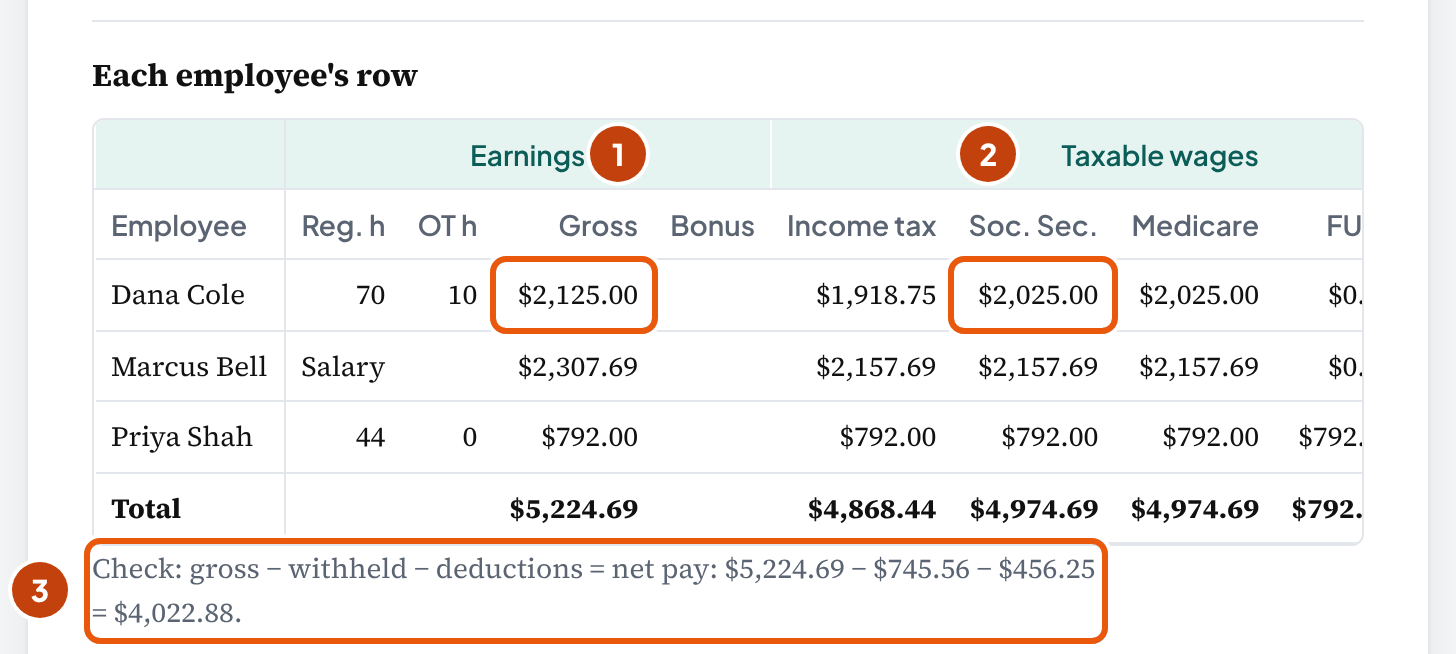
- Dana Cole, one of the example's three employees, has Social Security withheld on $2,025.00: her $2,125.00 gross less a $100.00 section 125 premium.
- Don't check Social Security as 6.2% of gross pay, as OnPay's register guide suggests. For the whole pay run, that gives $323.93 instead of the right $308.43.
- Overtime counts week by week. Dana's 50 and 30 hours pay $2,125.00, not the $2,000.00 you'd get from an 80-hour average (29 CFR 778.104).
- Expect a big tax withdrawal, because it carries the employees' withholding too. The federal deposit generally holds the income tax withheld plus both shares of Social Security and Medicare (IRS Publication 15): $1,126.12 here, against the employer's own Social Security and Medicare of $380.56. So match the whole $1,152.25 tax withdrawal to Payroll Clearing: only the employer's $406.69 of it is expense.
- In QuickBooks Online, match each withdrawal to the entry you posted. Categorizing the net-pay withdrawal books the wages a second time; matched, Payroll Clearing ends at $0.00.
What is a payroll register?
In short: It's the record of one pay run: a row for each employee and a totals row at the bottom. You check your books, the bank and Form 941 against it.
This page follows one pay run, row by row: Maple Street Dental, a fictional Texas practice with three employees, paid on Friday, October 23, 2026. The tool above opens with its numbers, so you can find each figure there.
Your client's provider may name the report differently. Gusto's help pages call theirs the payroll summary, with "a full breakdown of earnings, taxes, and deductions" for one check date. So go by the columns, not the title: you want the version with one row per employee.
No federal rule sets its layout: "No particular order or form of records is prescribed" (29 CFR 516.1). Still, the register you get holds most of what the Department of Labor asks employers to keep. That's hours each workweek, straight-time pay, overtime premium, deductions, total wages and the date paid (29 CFR 516.2).
| Report | What it covers | What you use it for |
|---|---|---|
| Payroll register | Every employee on one pay run: a row each, all the columns, and a totals row | Checking the pay run and booking it |
| Pay stub | One employee's paycheck, plus that employee's year-to-date figures | The employee's own record |
| Payroll journal entry | The register's totals row as debits and credits | Posting the pay run to the general ledger |
| Payroll summary (a date range) | Totals for a month or quarter, often without the employee rows | The quarter's Form 941 and the payroll liability accounts |
If your client sends only a date-range summary, ask the provider for the register of the pay run itself. Without the employee rows, you can't trace a gap to one paycheck.
What each column of a payroll register means
In short: Hours, gross pay, taxable wages for each tax, withholdings, deductions, net pay and the employer's own taxes. Each column comes from a different document, so you check each one against its own source.
| Column | What it holds | Where it comes from |
|---|---|---|
| Employee, pay type | Name, hourly or salaried, and the rate | The provider's employee list |
| Hours | Regular hours up to 40 in each workweek, and overtime hours past 40 | Timesheets, by workweek |
| Gross pay | Regular pay, overtime pay and any bonus, before anything comes out | Rate × hours, or the salary for the pay period |
| Income tax wages | Gross pay less pre-tax deductions such as section 125 premiums and 401(k) deferrals | The register; it adds up to W-2 box 1 and Form 941 line 2 |
| Social Security and Medicare wages | Gross pay less section 125 deductions; Social Security stops at $184,500 for 2026 | The register; W-2 boxes 3 and 5 |
| FUTA wages | Same as Social Security wages, up to the first $7,000 per employee per year. Roth deferrals included (our reading; no IRS page we read names them) | The register; Form 940 |
| Income tax withheld | Federal, and state or local where they apply | The provider; each employee's Form W-4 sets the federal amount |
| Social Security and Medicare withheld | 6.2% and 1.45% of their taxable wages, figured per employee | The provider; the tool recomputes it |
| Deductions | Section 125 benefits, pre-tax retirement, then after-tax items such as Roth deferrals and garnishments | Benefit enrollments and court orders |
| Net pay | Gross pay less everything withheld and deducted | The direct deposits or checks |
| Employer taxes | The employer's Social Security, Medicare, FUTA and state unemployment | The provider; not taken from the employee |
Then do one subtraction yourself. Gross pay less withholdings less deductions has to equal net pay, on every row and in total. Maple Street's totals: $5,224.69 − $745.56 withheld − $456.25 deducted = $4,022.88 of net pay.
If your subtraction misses by a round-looking amount, a deduction column is usually missing from the report. A gap of a few cents is usually rounding. When it doesn't tie shows how to tell them apart.
Two checks stay with you. The tool doesn't work out federal or state income tax withholding: that needs each employee's withholding certificate (Form W-4) and the IRS withholding method. The provider has already done it, so you type it from the report.
The tool also doesn't track the 2026 401(k) limit: $24,500, plus an $8,000 catch-up limit that generally applies at 50 and over (IRS news release IR-2025-111). For an employee who defers a large share of pay, check the year-to-date deferrals against it yourself.
Bookkeeper tip: Put last pay run's register next to this one before you book it. Then a raise that never reached the rate shows up as a row that changed. So does a deduction that dropped off, or hours that don't match the approved timesheets.
Why taxable wages aren't the same as gross pay
In short: Because pre-tax deductions come out first, and each type lowers different taxes. A section 125 health premium lowers every tax's wages, a pre-tax 401(k) deferral only income tax wages, and a Roth deferral none. So you need each deduction's type, not only its amount.
Dana Cole earned $2,125.00 this pay run. She pays $100.00 for health insurance through the practice's section 125 plan and defers $106.25 into a pre-tax 401(k), so you get three different wage figures for her:
| Gross pay | $2,125.00 |
| Income tax wages: $2,125.00 − $100.00 section 125 − $106.25 401(k) | $1,918.75 |
| Social Security and Medicare wages: $2,125.00 − $100.00 section 125 | $2,025.00 |
| Social Security withheld: $2,025.00 × 6.2% | $125.55 |
| Medicare withheld: $2,025.00 × 1.45% = $29.3625 | $29.36 |
FUTA and Texas unemployment would use the $2,025.00 too, but Dana passed both wage bases earlier in the year, so they're $0.00 for her on this pay run.
| Deduction | Income tax wages | Social Security and Medicare wages | FUTA wages |
|---|---|---|---|
| Health insurance premium (accident and health benefits) through a section 125 plan | Lowered | Lowered | Lowered |
| Dependent care through the plan, up to $7,500 for 2026 ($3,750 married filing separately) | Lowered | Lowered | Lowered |
| HSA contribution through the plan, up to the HSA limit | Lowered | Lowered | Lowered |
| Pre-tax 401(k) or 403(b) deferral | Generally lowered (up to the annual limit) | Not lowered | Not lowered |
| Roth 401(k) deferral | Not lowered | Not lowered | Not lowered (our reading) |
| Garnishment or other after-tax deduction | Not lowered | Not lowered | Not lowered |
The section 125 rows come from IRS Publication 15-B (2026), Table 2-1, and Publication 15 (2026), section 15. The 401(k) and 403(b) rows come from the same section 15 table. Check the client's deduction list against it before you question the provider's math.
Roth deferrals are taxable for income tax, Social Security and Medicare, the IRS retirement plan FAQ says. No IRS page we read names Roth for FUTA, so treating it as a FUTA-taxable deferral is our reading.
“Box 3 & 5 (Social Security and Medicare wages) - Include all employee pre-tax, after-tax and designated Roth contributions.”
The employer's 401(k) match isn't taken out of pay, and it isn't wages for any of the three taxes (the same FAQ; Form 940 instructions). In your entry it goes to Benefits Expense.
The "6.2% of gross" check
A quick check from OnPay's payroll register guide breaks here: "Double-check that Social Security and Medicare withholdings equal 6.2% and 1.45% of gross wages, respectively." That works only when nobody has a section 125 deduction.
On Maple Street's register, $5,224.69 × 6.2% = $323.93, but the register shows $308.43. Is the provider wrong? No: the $15.50 gap is 6.2% of the $250.00 of section 125 premiums. Change the provider's figure to 6.2% of gross, and you'd overwithhold.
One textbook example we checked makes the same slip (OpenStax, section 12.5). It deducts a health premium and still figures Social Security on the full gross, which is right only when the premium is after-tax.
An S corporation owner's health insurance
If your client is an S corporation, an owner's premium can work the other way. For a more-than-2% shareholder of an S corporation, the company's health premiums go into income tax wages and W-2 box 1.
They stay out of Social Security, Medicare and FUTA wages when the plan covers all employees or a class of them (IRS, S corporation compensation and medical insurance issues).
What if Maple Street were an S corporation and Marcus owned more than 2% of it (not part of the example)? If it paid $500.00 of his premiums this pay run, his income tax wages would become $2,157.69 + $500.00 = $2,657.69, and his Social Security wages would stay $2,157.69.
The premium isn't cash to him, so his net pay doesn't change (our reading). In the tool, you enter it under More options.
Wage bases: why only Priya owes FUTA
- Social Security stops at $184,500 of wages for 2026, for each employee and the employer (IRS Publication 15, 2026). Nobody at Maple Street is near it.
- Medicare has no wage base. Once an employee's wages pass $200,000 in a calendar year, 0.9% more Additional Medicare Tax is withheld, with no employer share (Publication 15).
- FUTA applies to the first $7,000 paid to each employee in a calendar year, at 0.6% for most employers after the credit (Form 940 instructions; Publication 15).
- Texas unemployment applies to the first $9,000 per employee in a calendar year (Texas Workforce Commission). The example uses 2.7%, the 2026 rate for new employers; use the rate on the client's own notice.
Dana's Social Security wages so far in 2026 are $41,650.00 and Marcus's $45,311.49. Both passed FUTA's $7,000 and Texas's $9,000 long ago, so you'll see $0.00 in their FUTA and Texas columns.
Priya started this pay period, so all of her $792.00 is taxable: $792.00 × 0.6% = $4.75 of FUTA and $792.00 × 2.7% = $21.38 of Texas unemployment tax.
So if you see a FUTA column at $0.00 in October, it usually isn't an error. The tool works out which wage bases are used up from one box per employee, Social Security and Medicare wages paid earlier this year. Type the year-to-date figure from the last register: gross less section 125, before the Social Security cap.
Publication 15 says its "income tax" means federal income tax only, and sends you to the state. The tool assumes state unemployment wages treat each deduction the way FUTA does; that's our assumption. If your client's state differs, choose Another state and type its wage base and rate.
How overtime is counted in the register
In short: Week by week. Hours past 40 in each workweek are overtime, and you can't average two weeks on one biweekly paycheck. That's the federal rule; the tool doesn't apply any state's own overtime rules.
“The Act takes a single workweek as its standard and does not permit averaging of hours over 2 or more weeks. Thus, if an employee works 30 hours one week and 50 hours the next, he must receive overtime compensation for the overtime hours worked beyond the applicable maximum in the second week, even though the average number of hours worked in the 2 weeks is 40.”
Dana worked the regulation's example in reverse: 50 hours in the first week of the pay period and 30 in the second. Her overtime is paid at time and a half of her $25.00 rate, so $37.50 an hour (DOL Fact Sheet #23).
| Week 1, regular: 40 × $25.00 | $1,000.00 |
| Week 1, overtime: 10 × $37.50 | $375.00 |
| Week 2, regular: 30 × $25.00 | $750.00 |
| Gross pay | $2,125.00 |
Averaged as one 80-hour period with no overtime, the same hours would pay 80 × $25.00 = $2,000.00. That's $125.00 short, before the taxes figured on it.
A pay stub that says "80 hours" hides this. How would you know? Only from the hours by workweek, which is why the tool asks you for them on weekly and biweekly pay runs. Priya worked 20 and 24 hours, so she has no overtime: 44 × $18.00 = $792.00.
Twice-a-month and monthly pay periods don't line up with workweeks. For those, you type the regular and overtime hours from the timesheets, because the tool can't tell which workweek each day belongs to.
A bonus can raise the overtime rate. Under 29 CFR 778.211, a bonus announced to make employees work faster or stay is "part of the regular rate of pay". So overtime hours in those weeks pay more than the rate you see on the register.
If your client pays a production or attendance bonus, ask the provider whether it refigured the overtime for those weeks. The tool flags a bonus in a week with overtime but doesn't refigure the rate, so take that overtime figure from the provider's register.
A salary doesn't settle overtime by itself: Fact Sheet #23 requires overtime for covered employees "Unless specifically exempted". The tool takes a salary without overtime hours. So ask your client how each salaried employee is classified, and for one who is owed overtime, take the pay from the provider's register.
A payroll register example: Maple Street Dental
In short: Three employees, one biweekly pay run: $5,224.69 of gross pay and $4,022.88 of net pay.
| Employee | Pay | Gross pay | Income tax wages | Social Security and Medicare wages |
|---|---|---|---|---|
| Dana Cole, dental assistant | $25.00 an hour; 50 + 30 hours | $2,125.00 | $1,918.75 | $2,025.00 |
| Marcus Bell, office manager | $60,000 a year ÷ 26 | $2,307.69 | $2,157.69 | $2,157.69 |
| Priya Shah, new hire | $18.00 an hour; 20 + 24 hours | $792.00 | $792.00 | $792.00 |
| Totals | $5,224.69 | $4,868.44 | $4,974.69 |
| Employee | Income tax | Social Security | Medicare | Deductions | Net pay |
|---|---|---|---|---|---|
| Dana Cole | $150.00 | $125.55 | $29.36 | $206.25 (section 125 $100.00, 401(k) $106.25) | $1,613.84 |
| Marcus Bell | $180.00 | $133.78 | $31.29 | $250.00 (section 125 $150.00, Roth $100.00) | $1,712.62 |
| Priya Shah | $35.00 | $49.10 | $11.48 | $0.00 | $696.42 |
| Totals | $365.00 | $308.43 | $72.13 | $456.25 | $4,022.88 |
The income tax amounts are example amounts. On your client's register, each employee's Form W-4 sets them. The example has no state income tax typed.
| Salary per pay period: $60,000 ÷ 26 = $2,307.6923 | $2,307.69 |
| Social Security and Medicare wages: $2,307.69 − $150.00 section 125 | $2,157.69 |
| Social Security: $2,157.69 × 6.2% = $133.7768 | $133.78 |
| Medicare: $2,157.69 × 1.45% = $31.2865 | $31.29 |
| Net pay: $2,307.69 − $180.00 − $133.78 − $31.29 − $150.00 − $100.00 | $1,712.62 |
The Roth $100.00 comes out of his pay but lowers none of his taxable wages, so his income tax wages are $2,157.69 too.
IRS Publication 15 figures the employee's share "by multiplying each payment by the employee tax rate." So the tool rounds each employee's taxes to the cent on each paycheck, then adds them. That rounding leaves you a cent to explain on Form 941 later.
On top of the gross, Maple Street owes its own taxes: $308.43 of Social Security, $72.13 of Medicare, $4.75 of FUTA and $21.38 of Texas unemployment, $406.69 in all. So the pay run costs $5,224.69 + $406.69 = $5,631.38, the debit side of the entry you'll post.
How to turn the register into the payroll journal entry
In short: Debit Wages Expense for the gross pay and Payroll Tax Expense for the employer's taxes. Credit what's owed to each party: the employees' net pay, the taxes, and each deduction.
| Account | Debit | Credit |
|---|---|---|
| Wages Expense | 5,224.69 | |
| Payroll Tax Expense | 406.69 | |
| Payroll Clearing (net pay) | 4,022.88 | |
| Payroll Clearing (taxes) | 1,152.25 | |
| Health insurance payable | 250.00 | |
| Retirement plan payable | 206.25 |
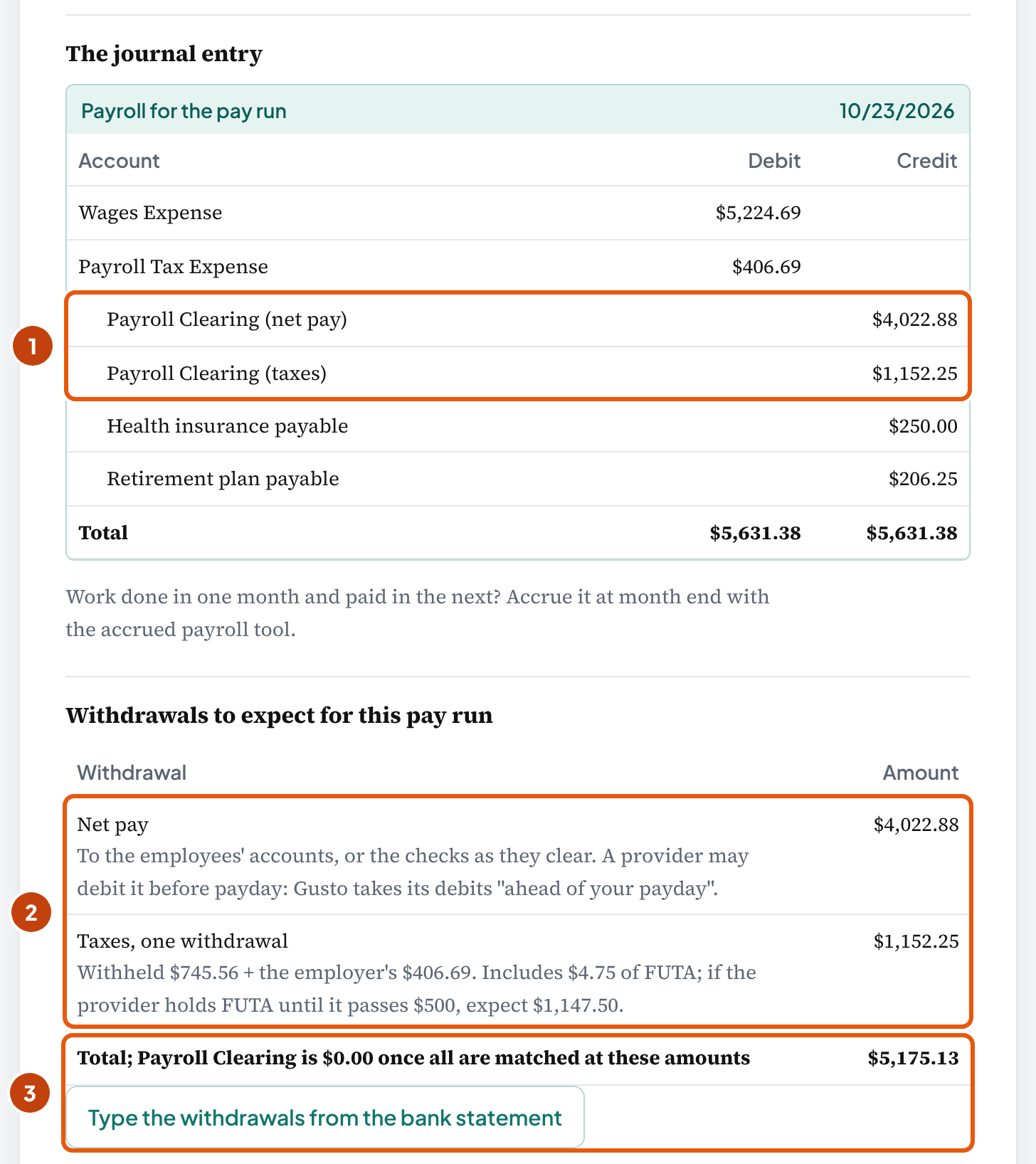
Debits $5,631.38, credits $5,631.38. The taxes line is the $745.56 withheld plus the employer's $406.69, because the provider withdraws both. Retirement plan payable is Dana's $106.25 401(k) plus Marcus's $100.00 Roth.
“Salaries Expense represents the employee's gross income (pay) before any deductions. Each deduction liability is listed in its own account”
Withheld taxes aren't a second expense. The $745.56 is already inside the $5,224.69 of gross pay; Maple Street owes it to the IRS instead of to the employees. Only the employer's $406.69 is tax expense; the $745.56 is a credit to what's owed.
| Line on the register | Account | Debit or credit |
|---|---|---|
| Gross pay, including overtime and bonus | Wages Expense | Debit |
| Employer Social Security, Medicare, FUTA and state unemployment | Payroll Tax Expense | Debit |
| Employer contributions: health premiums, 401(k) match | Benefits Expense | Debit |
| Provider's fee, when it's withdrawn with the payroll | Payroll Processing Fees | Debit |
| Net pay | Payroll Clearing (net pay) | Credit |
| Taxes the provider withdraws: income tax withheld, both shares of Social Security and Medicare, FUTA, state taxes | Payroll Clearing (taxes) | Credit |
| The same taxes when the client deposits them | Federal, FUTA and state tax payable accounts | Credit |
| Section 125 premiums, and the employer's health contribution | Health insurance payable | Credit |
| 401(k), 403(b) and Roth deferrals, and the employer's match | Retirement plan payable | Credit |
| Garnishments and other after-tax deductions | Other payroll deductions payable | Credit |
Payroll Clearing is one common setup, our assumption, not a rule. Each bank withdrawal clears its own line. If you credit the bank directly instead, each credit has to equal a withdrawal to the cent.
When the client deposits the taxes
If your client makes the tax deposits itself and the provider takes only the net pay, keep the taxes as liabilities until they're paid.
| Account | Debit | Credit |
|---|---|---|
| Wages Expense | 5,224.69 | |
| Payroll Tax Expense | 406.69 | |
| Payroll Clearing (net pay) | 4,022.88 | |
| Federal payroll taxes payable | 1,126.12 | |
| FUTA payable | 4.75 | |
| State unemployment tax payable | 21.38 | |
| Health insurance payable | 250.00 | |
| Retirement plan payable | 206.25 |
Federal payroll taxes payable is the Form 941 deposit: $365.00 + $616.86 + $144.26. Each deposit later debits the liability and credits the bank.
Post one entry per pay run, dated the check date. Intuit's help for QuickBooks Online says to date it the paycheck date, and that you can combine the employees' totals into one entry.
Does a month end fall in the middle of a pay period? Then the days already worked need a separate accrued payroll entry.
What leaves the bank, and why the tax withdrawal is so big
In short: The federal deposit generally holds the income tax withheld and both shares of Social Security and Medicare. At Maple Street that's $1,126.12, about three times the employer's own Social Security and Medicare of $380.56.
“Generally, you must deposit federal income tax withheld and both the employer and employee social security and Medicare taxes.”
| Income tax withheld | $365.00 |
| Social Security, both shares: 2 × $308.43 | $616.86 |
| Medicare, both shares: 2 × $72.13 | $144.26 |
| Federal deposit (Form 941) | $1,126.12 |
| FUTA | $4.75 |
| Texas unemployment | $21.38 |
| Tax withdrawal | $1,152.25 |
The employer's own Social Security and Medicare are $308.43 + $72.13 = $380.56. The other $745.56 of the withdrawal came out of the employees' pay.
- Gross pay (Wages Expense)
- $5,224.69
- Employer taxes (Payroll Tax Expense)
- $406.69
- Total cost
- $5,631.38
- Income tax withheld
- $365.00
- Social Security, 2 × 308.43
- $616.86
- Medicare, 2 × 72.13
- $144.26
- FUTA
- $4.75
- Texas unemployment
- $21.38
- Withdrawal 2
- $1,152.25
- Health (section 125)
- $250.00
- 401(k) and Roth
- $206.25
- Liabilities
- $456.25
$4,022.88 + $1,152.25 + $456.25 = $5,631.38, the whole cost.
How the money leaves depends on your client's provider. Gusto's help pages say it takes "three separate debit transactions": direct deposit pay, reimbursements, and "all payroll taxes".
They happen "ahead of your payday": one business day before the check date on next-day payroll. That's one provider's practice, so check how your client's provider does it. Gusto's one debit for "all payroll taxes" would carry Texas's $21.38 of unemployment tax with this pay run (our reading). A provider that pays a state tax later leaves it in Payroll Clearing until it goes.
Priya's $4.75 of FUTA may not leave yet. When FUTA for the quarter is $500 or less, the employer doesn't have to deposit it and can carry it forward (Publication 15). Whether a provider withdraws it now is the provider's choice. If it holds the FUTA, expect a tax withdrawal of $1,147.50 ($1,152.25 − $4.75) instead of $1,152.25; the tool's withdrawal list shows both.
If the tax withdrawal is the full $1,152.25, Payroll Clearing is back to $0.00 once both are matched: the entry credited $5,175.13, and the bank took $5,175.13. If the provider holds the FUTA, $4.75 stays until it goes.
Reconcile Payroll Clearing after each pay run. Baylor University's internal policy, for example, does it "after each payroll run". A balance left behind tells you something: a fee, a tax the provider deposits later, or a withdrawal posted twice.
When the client makes the deposits
Then the deposit date follows your client's deposit schedule, not the payday. $50,000 or less of taxes in the lookback period means monthly; more than that, semiweekly. For 2026 the lookback period is July 1, 2024 through June 30, 2025 (Publication 15).
Maple Street is likely a monthly depositor. At $1,126.12 every two weeks, it reports about 26 × $1,126.12 = $29,279.12 a year, under $50,000 (our arithmetic; the lookback uses the taxes it actually reported).
A monthly depositor deposits by the 15th day of the following month, so the October 23 taxes leave by mid-November. A semiweekly depositor owes taxes on wages paid Wednesday, Thursday or Friday "by the following Wednesday" (Publication 15): October 28, 2026 for this payroll.
How to record a payroll journal entry in QuickBooks Online
In short: As one journal entry dated the check date, built from the register's totals. Then match each bank withdrawal to it. Categorizing a withdrawal books it a second time.
- Get the payroll register for the pay run from the provider.
- Select + Create, then Journal Entry, and enter the paycheck date as the journal date.
- Enter the lines from the entry above, combining all the employees' totals. Intuit's article uses its own payroll accounts, such as Payroll Expenses: Wages, Payroll Expenses: Taxes, and Payroll Liabilities: Federal Taxes (941/944). Use the names in your client's chart of accounts.
- Before you save, check the totals against the register. The debits are gross pay plus employer taxes ($5,224.69 + $406.69 = $5,631.38), and the Payroll Clearing credits equal net pay and the tax withdrawal.
Intuit's article credits each employee's net paycheck on its own line. If the provider takes all the net pay in one withdrawal, you need one clearing line for the total, so the withdrawal has something to match. That's our setup, not Intuit's.
“Manually entering payroll paychecks into QuickBooks Online tracks your payment totals. However, it doesn't create the data you'll need for your employee's W-2s.”
That's fine when the provider files the W-2s, because your journal entry is for the books.
Does the client's provider already sync each pay run to QuickBooks as an entry? Then don't post this entry as well, or the pay run is booked twice; check the synced entry against the register instead (our suggestion).
Match the withdrawals, don't categorize them
“Match it: Choose this option if you already entered a record for the transaction in QuickBooks. Categorize it: Choose this option if you don't have an existing record. This creates a brand-new record in QuickBooks.”
On the QuickBooks Community, a user found payroll expense "~60% higher than it should be." QuickBooks had counted both the gross wages and the net-pay direct deposit as expense. That's what Categorize does to a pay run you've already posted.
- From the payroll entry
- $5,224.69
- From the bank feed
- $4,022.88
- Wages Expense
- $9,247.57
Payroll Clearing (net pay) is left at a credit of $4,022.88.
- From the payroll entry
- $5,224.69
- From the bank feed
- $0.00
- Wages Expense
- $5,224.69
Payroll Clearing (net pay): $4,022.88 − $4,022.88 = $0.00.
To fix one that's already categorized, find the transaction and select Undo. QuickBooks moves it back to the For review tab, where you can match it. Intuit's advice is to "fix all matches before you complete your monthly account reconciliations."
Bookkeeper tip: Total the debits and credits even on an example you copy. Intuit's own sample entry in that article is $15.00 out of balance: debits of $1,700.25, credits of $1,685.25. A $15.00 state disability insurance line is listed but not added (our arithmetic).
The tool's QuickBooks Online entry (CSV) gives the lines in the columns of QuickBooks Online's journal entry import. The columns come from Intuit's help page; we haven't tested an import in a live account. Match each account name to the client's chart of accounts before you import.
When the register or the bank doesn't match
In short: Subtract before you search. The size of the gap usually names its cause: a missing column, a few cents of rounding, a fee, or a withdrawal booked twice.
One poster on the QuickBooks Community had a provider summary that wouldn't tie. Gross pay of $27,803.45, less child support, income taxes and the employee's FICA, came to $21,689.54. Net pay was $20,477.33.
That's $1,212.21 short. The poster traced $1,212.19 to "the medical deductions for employees", which the summary had no column for. Another member guessed the last 2 cents were rounding.
The same poster's tax transfer was $8,245.63, while the six tax lines in the post add up to $8,245.61 (our arithmetic). So when you see a gap of a few cents, look at rounding first.
| Cause | What you see | What to do |
|---|---|---|
| A deduction missing from the report | Net pay lower than gross less the listed lines, by a round-looking amount | Ask the provider for the register with every deduction, and add the column |
| Rounding | A few cents between the tax withdrawal and the tax lines, or the quarter's Form 941 | Nothing on the register; Form 941 line 7 takes the cents |
| The provider's fee | Payroll Clearing left with the fee's amount | Debit Payroll Processing Fees, or post the fee from the provider's invoice |
| A withdrawal categorized instead of matched | Wages or taxes too high by about the withdrawal | Undo it in the bank feed, then match it to the entry |
| A tax paid by a plain check (QuickBooks Desktop) | A payroll liability that never clears | Intuit says Desktop sees a liability as paid only through a liability check; replace the plain check with one, following Intuit's steps |
| Social Security looks too low | The provider's figure lower than a check on gross pay | Usually right: section 125 deductions, or the $184,500 base |
| FUTA at $0.00 in the fall | No FUTA for most employees | Usually right: their first $7,000 was paid earlier in the year |
| A tax withdrawal bigger than the employer's taxes | Withdrawal several times the employer's FICA (about three times in the example) | Expected: it holds the withholding and both shares |
In the tool, select Type the withdrawals from the bank statement under the withdrawals, and type what you see there. The tool shows what's left in Payroll Clearing and which cause fits that amount.
How to tie the quarter's registers to Form 941
In short: Add up every register paid in the quarter, by pay date. Their totals feed Form 941 lines 2, 3, 5a and 5c, and the quarter's deposits equal the liability, give or take cents on line 7.
| Form 941 line | What the instructions say goes there | From Maple Street's October 23 register |
|---|---|---|
| Line 2 | Amounts "that would also be included in box 1" of the W-2s | Income tax wages, $4,868.44 |
| Line 3 | Federal income tax withheld | $365.00 |
| Line 5a | Wages subject to Social Security, "before payroll deductions", up to the wage base; tax at 12.4% | $4,974.69 × 12.4% = $616.86 |
| Line 5c | Wages subject to Medicare, no limit; tax at 2.9% | $4,974.69 × 2.9% = $144.27 |
| Line 5d | Wages subject to Additional Medicare Tax withholding | $0.00; nobody is past $200,000 |
| Line 5e | Column 2 of lines 5a to 5d, added | $616.86 + $144.27 = $761.13 |
| Line 6 | Line 3 + line 5e, before adjustments | $365.00 + $761.13 = $1,126.13 |
| Line 7 | Fractions of cents from rounding the employee share | −$0.01 (see below) |
| Line 10 | Lines 6 to 9 combined, after adjustments | $1,126.13 − $0.01 = $1,126.12, the deposit |
The line 5a instructions say "Enter the amount before payroll deductions." So you enter the register's Social Security wages (our reading of that line, with Pub 15-B): $4,974.69 here. That's gross less section 125 premiums, which aren't Social Security wages (Pub 15-B, Table 2-1), with 401(k) deferrals left in (Pub 15, section 15).
On this pay run, $4,974.69 × 2.9% = $144.27, but the register's Medicare is 2 × $72.13 = $144.26. Which one is wrong? Neither: Form 941 figures the tax on the quarter's total wages, while your registers round each paycheck.
This pay run's rounding is −$0.01. On the return, line 7 is figured once, on the quarter's totals, so it can differ by a few cents from the sum of the pay runs. The Form 941 instructions say that line "may be a positive or a negative adjustment." Social Security agrees to the cent here: $616.86 both ways.
Carry it down and line 10 comes to $1,126.13 − $0.01 = $1,126.12: the same $1,126.12 Maple Street deposited for this pay run.
Count each register in the quarter it was paid, not the quarter the work was done. The Schedule B instructions say to use "the dates you paid wages to your employees", not the dates liabilities were accrued or deposited.
Their own example: a pay period ending December 31, 2025, paid January 6, 2026, goes in 2026, so you count it in that year's first quarter.
Ties to the quarter
- Line 12. It "must equal" the quarter's total liability on line 16 or on Schedule B.
- Schedule B. A semiweekly depositor uses it: one that reported more than $50,000 of employment taxes in the lookback period, or had a liability of $100,000 or more on any one day in the current or prior calendar year. It lists each liability by the date wages were paid, so this register's $1,126.12 would sit on October 23.
- Deposits. Line 13 holds the quarter's deposits, including this register's $1,126.12.
- FUTA. You don't have to deposit FUTA until the amount owed, including any carried forward, is over $500 (Publication 15). The year's FUTA goes on the annual Form 940: last year's (2025) Form 940 was due February 2, 2026, or February 10 if all FUTA was deposited on time.
If line 14, the balance due, is under $1, the instructions say you don't have to pay it. A few cents left there after line 7 usually means rounding, not a missed deposit.
Then tie your books. At quarter end, the payroll liability accounts hold only what's still to be deposited, and anything more is a missed or doubled entry. Prove them with the balance sheet reconciliation template.
In a file that's behind, compare the wages in the books with each filed Form 941 before you post new pay runs (our suggestion). That way an old gap shows up before it mixes with this year's numbers.
Is this tie-out your job or the provider's? It's a scope question, so put the answer in the engagement letter.
How to fix a payroll error in a past quarter
In short: On Form 941-X, one for each quarter you correct. For tax that was underreported, file and pay by the due date of the Form 941 for the quarter in which you found the error. Write down that date.
- Adjustment process, underreported tax: you pay it with the Form 941-X (Form 941-X instructions).
- Adjustment process, overreported tax: you apply it as a credit on the Form 941 for the period you file in.
- Claim process: for overreported tax you want refunded or abated.
| You find the underreported error in | File Form 941-X and pay by |
|---|---|
| January, February or March | April 30 |
| April, May or June | July 31 |
| July, August or September | October 31 |
| October, November or December | January 31 |
Say you find an underpayment on November 12, 2026, in the fourth quarter. Form 941-X and the payment are due by January 31, 2027.
Meet that date, and the Form 941-X instructions say it "will generally ensure that your correction is interest free." It also generally keeps failure-to-pay and failure-to-deposit penalties off. That holds only if you:
- file by the Form 941 due date for the quarter you found the error
- pay the amount owed by the time you file
- enter the date you found the error
- explain the facts behind the correction in detail
The interest-free treatment doesn't apply if the issue came up in an exam of an earlier period, or if the tax was knowingly underreported. Nor does it apply after a notice and demand for payment or a notice of determination under section 7436.
You "discover" an error once you have "enough information to be able to correct it". Write that date in the client's file, because the deadline counts from that quarter.
For income tax withheld in an earlier year, the rule is narrower than for the current year. You can correct it on Form 941-X only if line 3 showed the wrong amount because of a typo or a math slip: "Only transposition or math errors involving the inaccurate reporting of the amount withheld are administrative errors" (Form 941-X instructions).
Other prior-year withholding errors can't be corrected on Form 941-X, apart from errors under section 3509. Ask your client's tax preparer about those.
Does the error change an employee's W-2? Then file Forms W-2c and W-3c "as soon as possible after you discover an error" (W-2 and W-3 General Instructions).
If you need the IRS to remove a penalty it has already assessed, use Form 843, not Form 941 or 941-X (Form 941 instructions).
Who's responsible when a payroll provider makes the deposits?
In short: Your client. The IRS says the employer stays responsible for the deposits even when a provider makes them. If the provider misses a deposit, the IRS "may assess penalties and interest on the employer's account."
“The employer is ultimately responsible for the deposit and payment of federal tax liabilities. Even though the employer may forward the tax amounts to the third-party to make the tax deposits, the employer is the responsible party.”
- EFTPS: the IRS suggests the employer, your client, get its own EFTPS PIN and use it "to periodically verify payments." EFTPS keeps 16 months of payment history online.
- The address of record: the IRS "strongly suggests" the employer doesn't change it to the provider's, so IRS letters still reach your client.
- A missed payment: "A red flag should go up the first time a service provider misses a payment or makes a late payment." When it happens, tell your client the same day, and have them check EFTPS and ask the provider for the deposit confirmation (our suggestion).
The withheld part can also be collected from a person. Under the Trust Fund Recovery Penalty, the IRS can collect the unpaid income tax withheld plus the employee's share of FICA from a "responsible person". On Maple Street's pay run, that's the $745.56 withheld.
The penalty applies when that person was, or should have been, aware of the unpaid taxes and "intentionally disregarded the law or was plainly indifferent to its requirements".
A responsible person "has the duty to perform and the power to direct" the collecting and paying of those taxes. The IRS list includes officers, employees and a payroll provider's staff.
"An employee is not a responsible person if the employee's function was solely to pay the bills as directed by a superior," the same IRS page says. Does that cover you as an outside bookkeeper? The page doesn't say. So write who makes the deposits into your engagement letter (wording below), and don't take on deposit duties the letter doesn't give you.
Late deposits cost a share of the unpaid deposit. It's 2% for 1 to 5 days late, 5% for 6 to 15 days, and 10% after that (IRS, Failure to Deposit Penalty). It rises to 15% if the deposit is still unpaid more than 10 days after the first IRS notice.
The tiers don't stack: a deposit 8 days late costs 5%, not 2% plus 5%. If Maple Street's $1,126.12 deposit were late, you'd be looking at $22.52, $56.31 or $112.61, by our arithmetic.
Book a deposit penalty to its own expense account, not Payroll Tax Expense. IRS Publication 334 lists it among the expenses you can't deduct: "[p]enalties and fines you pay to a governmental agency or instrumentality because you broke the law." Applying that to a deposit penalty is our reading.
Sample engagement letter wording
Payroll is processed by [provider], which calculates the pay, withholds the taxes, makes the federal and state tax deposits, and files the payroll tax returns. You remain responsible for those deposits and filings. We record each pay run from the provider's payroll register and match it to the bank withdrawals. Each quarter we compare the registers with the provider's Form 941. We don't make tax deposits or file payroll returns. Please keep your own EFTPS login so you can check the deposits.
Next: The engagement letter template has payroll fields for the provider and the tasks.
What payroll records to keep, and for how long
In short: At least 4 years for the IRS. Under the federal wage-hour rules, you need at least 3 years for payroll records and 2 years for timecards.
IRS Publication 15 says: "Keep all records of employment taxes for at least 4 years." Its list includes:
- amounts and dates of all wage payments
- employees' names, addresses, Social Security numbers and occupations, and their dates of employment
- copies of each employee's Form W-4
- dates and amounts of tax deposits, with the EFTPS acknowledgment numbers
- copies of the returns filed and their confirmation numbers
- records of fringe benefits and expense reimbursements
The Department of Labor's rules add their own periods. You keep payroll records for at least 3 years from the last entry (29 CFR 516.5). Timecards and wage rate tables need at least 2 years (29 CFR 516.6).
Keep each register with its bank withdrawals and deposit confirmations. EFTPS shows only 16 months of history online (IRS, Outsourcing payroll duties), so a four-year file needs your own copies.
Common payroll register mistakes
In short: Most come from a shortcut: one wage figure for every tax, an averaged pay period, or a withdrawal booked as an expense.
| Risky | Safer |
|---|---|
| Check Social Security as 6.2% of gross. | Check it against Social Security wages: gross less section 125 deductions, up to $184,500. At Maple Street, $308.43, not $323.93. |
| Count 80 hours on a biweekly paycheck as 80 regular hours. | Count each workweek: Dana's 50 and 30 hours pay $2,125.00, not $2,000.00. |
| Post the employees' withheld taxes as a second expense. | Debit Wages Expense for the gross and Payroll Tax Expense for the employer's share only: $406.69. |
| Categorize the net-pay withdrawal as Wages Expense after posting the entry. | Match it to Payroll Clearing, so wages stay at $5,224.69, not $9,247.57. |
| Treat the $1,152.25 tax withdrawal as the employer's tax cost. | Split it: $745.56 withheld from the employees and $406.69 of employer taxes. |
| Book a summary that doesn't tie and plug the difference. | Find the missing column first: in the QuickBooks Community case, $1,212.19 of medical deductions. |
| Put a quarter's registers in by the date the work was done. | Use the pay date, as Schedule B does. |
| Leave the deposits to the provider and never look. | Have the client check EFTPS with its own PIN. The employer stays responsible. |
Frequently asked questions
What is in a payroll register?
One row per employee for one pay run, and a totals row. Each row shows hours (regular and overtime), gross pay, the taxable wages for each tax, federal and state income tax withheld, Social Security and Medicare withheld, deductions such as health premiums and 401(k) deferrals, net pay, and the employer's own taxes. On every row, gross pay less withholdings less deductions equals net pay.
How do you create a payroll register?
Give each employee a row: hours by workweek (or the salary for the period), gross pay with overtime past 40 hours in each workweek, each tax's taxable wages, withholdings, deductions and net pay. Add a totals row and check that gross less withholdings less deductions equals net pay. The tool on this page does each step and downloads an Excel file with live formulas.
Can you show an example of a payroll register?
This page's example is a fictional Texas dental practice paid every two weeks, on October 23, 2026. Three employees earn $5,224.69 of gross pay. $745.56 is withheld in taxes and $456.25 deducted for health insurance and retirement, which leaves $4,022.88 of net pay. The employer's own taxes add $406.69, so the pay run costs $5,631.38.
Is a payroll register the same as a payroll journal?
Not quite. The register lists every employee's pay, taxes and deductions for one pay run. The payroll journal entry turns the register's totals row into debits and credits for the general ledger. Report titles vary by provider, so go by the columns, not the title.
How do you do a payroll journal entry?
From the register's totals row: debit Wages Expense for gross pay and Payroll Tax Expense for the employer's taxes. Credit net pay, the taxes owed (withheld plus the employer's share), and a liability for each deduction. In the example, debits of $5,224.69 and $406.69 equal credits of $4,022.88 net pay, $1,152.25 of taxes, $250.00 of health insurance and $206.25 of retirement deferrals.
What type of expense is payroll?
Two expenses, sometimes three. Gross wages go to Wages Expense (or Salaries Expense), and the employer's own Social Security, Medicare, FUTA and state unemployment taxes go to Payroll Tax Expense. Employer-paid benefits can have their own Benefits Expense account. The taxes withheld from employees aren't an extra expense: they're part of gross wages, owed to the government instead of the employee.
How do you record a payroll journal entry in QuickBooks?
In QuickBooks Online, as one journal entry (+ Create, then Journal Entry) dated the paycheck date, with all employees combined. Then match each bank withdrawal to it; categorizing a withdrawal books it a second time.
What does the taxable earnings column of a payroll register record?
The wages each tax applies to, after pre-tax deductions and wage base limits. Section 125 health premiums come out of every tax's wages, pre-tax 401(k) deferrals only out of income tax wages, and Social Security stops at $184,500 of wages for 2026. So one employee can have different taxable wages for income tax, Social Security, Medicare and FUTA, often lower than gross pay. One exception runs the other way: a more-than-2% S corporation shareholder's company-paid health premiums raise income tax wages above the gross.
Is a payroll register required by law?
Not as a named form. The Department of Labor's rule says "No particular order or form of records is prescribed" (29 CFR 516.1). But employers have to keep what a register holds, such as hours each workweek, pay, deductions and the date paid (29 CFR 516.2), and the IRS requires employment tax records, including the amounts and dates of all wage payments.
How long do you keep payroll registers?
At least 4 years. The IRS says to keep all records of employment taxes for at least 4 years (Publication 15). The Department of Labor requires payroll records for at least 3 years and timecards for at least 2 years (29 CFR 516.5 and 516.6), so 4 years covers both.
What is the salaries payable journal entry?
When pay is recorded before it's paid, credit Salaries Payable (or Wages Payable) for the net pay owed to employees, alongside the tax and deduction liabilities, and debit Salaries Expense for the gross. On payday, debit Salaries Payable and credit cash. A Payroll Clearing account, one common setup, works the same way and is cleared by the provider's withdrawal. For wages earned but not paid at month end, use an accrued payroll entry instead.
What is the difference between a payroll register and a payroll summary?
As this page uses the terms, a register shows each employee's row for one pay run, and a summary shows totals for a date range such as a quarter, which is what you compare with Form 941. Providers name them differently: Gusto's payroll summary for one check date gives a full breakdown of earnings, taxes and deductions. If a report lists each employee, it works as a register.
How we built this page
Ledgental Team wrote this guide and built the tool. Ledgental also makes a bookkeeping app that's free during its beta; this tool doesn't connect to it. Everything you type, including employee names, stays in your browser. Names are saved only on this device, never in the scenario link.
What the numbers rest on
- Rates, wage bases and taxable wages come from IRS Publications 15 and 15-B (2026), the IRS retirement plan FAQ, the IRS page on S corporation medical insurance, the Form 940 instructions, the Social Security Administration and the Texas Workforce Commission. Deposits, Form 941, Form 941-X and responsibility come from Publication 15, the Form 941, Schedule B and Form 941-X instructions, and the IRS pages on outsourcing, the Trust Fund Recovery Penalty and deposit penalties. Overtime and records come from 29 CFR 516 and 778 and DOL Fact Sheet #23. Each was read at the source in September or October 2026; the dates are in our fact log.
- The tool keeps every rate as a named constant and is checked by known-answer tests worked out by hand: the running example row by row, the entry and the withdrawals, the 1-cent Form 941 difference, the workweek cases from 29 CFR 778.104, the Social Security, FUTA and Additional Medicare limits, each deduction type, the S corporation owner's health premium, the QuickBooks Community summary that was $1,212.21 off, Intuit's $15.00 example, and a check that every input changes the result.
- Our assumptions: Social Security and Medicare rounded per employee per paycheck, the employer's share figured the same way; salary per pay period as the annual salary ÷ 52, 26, 24 or 12; overtime at 1.5 times the hourly rate; Roth deferrals counted as FUTA wages; state unemployment wages following FUTA's treatment of each deduction and counted by the date paid (the Texas Workforce Commission's rates page and the California EDD's tax-rated employers page don't say); the S corporation owner's premium left out of net pay; the entry through a Payroll Clearing account, one common setup. The example's 2.7% Texas rate is the 2026 rate for new employers, used as an example.
- The example (Maple Street Dental and its three employees) is fictional, and its income tax amounts are example amounts.
- Not covered: working out income tax withholding, employees in more than one state, tips, household and farm employers, the 401(k) limit, and a full quarter's tie-out inside the tool.
What changed
- October 18, 2026: first published.
- October 19, 2026: guide rewritten for easier reading: each section opens with its answer and ends with what to do, repeats cut (the report-title advice said once), the S corporation case marked as a what-if, and two practical notes added (posting from the register when the provider syncs, and comparing a behind file's wages with the filed Forms 941). Tool wording and the employee cards tidied. No figure changed.
- October 19, 2026 (later): the hero now opens with the 6.2% check to drop (OnPay linked) and the withdrawals to match; the Form 941 section carries the deposit to lines 5e, 6, 7 and 10 and adds the ties to the quarter (Schedule B or line 16, deposits, Form 940); a missed provider deposit is now the client's to check in EFTPS (our suggestion), since the PIN is the employer's; the clearing paragraphs moved above the client-deposits case; several sentences corrected after a fact check. The tool now shows the Form 941 lines for the pay run, a totals row under the entry, the withholdings split by tax, the tax choice before the employees, and an answer that says what to post and what to match. No figure changed.
- October 19, 2026 (third pass): the hero leads with what to post and match, and the 6.2% check moved to the takeaways; the tool-limits paragraph is back under the columns; the Schedule B definition is complete; the FUTA deposit rule says when a deposit isn't required yet; line 5a cites Pub 15-B; the "Social Security not 6.2% of gross" troubleshooting row and the FAQ answers with figures are back. The tool gets a tax-rates step, a check against the register's totals (net pay and taxes withheld), visible hints, and Social Security and Medicare checked beside their fields. No figure changed.
- October 19, 2026 (fourth pass): "What is" opens with the definition again; line 5a is labeled as our reading again; line 7 is explained as figured once on the quarter's totals; an unverified forum report about provider syncs was cut. The tool's answer now says what to post, then the withdrawals to match (with the fee when there is one), and the year-to-date box asks for Social Security and Medicare wages before the Social Security cap, not gross pay, which the wage base and Additional Medicare tests need. Marcus's year-to-date figure is now his Social Security and Medicare wages, $45,311.49; no output figure changed.
Cite this page
Copy one of these lines to credit the page. To link to one section, use the link icon beside its heading.
- Plain line
- Ledgental, Payroll Register Template and Journal Entry, updated October 2026, https://ledgental.com/tools/payroll-register
- APA
- Ledgental. (2026, October). Payroll Register Template and Journal Entry. https://ledgental.com/tools/payroll-register
- Chicago
- Ledgental. “Payroll Register Template and Journal Entry.” Last modified October 2026. https://ledgental.com/tools/payroll-register.
Reusing this page: the guide's text, tables, and diagrams are licensed under CC BY 4.0. Credit "Ledgental" with a link to this page. Quotations from federal regulations and the IRS are public domain, and quotations from other sources stay under their owners' terms.
Sources
- Publication 15 (2026), (Circular E), Employer's Tax Guide, Internal Revenue Service
- Publication 15-B (2026), Employer's Tax Guide to Fringe Benefits, Internal Revenue Service
- Retirement plan FAQs regarding contributions: are retirement plan contributions subject to withholding for FICA, Medicare or federal income tax?, Internal Revenue Service
- S corporation compensation and medical insurance issues, Internal Revenue Service
- 401(k) limit increases to $24,500 for 2026 (IR-2025-111), Internal Revenue Service
- Questions and answers for the Additional Medicare Tax, Internal Revenue Service
- Instructions for Form 940, Internal Revenue Service
- Instructions for Form 941 (03/2026), Internal Revenue Service
- Instructions for Schedule B (Form 941) (Rev. June 2025), Internal Revenue Service
- Instructions for Form 941-X (Rev. April 2026), Internal Revenue Service
- General Instructions for Forms W-2 and W-3 (2026), Internal Revenue Service
- Outsourcing payroll duties, Internal Revenue Service
- Employment taxes and the Trust Fund Recovery Penalty (TFRP), Internal Revenue Service
- Failure to Deposit Penalty, Internal Revenue Service
- Publication 334 (2025), Tax Guide for Small Business, Internal Revenue Service
- 29 CFR 516.1, 516.2, 516.5 and 516.6, Records to be kept by employers, Code of Federal Regulations (via Cornell LII)
- 29 CFR 778.104, Each workweek stands alone, Code of Federal Regulations (via Cornell LII)
- 29 CFR 778.211, Discretionary bonuses, Code of Federal Regulations (via Cornell LII)
- Fact Sheet #23: Overtime Pay Requirements of the FLSA, U.S. Department of Labor, Wage and Hour Division
- Social Security: contribution and benefit base, Social Security Administration
- Tax rates (unemployment tax), Texas Workforce Commission
- Principles of Accounting, Volume 1, 12.5 Record transactions incurred in preparing payroll, OpenStax, Rice University
- Monthly Financial Validation Process (internal policy), Baylor University
- Manually enter payroll paychecks in QuickBooks Online, Intuit
- Match your bank and credit card transactions in QuickBooks Online, Intuit
- Fix a discrepancy on Payroll Liability Balances report (QuickBooks Desktop), Intuit
- Processing payroll overview (for admins), Gusto
- Payroll journal entry (thread), QuickBooks Community
- QuickBooks counting both gross and net pay as payroll expense (thread), QuickBooks Community
General information about US federal payroll tax rules and payroll bookkeeping, not tax, legal or accounting advice. Ledgental isn't affiliated with the IRS, the Department of Labor, Intuit, Gusto or OnPay. Rates and rules were checked at the IRS, the Department of Labor, the Social Security Administration and the Texas Workforce Commission in September and October 2026 and change every year. Maple Street Dental and its employees are fictional, and the 2.7% Texas rate is an example. Check state rules and any return with the client's tax preparer.