Key takeaways
- An AR aging lists what every customer owes on one date, sorted by lateness. Current means not past due (in the tool, an invoice due that day counts as Current), and the late columns count from the due date.
- Tie the aging to Accounts Receivable in the books for the same date, on the accrual basis. In the example both show $13,855.00. If yours don't, the five checks are below, quickest first.
- Age what's still open, not the invoice amount. Pine Street Clinic's $1,800.00 invoice with $900.00 paid ages as $900.00, and a payment dated after the as-of date doesn't count yet.
- A credit is money your client owes its customer. Apply it or refund it. In many states, old unclaimed credits must be reported to the state, and writing them off to income doesn't end that (Pennsylvania); New York bars the write-off without documentation.
- The allowance, the write-off and the tax deduction are three separate things. For tax, IRS Topic 453 allows a bad debt only "in the year the debt becomes worthless."
What is an accounts receivable aging report?
In short: It's the list of what customers owe your client on one date, sorted by how late each balance is. Its total has to equal Accounts Receivable in the books on that date.
Say your client is Lopez Cleaning Co, a fictional cleaning company that bills on Net 15 terms, and you're closing October. Maria Lopez, the owner, wants to know who's late. You want to know something else: do the open balances add up to Accounts Receivable in the books?
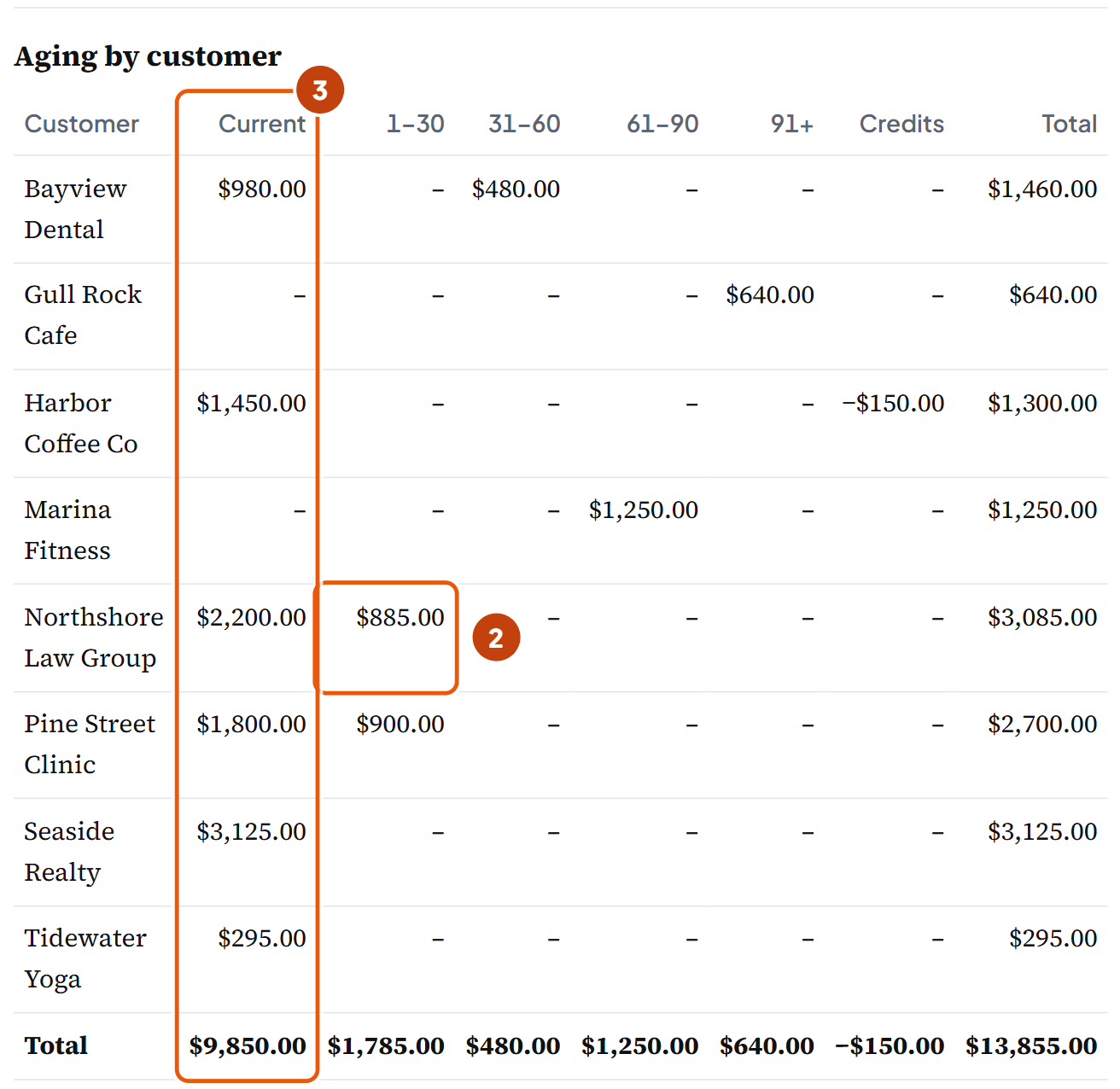
Run the aging as of the balance sheet date, not the day you open the report. Say you run it on November 3. The invoices paid on November 1 and 2 drop off your list, but the October 31 books still carry them, and your tie-out fails for no real reason. Here's Lopez's aging on Saturday, October 31, 2026:
| Customer | Current | 1–30 | 31–60 | 61–90 | 91+ | Credits | Total |
|---|---|---|---|---|---|---|---|
| Bayview Dental | 980.00 | 480.00 | 1,460.00 | ||||
| Gull Rock Cafe | 640.00 | 640.00 | |||||
| Harbor Coffee Co | 1,450.00 | −150.00 | 1,300.00 | ||||
| Marina Fitness | 1,250.00 | 1,250.00 | |||||
| Northshore Law Group | 2,200.00 | 885.00 | 3,085.00 | ||||
| Pine Street Clinic | 1,800.00 | 900.00 | 2,700.00 | ||||
| Seaside Realty | 3,125.00 | 3,125.00 | |||||
| Tidewater Yoga | 295.00 | 295.00 | |||||
| Total | 9,850.00 | 1,785.00 | 480.00 | 1,250.00 | 640.00 | −150.00 | 13,855.00 |
$9,850.00 isn't due yet: those are the six invoices dated October 31. $4,155.00 is past due, and $2,370.00 of that is more than 30 days late.
The −$150.00 runs the other way. Harbor Coffee overpaid, so Lopez owes Harbor $150.00 (what to do with it).
Summary, detail, schedule or aged trial balance?
An aging summary has one line per customer, like the table above. An aging detail lists every open invoice.
A textbook schedule of accounts receivable lists each customer's balance. OpenStax says its total "should equal the total of accounts receivable in the general ledger." Some software, Sage 100 for one, calls this list an A/R trial balance, which is why people search for aged trial balance.
Send your client the summary and keep the detail for yourself (our suggestion). If you need one customer's open invoices on a page for that customer, that's a statement of account.
How to make an aging report in the tool
In short: You need two reports for the same date: the client's open invoices, and the balance sheet on the accrual basis. Five steps turn them into the aging and its proof.
- Pick the as-of date. Use the month-end you're closing. Lopez's is 10/31/2026.
- Get the open invoices out of the books. In QuickBooks Online, run the Accounts receivable aging detail report (Reports, "Who owes you") and export it to Excel. Put the columns in this order: Customer, Number, Invoice date, Terms, Amount, Paid so far. If your export shows an open balance instead of the amount paid, put it under Amount and leave Paid so far empty. Then use Paste rows from a spreadsheet. A negative amount comes in as a credit.
- Add what the report leaves out. A payment your client received but never applied gets its own row as Payment not applied, and so does a credit memo. Paid so far: what the customer has paid on this invoice, from the client's customer payments report. Paid on: only when all of the row's payments came after the as-of date: type that date, and the row ages at the full invoice amount. Part paid by then? Enter just that part in Paid so far and leave Paid on empty. If Pine Street's $900.00 had come in on November 2, you'd keep $900.00 in Paid so far and type 11/02/2026 in Paid on, and INV 1050 would age at $1,800.00.
- Type Accounts Receivable from the books. Take it from the balance sheet or trial balance for the same date, on the accrual basis. For Lopez it's $13,855.00.
- Read the answer, then the fix-first list. The sentence at the top says whether the aging ties. If it ties, it says what to fix before you send it and what goes to the owner; if not, what to check first. The fix-first list, under the report's totals, names each item. Download Excel once it ties.
Does your client bill in more than one currency, charge finance charges, or age installment plans as one debt? Then the tool won't fit. Leave out customer deposits the books hold in a liability account.
How are the days counted? Current vs 1–30, due date vs invoice date
In short: From the due date. An invoice is Current until its due date passes, and the late columns count the days after it.
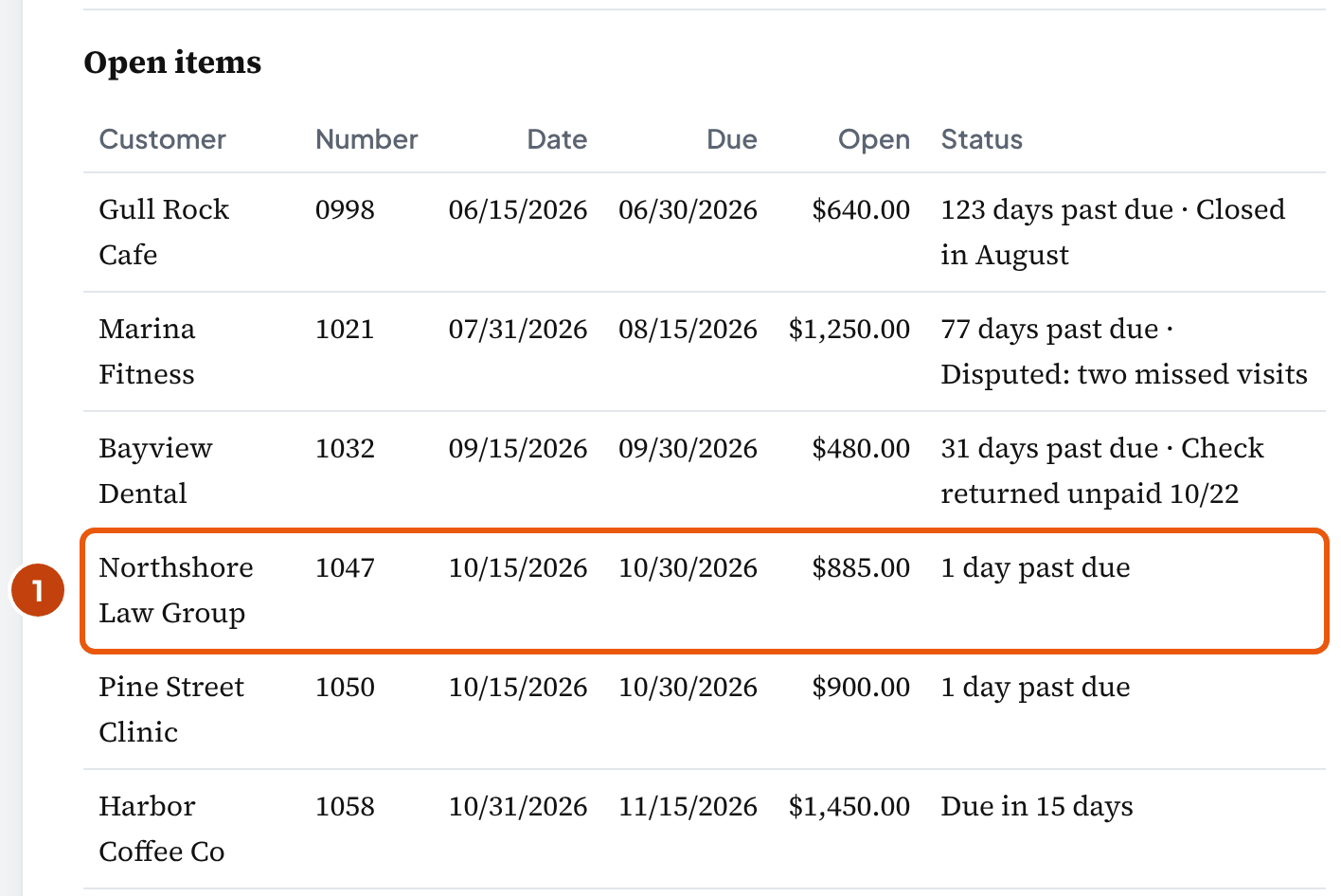
Take Northshore Law Group's INV 1047. It's dated October 15 on Net 15 terms, so it's due October 30:
On October 31, INV 1047 is 16 days old but only 1 day past due.
10/15/2026
Invoice dated
Terms Net 15
10/30/2026
Due
Day 15 after the invoice
10/31/2026
As of (month-end)
The aging is run
By invoice date (age)
10/31/2026 − 10/15/2026 = 16 days old → 0–30 days old
By due date (lateness)
10/31/2026 − 10/30/2026 = 1 day past due → 1–30 days past due
Days past due tells you who's late, and that's what collections and lenders care about. Days since the invoice tells you how old the balance is.
For lateness, U.S. Treasury's receivables instructions set the clearest rule we found. They're written for federal agencies, so you aren't bound by them:
“Age delinquent debts from the date of delinquency.”
Treasury calls a debt delinquent once it "has not been paid by the date specified." Then it sorts the debt into "1-30 days; 31-60 days; 61-90 days" and on.
QuickBooks also counts from the due date, with one difference on the due date itself (below). Its Current column is "anything that is not yet due." Its past-due columns (1–30 and later) are "anything past due by the number of days that passed after the due date." An invoice with no due date is due on receipt.
Is an invoice due on the as-of date Current? In the tool, yes. That's our reading of Treasury's definition: on its due date, the customer can still pay on time.
QuickBooks and Xero keep that invoice out of Current. QuickBooks puts in Current only invoices due "in the future of the report date", so one due on the as-of date lands in its 1–30 column (our reading). Xero, aged by due date, puts in Current only what's due after the report date, unless you tick the checkbox that adds invoices due that day. So if QuickBooks' Current total is lower than the tool's, look for invoices due on the as-of date.
Xero also lets you age "By … Due Date or Invoice Date", and so does the tool. It ages by due date; switch it to invoice date under Aging basis, columns and bad-debt estimate, and it counts the columns in days since the invoice ("0–30 days old" and on), never "past due".
Whichever basis you use, print it on the report, so your client knows which clock they're reading. The tool prints it under the report's title. In its report, INV 1047's $885.00 sits in 1–30, and the six invoices dated October 31 stay Current until November 15:
Bookkeeper tip: Don't label the first column "0–30 days" and call it Current. It puts an invoice 20 days late next to one that isn't due for two weeks. Keep Current for balances not yet due, and start your late columns at day 1.
The column edges are your choice
30, 60 and 90 days are Treasury's first three edges. The tool puts everything past 90 in one column (our layout).
On Net 15 terms you may prefer 15, 30 and 45. With those, Bayview's returned check, 31 days past due, moves from 31–60 to 31–45. You change them under Aging basis, columns and bad-debt estimate.
Partial payments, credits, overpayments and disputes
In short: Age what's still owed on the as-of date. A partial payment comes off the invoice. A payment after the as-of date doesn't. And a credit is money your client owes its customer.
| Invoice dated 10/15/2026, Net 15 | $1,800.00 |
| Paid 10/26/2026 | − $900.00 |
| Open on 10/31/2026, due 10/30: 1 day past due | $900.00 |
It ages in 1–30 at $900.00. A template that adds up invoice amounts would show $1,800.00 and overstate the total by $900.00.
If that $900.00 had come in on November 2 instead, the invoice was still owed in full on October 31, so your aging would show $1,800.00.
Xero's report works the same way. It shows what was outstanding "as at the report date … even if they've been paid since."
What about a disputed invoice?
Keep it in the aging at its full amount, in the column its due date puts it in, with a note on the row (our suggestion). Marina Fitness's INV 1021 stays at $1,250.00 in 61–90 with the note "Disputed: two missed visits". In the tool, a note with the word "disputed" prints in Open items and puts the invoice on the fix-first list. Until the owner decides, leave it in the allowance at its column's rate: 50% of $1,250.00 is $625.00, at the 50% we assume in the allowance example below (our suggestion).
The tie-out doesn't move until something is posted in the books. If the owner agrees to credit it, record a credit memo against the invoice instead of deleting or voiding it (our suggestion). In the tool, add a Credit memo row for it; the tool applies a credit to the customer's oldest open invoice, so check that the Fix first line names the disputed one. The invoice stays as the record that the customer was billed, and the credit memo shows why the balance went down.
What do you do with a customer credit?
Apply it to an open invoice, or refund it. Harbor Coffee paid $1,600.00 on October 26 against INV 1045, its October 15 invoice for $1,450.00, and nobody applied the extra $150.00.
The tool shows that $150.00 in its own column and counts it in the total, because AR in your books nets it too.
With automatic credits turned on, QuickBooks Online applies a credit "to the oldest unpaid invoice," and the tool's fix-first list does the same (our default). Harbor's only open invoice is INV 1058, its October 31 invoice, so $1,450.00 becomes $1,300.00.
If there's no invoice to apply it to, QuickBooks says "your customer's balance is negative." That's your cue to ask your client about a refund.
Large credits at year end are a materiality call. The University of Tennessee's page on reporting accounts receivable (checked October 19, 2026) says credit balances "may be reclassified as a liability (Accounts Payable), if significant." That's one institution's practice, and we found no US rule that requires it. So if your client's credits are material, ask the preparer how to show them on the year-end balance sheet.
Can you write an old credit off to income?
Not without proof. Say your client asks you to clear old overpayments into income. New York doesn't allow the write-off at all without documentation or the customer's written disclaimer:
“a holder cannot write off open customer credit balances in the absence of written documentation evidencing that the credit was issued in error or properly applied, or a specific written disclaimer from the customer.”
New York State Comptroller, Unclaimed Property Relating to All Business Entities, reference sheet
In Pennsylvania, writing a credit off doesn't end the duty to report it: "Writing dormant accounts off into income does not negate the obligation to report and deliver unclaimed property."
How long is the dormancy period? It depends on the state. In New York it's three years, "whether payable to a business or an individual." NAUPA's table for credit memos gives, for example, 1 year in Alabama, 3 in California, New York and Texas, and 5 in Delaware and Georgia. It shows no as-of date; we checked it on October 19, 2026. New York says the report goes to the state of the customer's last known address.
So write to any customer whose credit is more than a year old (our suggestion). New York's version: before the three years run out, "the holder must contact the customer in writing." And check the customer's state before your client's credits get old.
Why doesn't the aging match Accounts Receivable on the balance sheet?
In short: Usually it's a date or basis difference, or a journal entry posted to AR with no customer on it. Your aging is built from customer invoices and payments. The balance sheet takes every entry to the account, so anything posted without a customer shows up in one and not the other.
“The Aged Receivables and Aged Payables reports should always agree with their corresponding General Ledger accounts.”
Sage 50 knowledgebase, Aged Report doesn't match General Ledger balance
Lopez's aging ties. Here's AR on October 31 in the general ledger: $12,960.00 opening + $19,650.00 invoiced + $480.00 for Bayview's returned check (from the bank reconciliation) − $19,235.00 collected = $13,855.00.
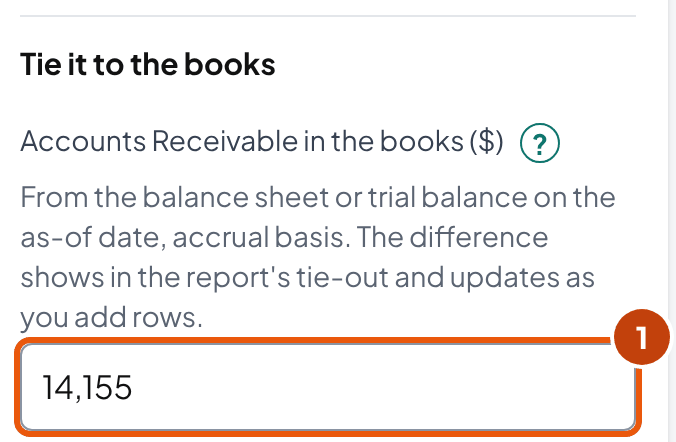
Now say the tax preparer posts a $300.00 adjusting entry to Accounts Receivable on October 31, with no customer on it. Your books show $14,155.00, and your aging still shows $13,855.00.
Type $14,155.00 as the books figure. The tool shows the $300.00 difference and the places to look. Its first suspect is the books figure itself. A balance sheet run for another date, or on the cash basis, can differ from the aging even when every invoice is right.
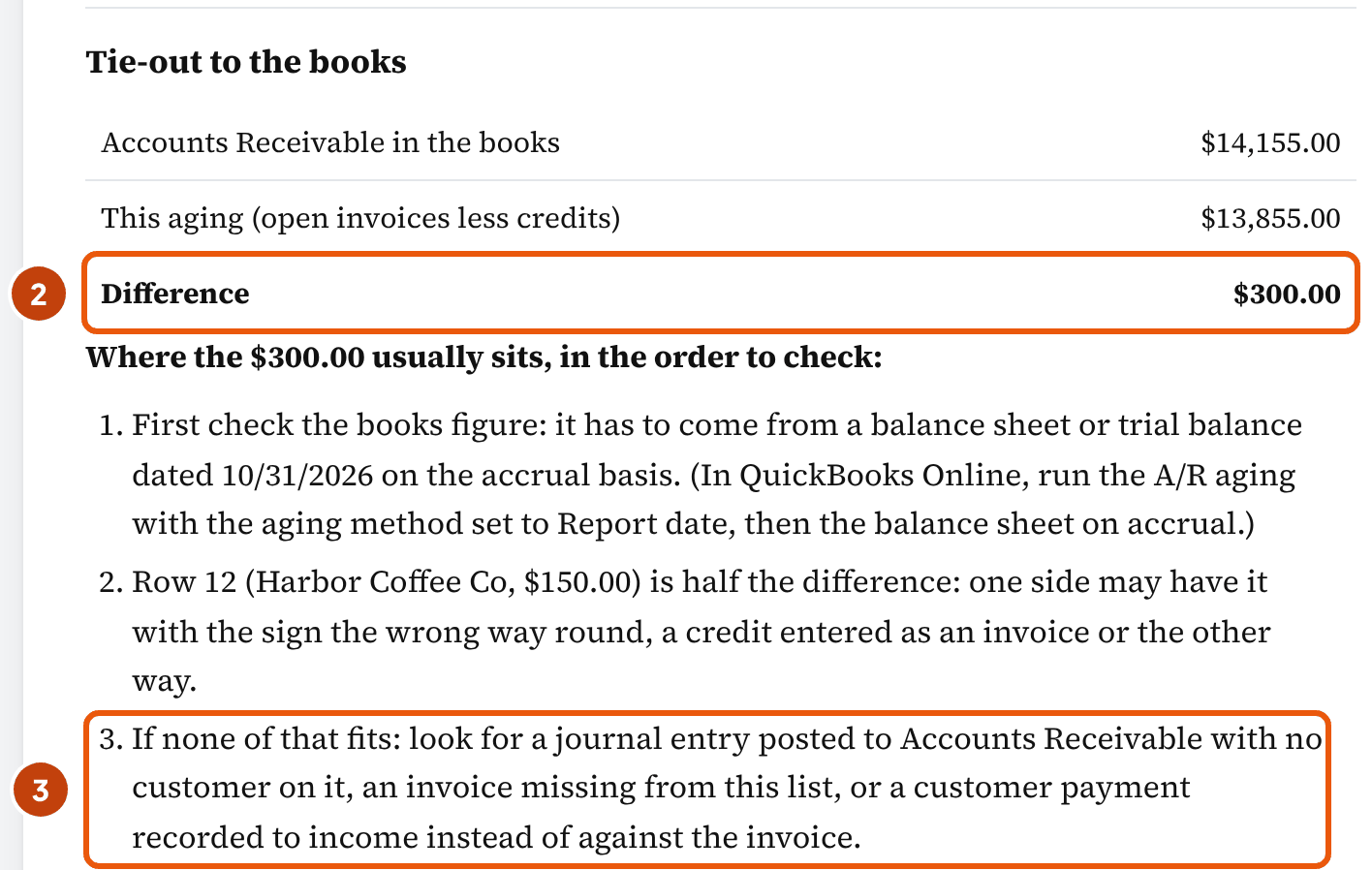
Check these in order; the tool lists the ones that fit your numbers. The first takes a minute in the report settings, and the last means searching the ledger:
- Same date, same basis. Run the balance sheet for the aging's date, on the accrual basis. In QuickBooks Online, Intuit says a mismatch is "usually because the aging report defaults to current": set the aging method to Report date.
- A row equal to the difference. An invoice that's in the books twice, or one the books don't have yet.
- A row equal to half the difference. A $150 credit typed as an invoice turns −$150 into +$150, a $300 swing, so look for a row worth half the difference. Treat a match as a lead, not proof. In the $300.00 example, Harbor's $150.00 credit fits, but it's entered correctly.
- Items dated after the as-of date. A balance sheet run for a later date picks them up. On Sage 100, also check posting dates. Its aging uses the invoice date or due date and its trial balance the posting date, so they match only when every posting date equals its invoice date.
- Entries with no customer. QuickBooks Desktop lists "Transactions with no Customer:Job name" as a cause. Sage 50 says to "Look for General Journal Entries" in the account. This is where the $300.00 is.
How do you fix an entry like the $300.00? Ask the preparer what it was for. Record it against the customer as an invoice or a credit memo, then reverse the journal entry.
Get the preparer's agreement in writing first, since it's their entry (our suggestion). Intuit's help also cautions: "It is important to consult an accountant before trying to correct these accounts with a journal entry."
Proving the rest of the balance sheet? Use the balance sheet reconciliation template.
Bookkeeper tip: A $0.00 difference proves your list and your ledger agree. It doesn't prove every invoice is right: an invoice entered twice in both, or a customer who was never billed, still ties to the cent.
What to do with what the aging shows
In short: Clear what's wrong in the books first. Then send the owner a short note: who to chase, what's disputed, and what needs a decision.
The tool's fix-first list does the first part. For Lopez it has four items, and three of them need Maria, the owner. You can send her this:
Maria, attached is the October 31 aging: $13,855.00 open, $4,155.00 past due. Three things need you. Bayview Dental's $480.00 check came back unpaid: can you call them this week for a replacement? Marina Fitness is disputing $1,250.00 for the two missed visits: credit it, or keep billing? And Gull Rock Cafe's $640.00 is 123 days past due, and the cafe closed in August: keep trying, send it to collections, or write it off? I also applied Harbor Coffee's $150.00 overpayment to their October 31 invoice.
In the tool: Copy summary in the menu gives the same figures as plain text. Open the tool ↑
If your client bills consumers, like a dental practice billing patients, get an attorney's view before any reminder goes out. An outside bookkeeper isn't the client's employee, and we found no official guidance on bookkeepers sending reminders. Lopez bills businesses, so the federal Fair Debt Collection Practices Act doesn't apply (our reading): it covers debts "primarily for personal, family, or household purposes." For consumer debts, the client's own staff collecting "in the name of the creditor" aren't debt collectors under the Act. A client that "uses any name other than his own which would indicate that a third person is collecting" is one.
Send reminders in your client's name, signed by the client, so the customer knows the business itself is asking (our suggestion):
Hello, our records show INV 1032 for $480.00, dated September 15 and due September 30, is still open: the check we received came back unpaid on October 22. Could you send a replacement payment this week, or tell us if something's wrong with the invoice? Thank you. Maria Lopez, Lopez Cleaning Co
Then read the pattern. One customer who's always late is a question about that customer: a deposit, shorter terms, or payment before the next visit (our examples). If Bayview's replacement check bounces too, that's a terms question for Maria.
If most customers slid into 1–30 at once, compare invoice dates with service dates. Invoices that went out late, or with the wrong terms, show up that way (our reading, not a rule). And if every invoice is on Net 15, the Current column is roughly what falls due over the next 15 days (our reading). Use it as a starting point for your client's cash plan, not as a forecast.
What does a lender look for in the aging?
A lender looks for the balances it can lend against. Banks lend on receivables, and the OCC's handbook says their controls "generally consist of periodic accounts receivable agings." It also gives the usual cut-off:
“The normal practice is to consider accounts ineligible when they exceed three times the terms, e.g., 90 days for 30-day terms.”
On Net 15 terms that's 45 days. Marina's $1,250.00 and Gull Rock's $640.00 are past it on any count. Bayview's $480.00 is past it too if the bank counts from the invoice date (46 days). So ask which date your client's loan agreement uses.
The OCC also describes "cross-aging": all of a customer's accounts can become ineligible once some of them are. So resolving old items (collecting them, crediting them, or writing them off with the owner's approval) can raise what your client can borrow (our reading). The loan agreement decides the details.
Bad debts: the allowance, the write-off and the tax deduction
In short: They're three different things, and one entry doesn't do all three. The allowance is an estimate in the books. The write-off removes one invoice. The tax deduction follows only a specific debt that became worthless.
For Lopez: a $1,447.20 allowance estimated from the aging, a $640.00 write-off for Gull Rock Cafe, and a tax deduction only once a specific debt is worthless.
The allowance
An estimate of what won't be collected, for the books
Entry
Bad debt expense $1,447.20 / Allowance for doubtful accounts $1,447.20
Accounts Receivable
Gross AR unchanged; net AR down $1,447.20
Taxable income
No deduction: the reserve method was repealed for tax years after 1986
The write-off
One invoice taken off the books, once the owner gives up on it
Entry
Allowance $640.00 / Accounts Receivable $640.00 (or Bad debt expense, by the direct method)
Accounts Receivable
Gross AR down $640.00; net AR unchanged under the allowance method
Taxable income
A book entry. For a partly worthless debt, the deduction can't be more than what's charged off in the books during the taxable year (26 CFR 1.166-3)
The tax deduction
A specific debt that became worthless during the tax year
Entry
None of its own: it's claimed on the return
Accounts Receivable
No effect on the books
Taxable income
Only for amounts already in income; generally none on the cash method
The allowance: an estimate from the aging
You multiply each column by the share you expect to lose, then add them up. OpenStax's textbook describes it: "an uncollectible percentage is assigned to each category."
The percentages come from your client's own history. We found no published source that sets them for a client (textbook rates are illustrations), so the ones below are our assumptions for the example, not rates to copy:
| Current $9,850.00 × 1% | $98.50 |
| 1–30 $1,785.00 × 2% | $35.70 |
| 31–60 $480.00 × 10% | $48.00 |
| 61–90 $1,250.00 × 50% | $625.00 |
| 91+ $640.00 × 100% | $640.00 |
| Allowance needed | $1,447.20 |
With no allowance in the books yet, the entry is $1,447.20. If the allowance already has a credit balance, subtract it; if it has a debit balance, add it (OpenStax §9.2).
| Account | Debit | Credit |
|---|---|---|
| Bad debt expense | 1,447.20 | |
| Allowance for doubtful accounts | 1,447.20 |
Does every client need an allowance? OpenStax says the direct write-off method "is not an acceptable method of recording bad debts, because it violates the matching principle." The one exception is a business that sells mostly for cash, where "credit is not a significant component of its sales."
Lopez bills every customer on account, so on our reading it keeps the allowance. Ask the same question about your client: how much of its sales are on credit?
The write-off: one invoice, approved by the owner
Say Maria gives up on Gull Rock Cafe's $640.00. With the allowance above booked, the write-off comes out of it, so net receivables don't move. Post it against the customer, so your aging and your books drop together:
| Account | Debit | Credit |
|---|---|---|
| Allowance for doubtful accounts | 640.00 | |
| Accounts Receivable: Gull Rock Cafe | 640.00 |
If your client keeps no allowance (the direct method), debit Bad debt expense instead. Either way the aging total drops to $13,215.00. To build the direct-method entry with your own amounts, use the bad-debt write-off in the journal entry tool.
If Gull Rock pays after all, OpenStax's method takes two entries. Reverse the write-off to put the receivable back, then record the payment against it.
The tax deduction: specific, worthless, and in that year
“You may take the deduction only in the year the debt becomes worthless. You don't have to wait until a debt is due to determine that it's worthless.”
IRS Topic 453, Bad debt deduction (page reviewed September 24, 2026)
The allowance never reaches the return. Congress repealed the reserve deduction for tax years beginning after 1986 (IRC § 166(c)).
What counts is a specific debt. For one that's only partly worthless, the regulations (26 CFR 1.166-3) allow the deduction "only to the extent charged off during the taxable year." So your write-off in the books matters.
Is your client on the cash method? Then there's generally nothing to deduct, because the income was never reported. Topic 453 says a cash-method taxpayer "generally can't take a bad debt deduction for unpaid salaries, wages, rents, fees, interests, dividends, and similar items of taxable income."
If a deducted debt is paid later, the payment is generally income in the year it comes in (26 CFR 1.166-1; § 111 can exclude a recovery whose deduction didn't lower the tax).
If your client missed a deduction, a refund claim for a worthless debt has 7 years from the return's due date, not the usual 3 (IRC § 6511(d)(1)). Raise it with the client's tax preparer, because the deduction is their call.
Cleaning up old receivables in an inherited file
In short: Apply before you write off. On an inherited aging, old balances are often payments nobody matched to their invoices, not customers who didn't pay (our reading).
- Match payments to invoices. Intuit says unapplied payments "affect accounts payable and accounts receivable negatively," and the fix is to open each payment and apply it. If the invoice was never entered, "you must enter the missing invoices or bills before you can apply the payments to them." The payment reconciliation tool works through it deposit by deposit.
- Clear the zero lines. A customer with an invoice and an equal credit shows $0.00 and still clutters your aging. Apply the credit to the invoice in Receive Payment.
- List what's left by customer, with the dates and anything the client told you. Ask the owner what to do with each balance.
- Write off only what the owner approves, and keep the approval with the books. The tool's Print the write-offs for approval gives you a list with a signature line.
The owner decides because collections and write-offs are business decisions (our reading). The Journal of Accountancy's April 2026 article on writing CAS engagement letters puts the responsibility for managing the business with the client. The firm's work is "limited to the scope of services outlined in the engagement letter." Put it in your engagement letter too: collections and write-off decisions stay with your client (our suggestion).
Date the write-off in the current period, unless the preparer wants it earlier (our suggestion; we found no bookkeeping rule on it). Leave closed years closed: in QuickBooks Online, any change dated on or before the lock date will "trigger the warning or password prompt."
For tax, a wholly worthless debt is deducted in the year it became worthless, whatever date the books use (the tax deduction).
Bookkeeper tip: Don't delete or void old invoices to make your aging look clean. The invoice is the record that the customer was billed. A write-off keeps it and shows why it's gone.
Common mistakes
In short: Most aging errors show up one of two ways: a total that doesn't match your books, or a customer who looks later than they are.
| Mistake | How it shows | What to do instead |
|---|---|---|
| Calling 0–30 days "Current" | An invoice 20 days late sits next to one not due for two weeks | Current is not yet due; start the late columns at day 1 |
| Adding up invoice amounts | Pine Street's INV 1050 shows $1,800.00, not $900.00, and the total runs over the books | Add what's still open after payments dated by the as-of date |
| Counting a payment that came after the as-of date | The aging is lower than AR in the books for that date | Leave it out: the invoice was owed that day |
| Hiding credits | The aging is higher than the books by the credits ($150.00 for Harbor) | Show them, apply them, or refund them; never post them to income |
| Comparing with a cash-basis balance sheet, or another date | Every invoice is right and the totals still differ | Same date, accrual basis |
| Fixing AR with a journal entry and no customer | The books and the aging differ by the entry ($300.00 in the example) | Record it against the customer, so both reports move together |
| Treating the allowance as the tax deduction | A deduction for an estimate, with no specific debt behind it | The deduction follows specific worthless debts (IRC § 166) |
Field details
The tool's fields, where each number comes from, and what each accepts.
| Field | Where to find it | Accepts |
|---|---|---|
| As-of date | The month-end you're closing | A date, like 10/31/2026 |
| Type | Invoice, credit memo, or a payment received but not applied | One of the three |
| Customer, Number | The open invoices report | Any text; the number is optional |
| Date | The invoice, credit memo or payment date | A date |
| Terms | The invoice | Net 0 to Net 999, Due on receipt, N EOM, a day of next month, or a discount term like 2/10 Net 30 (aged on the net days) |
| Amount | The invoice | A dollar amount; a minus sign on an invoice makes it a credit |
| Paid so far | The client's customer payments report: what the customer has paid on this invoice | A dollar amount; leave it empty when nothing was paid |
| Paid on | The payment record; fill it in only when all of the row's payments came after the as-of date | A date; after the as-of date, all of Paid so far is left out. For a split payment, leave it empty and put only the earlier part in Paid so far |
| Accounts Receivable in the books | The balance sheet or trial balance, same date, accrual basis | Any amount; a credit balance is negative |
| Column edges (aging basis section) | Your choice | Three whole numbers from 1 to 365, each larger than the last |
| Estimate per column (bad-debt estimate) | The client's own history | 0 to 100% |
Frequently asked questions
What is an ageing report in accounts receivable?
The same report as an aging report: "ageing" is another spelling, and Xero uses it ("Ageing By"). It lists what customers owe on one date, split into current (not yet due), 1–30, 31–60, 61–90 and over 90 days past due, and its total has to equal Accounts Receivable in the books on that date.
Can you give me an example of an aging accounts receivable report?
Lopez Cleaning Co, a fictional cleaning company, on October 31, 2026: $9,850.00 current, $1,785.00 1–30 days past due, $480.00 31–60, $1,250.00 61–90, $640.00 over 90, and a $150.00 customer credit, for $13,855.00. That's the same as Accounts Receivable in its books. The guide shows the table by customer, and the tool above starts with the same 12 rows.
What is an accounts receivable aging summary?
The one-line-per-customer version of the aging: each customer's balance split into the aging columns, with totals at the bottom. The aging detail lists every open invoice instead. Send the owner the summary and keep the detail for follow-up and the tie-out (our suggestion).
What does an AR aging report look like?
A table with one row per customer (or per invoice), columns for Current, 1–30, 31–60, 61–90 and over 90 days past due, and a total. Credits owed to customers show as negative amounts. Put the as-of date and the basis (due date or invoice date) at the top, so the reader knows which clock the columns use.
How do you calculate AR aging days?
Subtract the invoice's due date from the as-of date. An invoice due October 30 is 1 day past due on October 31; 0 or less means it isn't late yet, and the tool counts an invoice due that day as Current (our choice). The company-wide "days" figure is a different number: days' sales in receivables, which OpenStax works out as 365 divided by the receivables turnover ratio. It's an average for the business, not the age of any invoice.
What is an aged trial balance?
A name some software uses for the customer-by-customer list of receivables. Sage 100, for one, has an A/R Trial Balance next to its A/R Aged Invoice Report, and Sage says the two match only when every posting date equals its invoice date. Whatever it's called, the total has to equal the Accounts Receivable account.
Is a customer overpayment income?
No. It's money the business owes the customer until it's applied to another invoice or refunded. New York bars writing an open customer credit off without documentation or a written disclaimer from the customer. In many states an unclaimed credit is reported to the state after a dormancy period: NAUPA's table for credit memos shows, for example, 1 year in Alabama, 3 in New York and 5 in Delaware and Georgia.
Why doesn't my AR aging match the balance sheet?
Start with the date and basis: run the balance sheet for the same date, on the accrual basis. In QuickBooks Online, set the aging method to Report date. If they still differ, look for a row equal to the difference, a row equal to half of it (a credit typed as an invoice), items or payments dated after the as-of date, and a journal entry posted to Accounts Receivable with no customer on it.
Can I write off a customer's balance without the owner's approval?
Don't. The client is responsible for managing its business (Journal of Accountancy, April 2026), so a write-off is the owner's call (our reading), and it takes the balance off the books (as an expense, under the direct method). Get the approval in writing and keep it with the books. The tool prints the invoices marked to write off with a line for the owner's signature.
Is there an accounts receivable aging template in Excel?
Yes, the tool above downloads one with no sign-up. The Items sheet works out each due date, the open balance on the as-of date, the days past due and the column with live formulas. The Aging sheet totals them by customer and checks the total against Accounts Receivable in the books.
How we built this page
Ledgental Team wrote this guide and built the tool. Ledgental also makes a bookkeeping app that's free during its beta; this tool doesn't connect to it. The rows you enter stay in your browser, and nothing you enter goes into a link, because the rows hold customer names: the Print, CSV and more menu prints, downloads and copies. How we research, check sources and use AI tools: About Ledgental.
What the numbers rest on
- The aging is calendar arithmetic: as-of date minus due date, with the due date from the terms. The tool and this guide use the same engine, checked by known-answer tests built from the Lopez Cleaning example. The Excel workbook repeats its rules in formulas and hasn't been recalculated in LibreOffice yet.
- Our conventions, labeled where they're used: day 1 is the day after the due date (read from Treasury's and Intuit's definitions; neither says "day 1"), one column for everything over the third edge, credits in their own column, terms counted from the invoice date, and one payment date per invoice.
- Rules (Treasury's aging, the IRS bad-debt rules and § 6511, the FDCPA definitions, the OCC eligibility line, New York's and Pennsylvania's unclaimed property rules, NAUPA's table, OpenStax's aging method, and the QuickBooks, Xero and Sage help pages) were read at the source between October 4 and October 19, 2026 and are quoted in the text.
- Not covered: multi-currency, finance charges, installment plans aged as one debt, customer deposits held in a liability account, sales tax on bad debts, and state collection laws. We found no US rule that requires reclassifying customer credits as a liability, and no official guidance on a bookkeeper sending reminders for a client.
What changed
- October 19, 2026: first published: the aging tool (due-date and invoice-date bases, credits, the tie-out with its likely causes, the fix-first list, the allowance and write-offs), the Excel workbook, and this guide.
- October 19, 2026 (later): guide rewritten for easier reading: shorter sentences, each section opening with its answer, repeats cut (Treasury quoted once, the fix-first list shown once), the write-off shown by the allowance method to match the allowance above it, and two short answers added (old credits and income, what a run of late customers means). No figure changed.
- October 19, 2026 (evening): the tool's answer now says whether the aging ties and which fix-first item to clear first; the aging options moved under the invoice rows; ranges and hints added to the fields. In the guide, the day-count section was reordered, the QuickBooks and Xero wording behind the due-today rule was restored, and the diagrams got captions that state their finding. No figure changed.
- October 19, 2026 (night): Paid on explained as it works (a date after the as-of date leaves out all of Paid so far, so a split payment goes in as the part paid by then); unclaimed-credit rules split between Pennsylvania and New York; the tax-year rule for partly worthless debts corrected; the answer sentence now says which fix-first items go to the owner. No figure changed.
- October 19, 2026 (late): a short answer on disputed invoices; the Paid on hint and step 3 reworded; the tool's chart heading now gives how much of the past due is more than 30 days late, and the report drops its Difference tile (the tie-out table shows it). No figure changed.
Cite this page
Copy one of these lines to credit the page. To link to one section, use the link icon beside its heading.
- Plain line
- Ledgental, Accounts Receivable Aging Report, updated October 2026, https://ledgental.com/tools/accounts-receivable-aging-report
- APA
- Ledgental. (2026, October). Accounts Receivable Aging Report. https://ledgental.com/tools/accounts-receivable-aging-report
- Chicago
- Ledgental. “Accounts Receivable Aging Report.” Last modified October 2026. https://ledgental.com/tools/accounts-receivable-aging-report.
Reusing this page: the guide's text, tables and diagrams are licensed under CC BY 4.0. Credit "Ledgental" with a link to this page. Quotations from the IRS, Treasury, federal statutes and regulations are public domain, and quotations from other sources stay under their owners' terms.
Sources
- Instructional Workbook for Preparing the Treasury Report on Receivables and Debt Collection Activities (updated November 2018), Bureau of the Fiscal Service, U.S. Treasury
- Topic no. 453, Bad debt deduction, Internal Revenue Service
- 26 U.S.C. § 166, Bad debts, Cornell LII
- 26 CFR 1.166-1, bad debts (recovery of a deducted debt), Cornell LII copy of the eCFR
- 26 CFR 1.166-3, partial or total worthlessness, Cornell LII copy of the eCFR
- 26 U.S.C. § 6511, Limitations on credit or refund (seven-year period for bad debts), Cornell LII
- 15 U.S.C. § 1692a, Fair Debt Collection Practices Act definitions, Cornell LII
- Comptroller's Handbook: Accounts Receivable and Inventory Financing, Office of the Comptroller of the Currency
- Unclaimed Property Relating to All Business Entities, reference sheet, Office of the New York State Comptroller
- Pennsylvania Unclaimed Property Annual Reporting, 2025 report year, Pennsylvania Treasury
- Property Type: Credit Memos (dormancy periods by state), National Association of Unclaimed Property Administrators
- Principles of Accounting, Volume 1, §9.2 (aging method) and Chapter 7 key terms, OpenStax
- Principles of Accounting, Volume 1, §9.3 (days' sales in receivables), OpenStax
- Page on reporting accounts receivable (credit balances), University of Tennessee, Knoxville
- Article on writing CAS engagement letters (April 2026), Journal of Accountancy
- Why aging reports have both Current and 1-30, Intuit QuickBooks help
- Match your aging reports, Intuit QuickBooks help
- AR balance on the Chart of Accounts does not match AR balance on reports, Intuit QuickBooks help
- Create and apply credit memos or delayed credits in QuickBooks Online, Intuit QuickBooks help
- Resolve accounts receivable or accounts payable balances on a cash basis balance sheet, Intuit QuickBooks help
- Lock your books in QuickBooks Online, Intuit QuickBooks help
- Accounts receivable aging report (the "Who owes you" report path), Intuit QuickBooks blog
- Aged Receivables Detail report, Xero Central
- Aged Report doesn't match General Ledger balance (Sage 50), Sage knowledgebase
- AR Aged Invoice Report and Trial Balance Differences in Sage 100, Sage knowledgebase
General information, not tax, legal or accounting advice. The rules were checked at the sources listed between October 4 and October 19, 2026. Lopez Cleaning Co and its customers are fictional. This page isn't affiliated with the IRS, Treasury, the OCC, Intuit, Xero or Sage.