Key takeaways
- Post each line of an entry to its own account's page, on the entry's date and in the same column, then update that page's balance.
- Each balance sits on the side that increases it: debit for assets, expenses and draws, credit for liabilities, capital and revenue (sources below). Credits minus debits on every page gets half the accounts backwards.
- Never plug a difference to make the totals meet. Find the entry behind it. Say Lopez's check 2213 is typed as $604.00 instead of $640.00: the $36.00 gap is that check, and a plug would leave Cash wrong.
- A trial balance that ties proves only that debits equal credits. Before the bank reconciliation's entries, Lopez's tied at $212,593.59 while Cash was $692.38 too high; the reconciliation found it.
- At year end, close only revenue, expenses and draws. Fix a posted mistake with a new entry, not an edit.
What is a general ledger?
In short: Your journal, sorted by account. Each page lists every amount posted to one account and the balance after each line. OpenStax's textbook calls it a listing of "all of a company's accounts with their individual balances."
You keep the same numbers three ways. Your journal lists each transaction once, by date. Your ledger sorts those lines by account. Your trial balance lists each account's balance on one date.
| Record | Sorted by | It answers | In the Lopez example |
|---|---|---|---|
| Journal | Date | What happened on October 2? | J-01: check 2201 for October rent, $3,200.00 |
| General ledger | Account | What went through Cash, and what's left? | Cash: 17 lines after the September 30 balance, ending at $18,382.36 |
| Trial balance | Account, one line each | Do debits equal credits on October 31? | 18 accounts, $212,596.71 on each side |
Each page here has six columns. Hermanson, Edwards and Maher's open textbook calls the core the three-column format: "columns for debit, credit, and balance." We add the date, the reference and the description.
| Column | What goes in it | Lopez's rent, on the Cash page |
|---|---|---|
| Date | The entry's date in the journal, not the day you copied it to the page (Hermanson §2.9) | Oct 2, 2026 |
| Entry (the reference) | The entry's number, so the line can be traced back | J-01 |
| Description | What happened, copied from the entry | Check 2201, October rent |
| Debit | The amount, when the entry debits this account | |
| Credit | The amount, when the entry credits it | $3,200.00 |
| Balance | The balance after this line, and its side | $11,253.94 Dr |
The starting chart has all five kinds of account: assets, liabilities, equity, revenue and expenses. Each expense is mapped to a Schedule C line (below), and you can rename any account.
If your sheet is a bank register, keep it as your Cash page and open a page for every account its payments and deposits go to. Of the top ten Google results for "general accounting ledger template" we opened on October 18, 2026, two (Jetpack Workflow and Smartsheet) offer bank registers among their ledger template downloads.
How to write a general ledger: posting one entry
In short: Copy each line of the entry to its account's page, in the same column and on the entry's date. Then update that page's balance. A two-line entry lands on two pages, a three-line entry on three.
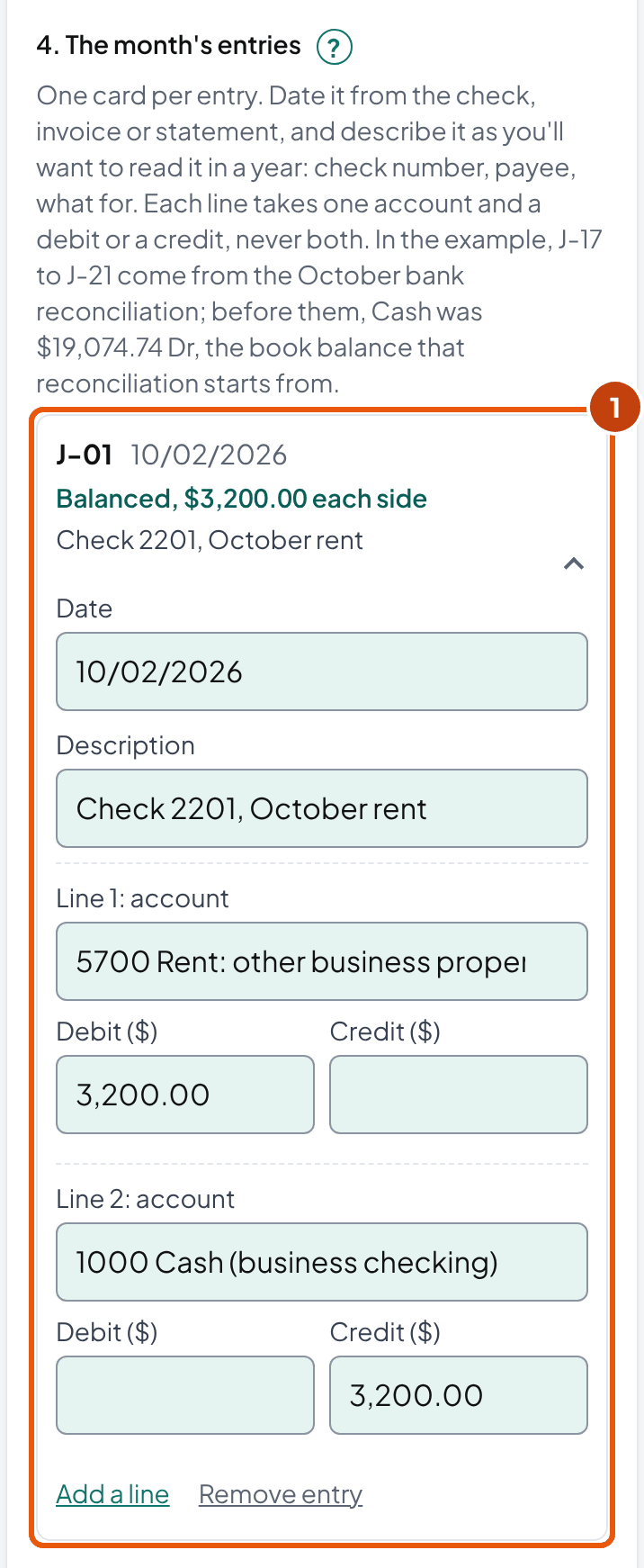
The example business is fictional: Lopez Cleaning Co LLC, Maria Lopez's single-member LLC on Schedule C. On October 2, 2026, it paid October's rent with check 2201:
| Account | Debit | Credit |
|---|---|---|
| Rent: other business property | $3,200.00 | |
| Cash (business checking) | $3,200.00 |
- On the Rent page, write Oct 2, J-01 and the description, and $3,200.00 under Debit. Rent is an expense, so a debit adds to it: $28,800.00 + $3,200.00 = $32,000.00 Dr.
- On the Cash page, write the same date and reference, and $3,200.00 under Credit. Cash is an asset, so a credit takes away: $14,453.94 − $3,200.00 = $11,253.94 Dr.
- In the journal, note the two account numbers, 5700 and 1000. Hermanson's textbook calls this cross-indexing. The page points to the entry and the entry to the pages, so you can trace any line back.
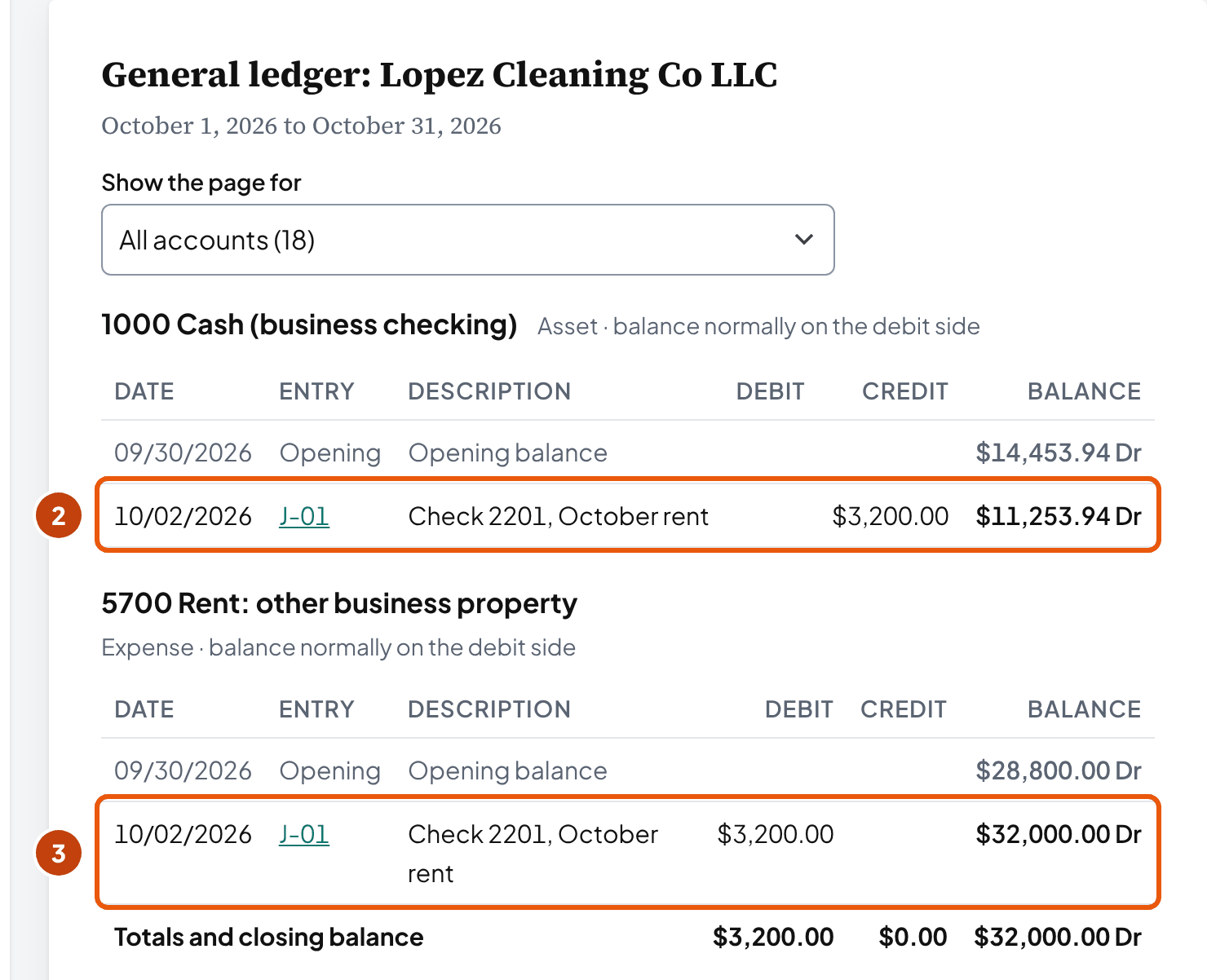
Why does Rent start at $28,800.00? That's the year's rent through September, from the September 30 balances. If your business is already running, your ledger starts the same way (below).
An entry with three lines
The October 15 payroll comes from the provider's report: $7,300.00 of wages and $550.00 of employer payroll taxes. The bank shows one $7,850.00 withdrawal. OpenStax calls this a compound entry, with "more than one account listed under the debit and/or credit column."
| Account | Debit | Credit |
|---|---|---|
| Wages | $7,300.00 | |
| Payroll taxes | $550.00 | |
| Cash (business checking) | $7,850.00 |
It posts to three pages: Wages, Payroll taxes and Cash. The two debits, $7,300.00 + $550.00 = $7,850.00, equal the one credit, so the entry balances.
How often do you need to post? Hermanson calls the timing "a matter of personal taste." If you post every week (our suggestion), your Cash page stays close to the bank, and your month-end reconciliation has fewer surprises.
In the tool above, each entry is a card under The month's entries. Type your lines, and every page and the trial balance update as you go.
Which way does each account's balance run?
In short: On the side that increases it. Assets, expenses and owner's draws grow with debits, so their balances are debits. Liabilities, capital and revenue grow with credits, so theirs are credits.
“The normal balance is the expected balance each account type maintains, which is the side that increases.”
| Kind of account | Lopez's accounts | Grows with | Balance on Oct. 31 |
|---|---|---|---|
| Asset | Cash, Accounts receivable, Equipment | Debit | Cash $18,382.36 Dr |
| Contra asset | Accumulated depreciation | Credit | $2,500.00 Cr |
| Liability | Credit card payable | Credit | $1,312.55 Cr |
| Owner's capital | Owner's capital | Credit | $20,203.64 Cr |
| Owner's draws | Owner's draws | Debit | $27,000.00 Dr |
| Revenue | Cleaning revenue, Interest income | Credit | Cleaning revenue $188,550.00 Cr |
| Contra revenue | Refunds and discounts | Debit | None in October |
| Expense | Rent, Wages, Supplies and six more | Debit | Wages $73,000.00 Dr |
Contra accounts run against their group. OpenStax describes one as having "an opposite normal balance to the paired account" that it reduces.
Accumulated depreciation lowers Equipment, so its balance is a credit. Refunds and discounts lower revenue, so theirs is a debit (OpenStax names sales returns and allowances as a contra revenue account).
OpenStax writes for a corporation, with stock and dividends. For your own business, an Indian Hills Community College handout gives the same rule: the capital account has "a normal credit balance," and drawing accounts "a normal debit balance."
So you measure each balance from the side that increases it. OpenStax: find "the difference between the sum of all figures on the side that increases and the sum of all figures on the side that decreases." That's why credits minus debits works for a loan you owe but turns Cash negative.
What if a balance ends on the wrong side?
That's an abnormal balance: a reason to look, not proof of an error. In OpenStax's example, $4,000 of credits and $6,000 of debits in Accounts payable leave a $2,000 debit.
OpenStax says that "could possibly occur with an overpayment to a supplier or an error in recording." So read the account's page before you change anything.
When a balance ends on the wrong side, a "Worth a look" box appears above the ledger pages. The tool doesn't stop you, because some are real. Does an expense end on the credit side? Look first for a line posted the wrong way. By our reasoning, refunds rarely exceed what you spent.
Capital can end on the debit side too. That happens when you draw more over the years than the business earned and you put in. By our reading, that's negative equity: a real position the balance sheet shows, not a posting error.
How do I start a ledger for a business that's already running?
In short: Enter each account's balance on the day before your first entry, as one opening entry. If you start mid-year, include the year's revenue and expense balances so far. The figure left over to balance goes to Owner's capital (the date and that account are our practice).
Where your numbers come from depends on the records you have. Start from the last closed period if there is one. Sage's help for its General Ledger module, set up mid-year, says to "obtain a Trial Balance for the most recent (closed) accounting period."
| What you have | Where the opening numbers come from |
|---|---|
| Earlier books, in software or a spreadsheet | Their trial balance for the last closed month or year |
| A corporation or partnership return with Schedule L | The year-end balance sheet on the return (our practice). For an S corporation, the Form 1120-S instructions say it "should agree with the corporation's books and records." |
| A Schedule C business (sole proprietor or single-member LLC), or a return that skipped Schedule L | Bank, card and loan statements for the start date, the list of equipment, and the unpaid invoices and bills (our practice; we found no source that says where to start). Schedule C has no balance sheet: its only start-of-year balance is line 35, inventory. |
Corporations and partnerships: who has a Schedule L to start from
On corporation and partnership returns the balance sheet is Schedule L. Small filers can skip it under these 2025 tests:
| Return (2025) | Schedule L can be skipped when |
|---|---|
| Form 1120-S | Total receipts and total assets at year end are both less than $250,000 (Schedule B, question 11) |
| Form 1065 | Total receipts are less than $250,000 and total assets less than $1 million, the K-1s were filed and furnished on time, and no Schedule M-3 is required (Schedule B, question 4) |
| Form 1120 | Total receipts and total assets at year end are both less than $250,000 (Schedule K, question 13) |
Lopez Cleaning Co's opening entry, September 30
Lopez's ledger starts October 1, from its September 30 trial balance: the balance sheet plus nine months of revenue and expenses. Owner's capital is the figure that makes the two sides equal:
| Debit balances: Cash, receivables, equipment, draws and nine expense accounts | $192,617.44 |
| Credit balances except capital: accumulated depreciation $2,250.00, card $1,236.40, revenue $168,900.00, interest $27.40 | $172,413.80 |
| Owner's capital: $192,617.44 − $172,413.80 | $20,203.64 |
Both sides total $192,617.44 on September 30, 2026. If yours don't, find the gap before you post October, because every later trial balance carries it. In the tool, they go under Balances on the day before you start.
Why bring in nine months of income and expenses? Schedule C is the business's profit or loss for the whole tax year, so it needs every month, not only the ones in your ledger.
Start from the balance sheet only, and the revenue page shows October's $19,650.00 instead of the year's $188,550.00. Nine months drop out of the totals you hand your tax preparer.
No textbook or IRS page we found sets the date or the balancing account, so both are our practice. We date the entry the day before, so October's pages start clean, and put the figure in capital, where an owner's equity sits. If your accountant prefers another way, follow theirs.
Software uses its own account for that figure. QuickBooks Online "uses the Opening Balance Equity account to offset these entries." In Xero, its developer guide says an imbalance can be journaled to a "Historical Adjustments" account. Either way, ask your preparer where that balance belongs.
Tip: Before you post October, check each opening balance against its own document. Cash goes against the reconciled bank balance, the card against its statement, receivables against the unpaid invoices. A wrong opening balance passes every later trial balance, by plain arithmetic, because the opening entry itself balances.
October for Lopez Cleaning Co: one month, posted
In short: 21 entries post to 18 accounts, and the trial balance ties at $212,596.71 on October 31. Cash ends at $18,382.36, the same as the bank reconciliation's adjusted balance.
Sixteen entries are the month's own, the kind you post in any month: rent, supplies, payroll, customer payments, two batches of invoices, the fuel card, uniforms and depreciation.
The other five came from the October bank reconciliation: interest, two bank fees (one entry), a returned check, an insurance autopay and a check booked at the wrong amount.
| Balance, September 30 | $14,453.94 Dr |
| + customer payments: $6,420.00 + $5,875.00 + $480.00 + $4,310.00 + $2,150.00 | $19,235.00 |
| − checks and the payroll withdrawal: $3,200.00 + $412.80 + $7,850.00 + $95.00 + $1,236.40 + $640.00 + $1,180.00 | $14,614.20 |
| Balance before the bank reconciliation's entries | $19,074.74 Dr |
| + added: interest $3.12 and check 2209 corrected, $36.00 | $39.12 |
| − taken off: fees $37.00, the returned check $480.00 and insurance $214.50 | $731.50 |
| Balance, October 31 | $18,382.36 Dr |
$18,382.36 is the adjusted balance in the bank reconciliation form's example, so the Cash page and the bank agree. When your books and your reconciliation are both right, the last line of your Cash page equals its adjusted balance.
Accounts receivable holds the other half of those payments. It starts at $12,960.00, grows with $9,800.00 and $9,850.00 of invoices and the $480.00 check that came back, and drops by the $19,235.00 paid: $12,960.00 + $20,130.00 − $19,235.00 = $13,855.00 Dr.
To see who owes that $13,855.00, and how late, use the accounts receivable aging report. Its example is the same October, and its total ties to this balance.
A card you owe runs from the credit side. September's $1,236.40 is paid on October 22, and October's fuel adds $1,312.55. So the card ends at $1,312.55 Cr, the amount you'll see due on the next statement.
The trial balance on October 31
| Account | Debit | Credit |
|---|---|---|
| 1000 Cash (business checking) | $18,382.36 | |
| 1100 Accounts receivable | $13,855.00 | |
| 1500 Equipment | $15,000.00 | |
| 1510 Accumulated depreciation | $2,500.00 | |
| 2000 Credit card payable | $1,312.55 | |
| 3000 Owner's capital | $20,203.64 | |
| 3100 Owner's draws | $27,000.00 | |
| 4000 Cleaning revenue | $188,550.00 | |
| 4200 Interest income | $30.52 | |
| 5100 Car and truck expenses | $12,292.55 | |
| 5300 Depreciation | $2,500.00 | |
| 5400 Insurance (other than health) | $2,145.00 | |
| 5700 Rent: other business property | $32,000.00 | |
| 5900 Supplies | $8,251.80 | |
| 6000 Payroll taxes | $5,500.00 | |
| 6200 Wages | $73,000.00 | |
| 6300 Bank fees | $370.00 | |
| 6400 Uniforms | $2,300.00 | |
| Totals | $212,596.71 | $212,596.71 |
Assets, draws and expenses fill the debit column. Accumulated depreciation, the card, capital and revenue fill the credit column. Accounts at zero are left off, as in OpenStax's definition: a list of all accounts "that have nonzero balances."
This template stops at the trial balance, but you can build both statements from it. Revenue less expenses is the year's profit so far: the two revenue accounts add to $188,580.52 and the nine expense accounts to $138,359.35, so $188,580.52 − $138,359.35 = $50,221.17.
The balance sheet adds up the same way. Cash $18,382.36 + receivables $13,855.00 + equipment $15,000.00 − accumulated depreciation $2,500.00 = $44,737.36. That equals the card's $1,312.55 plus capital after profit and draws, $43,424.81.
Before you post November, reconcile Cash, the card and any loan to their statements and get the trial balance to tie (our suggestion). October's closing balances become November's opening ones, so an error you leave in October sits in every trial balance after it.
My trial balance doesn't balance: where's the error?
In short: Start with the difference itself. An entry that doesn't balance explains it outright. Half the difference may match a line on the wrong side, and a difference that divides by 9 may point to two swapped digits or a misplaced decimal point.
The trial balance is off. Start from the difference.
Does one entry's debits differ from its credits?
YesThat entry is the error. Fix its lines first.
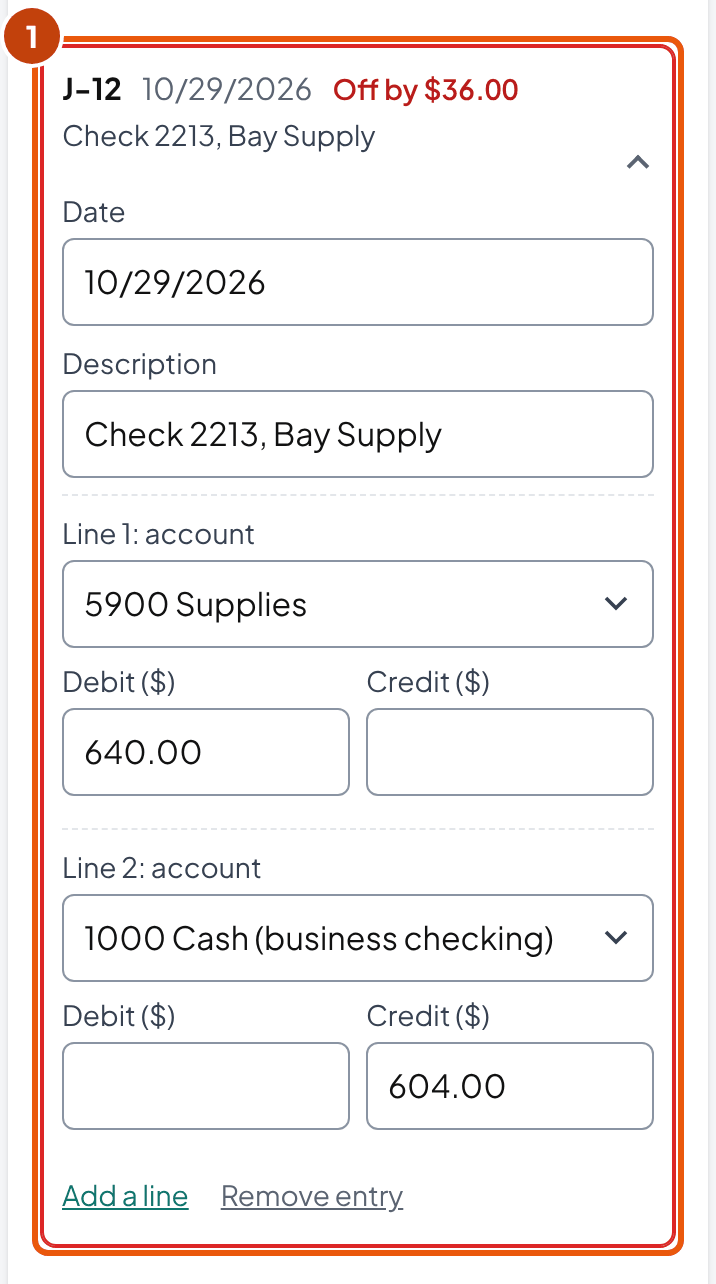
J-12: $640.00 debited, $604.00 credited, off by $36.00
Is half the difference the amount of one line?
YesCheck that line: it may be on the wrong side.
A $500.00 difference and a $250.00 line
Does the difference divide by 9?
YesLook for two swapped digits, or a decimal point in the wrong place.
If J-12 is right in the journal but its Cash page line says $604.00: $36.00 ÷ 9 = $4.00
Go back a step at a time
Each account's balance, then the postings, then the journal entries, then the transactions and the source documents.
Say you typed check 2213 to Bay Supply, J-12, as a $640.00 debit to Supplies and a $604.00 credit to Cash. Your trial balance comes out $36.00 apart, debits higher. The diagram's first question finds it: J-12 doesn't balance.
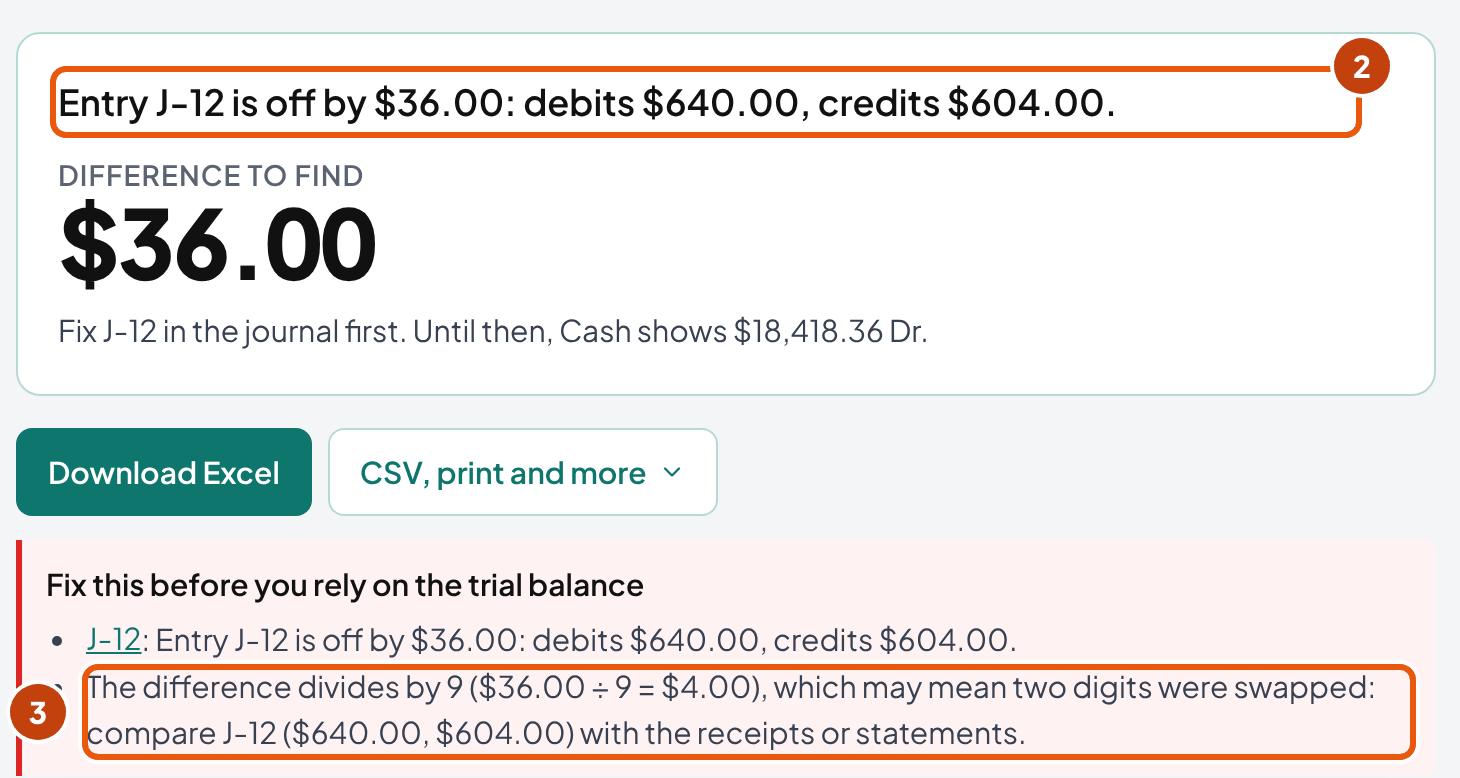
In the Excel file, the Entry check column finds it the same way: on the first row of an entry that doesn't balance, it shows debits minus credits instead of 0, here 36.00 on J-12.
If every entry balances (hand or spreadsheet ledger)
This tool names any entry that doesn't balance, so this part is for a ledger kept by hand or in a spreadsheet. Where do you look there? The difference itself is the clue. Halve it first: a $250.00 debit typed as a credit moves your totals $500.00 apart, so look for a $250.00 line on the wrong side.
Then divide it by 9. Two swapped digits, such as $640.00 typed as $604.00, leave a difference that divides by 9. So does a slide error, such as $1,250.00 typed as $125.00.
Does the difference equal one line's amount? Then a line may be missing from its page. By plain arithmetic, a line left off its page moves your totals by exactly its amount.
The halving and ÷9 tests come from Edwards and Hermanson's textbook, as Lumen Learning and San Jacinto College adapted it. On ÷9 it says a difference divisible by 9 means "you may have made a transposition error." That's no proof. By plain arithmetic, about one difference in nine divides by 9 by chance, so the test tells you where to look first, not what happened.
Lumen's Financial Accounting also lists "Failing to post part of a journal entry" among the causes.
If none of these fits, work back in the order the same chapter gives:
“Verify the balance of each general ledger account, verify postings to the general ledger, verify general journal entries, and then review the transactions and possibly the source documents.”
And don't plug the difference to make the totals meet. The $36.00 is a real check you typed wrong. A plug leaves Cash wrong and parks $36.00 where it doesn't belong. You'd meet it again at next month's bank reconciliation.
It balances. Are the books right?
In short: Not necessarily. A trial balance proves that debits equal credits, nothing more, so any mistake made with a balanced entry passes it. OpenStax: "We can have errors and still be mathematically in balance."
Lopez's own month shows it. Before the bank reconciliation, October's trial balance tied at $212,593.59. Yet Cash was $692.38 too high: $19,074.74 in the books against $18,382.36 once the bank's items were in.
Check 2209 was part of it. It was booked at $95.00 and cleared the bank at $59.00, and both lines of its entry said $95.00. So the entry balanced, and the totals did too.
| Mistake | Ties anyway? | What catches it | Source |
|---|---|---|---|
| A transaction never recorded | Yes | The bank or card reconciliation, the vendor's statement | Lumen §3.7 |
| A debit or credit posted to the wrong account | Yes | An account that jumps against last month, or its statement | Lumen §3.7 |
| A whole entry left unposted | Yes | Comparing the journal and the pages, line by line | Hermanson's textbook, answer key |
| The same wrong amount on both lines, like check 2209 | Yes | The bank reconciliation | Our reading: the entry balances, so the totals do |
| An entry posted twice | Yes | The bank reconciliation; the same reference twice on a page | Our reading, by the same arithmetic |
| Debit and credit swapped | Yes | An account moving the wrong way, or an abnormal balance | Our reading, by the same arithmetic |
So compare each balance sheet account with its outside document: Cash with the bank statement, the card with its statement, the loan with the lender's. Check receivables against your list of unpaid invoices. The balance sheet reconciliation template records each comparison.
The tool can't see these mistakes either: it checks the same arithmetic. Its abnormal-balance flag catches some swapped entries. The references show you when one entry appears twice on a page.
How do I close the year?
In short: With four closing entries, dated the last day of the year in every textbook example we read. Revenue and then expenses go to Income summary. Income summary goes to Owner's capital, and so do draws. Assets, liabilities and capital carry over.
Lumen's closing chapter closes into the owner's capital this way. OpenStax lists the same four steps for a corporation, with Retained Earnings and dividends in place of capital and draws. Its rule holds for both: "Permanent accounts are not part of the closing process."
Lopez's year ends December 31, so these aren't its real closing entries. They're the tool's close run on the October 31 figures, as an illustration. Each revenue, expense or draws line is that account's balance on the opposite side, which brings it to zero.
| Account | Debit | Credit |
|---|---|---|
| Cleaning revenue | $188,550.00 | |
| Interest income | $30.52 | |
| Income summary | $188,580.52 |
| Account | Debit | Credit |
|---|---|---|
| Income summary | $138,359.35 | |
| Car and truck expenses | $12,292.55 | |
| Depreciation | $2,500.00 | |
| Insurance (other than health) | $2,145.00 | |
| Rent: other business property | $32,000.00 | |
| Supplies | $8,251.80 | |
| Payroll taxes | $5,500.00 | |
| Wages | $73,000.00 | |
| Bank fees | $370.00 | |
| Uniforms | $2,300.00 |
| Account | Debit | Credit |
|---|---|---|
| Income summary | $50,221.17 | |
| Owner's capital | $50,221.17 |
| Account | Debit | Credit |
|---|---|---|
| Owner's capital | $27,000.00 | |
| Owner's draws | $27,000.00 |
| Revenue: $188,550.00 + $30.52 of interest | $188,580.52 |
| − expenses | $138,359.35 |
| Net income | $50,221.17 |
| Owner's capital: $20,203.64 + $50,221.17 − $27,000.00 of draws | $43,424.81 Cr |
After the four entries, revenue, expenses, draws and Income summary are all at zero. The post-closing trial balance lists only the balance sheet, $47,237.36 on each side. That's $2,500.00 more than the $44,737.36 of assets on the balance sheet, because the trial balance lists accumulated depreciation as its own credit instead of subtracting it from Equipment.
The post-closing balances are next year's opening balances. In the tool, Year-end close sits below the trial balance. "Show the closing entries" lists them without changing your ledger. The button under them, "Start the next period from these balances", loads them, so you start January with no revenue or expense on any page.
Download the year's Excel file before you start the new period. It keeps the year's journal, pages and trial balance as they stood before the closing entries. Send your tax preparer that year-end trial balance, with the last month's bank and card reconciliations (our suggestion).
If you keep a corporation's books, close to Retained earnings instead. Add that account under The accounts you'll post to as equity, then pick it under "The year's result goes to." OpenStax: "retained earnings is not closed out, it is only updated."
Every textbook example we read dates the closing entries on the last day of the year, though we found no rule that says so. If you date them January 1, they land on the new year's pages.
Nothing in a spreadsheet forces closing entries, but skip them and next year's revenue page starts with this year's total, so close once a year.
How do I fix a mistake without losing the trail?
In short: Leave the wrong entry where it is and post a correcting entry for the difference. A Cerritos College accounting handout puts it flatly: "Erasures are never permitted in the journal or ledger."
The handout splits it by timing. Catch it before posting, and you cross out the wrong figure and write the right one above it. Catch it after posting, and "a correcting journal entry must be made."
Lopez's check 2209 shows how. It was booked at $95.00 on October 20 and cleared the bank at $59.00. J-08 stays as it was, and J-21 on October 31 moves the $36.00 back:
| Account | Debit | Credit |
|---|---|---|
| Cash (business checking) | $36.00 | |
| Supplies | $36.00 |
Supplies now holds $95.00 − $36.00 = $59.00 for that check. Its page shows both lines, with their dates and references, so anyone who reads it later can see the $36.00 was found on October 31 and corrected, not hidden.
Once months have been posted on it, treat a wrong opening balance the same way (our suggestion). Post a dated correcting entry instead of retyping the old figure, so the months you've already reconciled still match their statements.
When the account was wrong, not the amount
The handout's own exercise is a $2,000 bill debited to Telephone expense instead of Utilities expense. Your correcting entry moves it across. Cash isn't touched, because the payment was right.
| Account | Debit | Credit |
|---|---|---|
| Utilities expense | $2,000.00 | |
| Telephone expense | $2,000.00 |
Why the trail matters in a spreadsheet
In a spreadsheet, anyone can retype a posted number, and the change is hard to spot later. So save a copy each time you close a month, named for the month (lopez-ledger-2026-10.xlsx), and work in a new copy. If a closed month's number changes later, your saved file shows it.
The IRS rules for computer records, Rev. Proc. 98-25, bind a business with $10 million or more of assets at the end of the tax year. A smaller business is bound in any of three cases:
- All or part of the information the tax law requires "is not in the taxpayer's hardcopy books and records, but is available in machine-sensible records". A spreadsheet-only ledger could meet this case (our reading).
- The records were used for computations that can't reasonably be checked without a computer, such as LIFO inventories.
- The IRS has told the business to keep them.
The records then have to "reconcile with the taxpayer's books and the taxpayer's return." So keep a PDF or printed copy of each closed month and of the year-end trial balance next to your saved files (our suggestion).
Name the accounts after the Schedule C lines
In short: Name each income and expense account after the Schedule C line it ends up on. At year end you copy each balance to its line, with no sorting.
The starting chart maps each income and expense account to a 2025 Schedule C line, except Interest income, where it says to ask your preparer. Lopez's balances on October 31, by the line our chart maps each one to (your preparer decides the final lines):
| Account | Schedule C (2025) | Lopez, January to October |
|---|---|---|
| Cleaning revenue | Line 1 | $188,550.00 |
| Interest income | Ask your preparer: line 6 names interest on notes and receivables, not bank interest | $30.52 |
| Car and truck expenses | Line 9 | $12,292.55 |
| Depreciation | Line 13 | $2,500.00 |
| Insurance (other than health) | Line 15 | $2,145.00 |
| Rent: other business property | Line 20b | $32,000.00 |
| Supplies | Line 22 | $8,251.80 |
| Payroll taxes | Line 23 | $5,500.00 |
| Wages | Line 26 | $73,000.00 |
| Bank fees | Line 27b (other expenses) | $370.00 |
| Uniforms | Line 27b (other expenses) | $2,300.00 |
In our starting chart, bank fees and uniforms both go to line 27b, other expenses, and each keeps its own account. The instructions for line 48 say to "List the type and amount of each expense separately."
The depreciation on your return is the preparer's figure, so give your preparer the equipment list along with the ledger.
If the business files Form 1065 or 1120-S, or keeps its books in QuickBooks Online or Xero, use the chart of accounts template instead. It builds the chart from the return the business files, maps each account to its line on that form, and writes the import file.
What never goes on Schedule C
- Equipment. It stays on the balance sheet and reaches the return as depreciation. The instructions: "Reduce the amounts on lines 8 through 27a and Part V by amounts capitalized."
- Owner's draws. The wages line excludes "amounts paid to yourself."
- Sales tax you collected. "These taxes are not included in gross receipts or sales nor are they a deductible expense." It sits in a liability until it's paid to the state.
- The owner's income tax. Not deductible, the instructions say: "Federal income taxes, including your self-employment tax."
- Retirement contributions made for the owner. The instructions put contributions "made as an employer on your behalf" on Schedule 1 (Form 1040), line 16, "not on Schedule C."
Equipment has one exception, the de minimis safe harbor. Under it, a business without applicable financial statements can elect to expense items of up to $2,500 per item or invoice. It attaches an election statement to a timely filed return. The IRS tangible property page adds a book condition. You expense them "in accordance with a consistent accounting procedure or policy existing at the beginning of the taxable year," and "on your books and records for the taxable year." So an item you expense on the return is expensed in the ledger too.
Two lines have their own limits. Meals are deductible at 50% "in most cases" (line 24b), and the 2025 standard mileage rate is 70 cents a mile, both from the 2025 Schedule C instructions.
Book the full cost of meals and mileage in the ledger, and let your preparer apply the 50% and the rate on the return.
Is a spreadsheet ledger enough? When to move to software
In short: For the IRS, yes, if it's accurate. IRS Topic 305: "there's not a required method of bookkeeping you must use," only one that "clearly and accurately reflects your gross income and expenses."
No IRS or SBA rule we found sets a size where your spreadsheet stops being allowed.
For most SBA loans, the application must include "current financial statements, historical financial statements (or tax returns if appropriate) for the past three years" (13 CFR 120.191). The rule doesn't say who prepares them or with what, so statements built from a ledger that ties can serve (our reading).
The reasons to move are about your time. Once you track unpaid invoices, bills and several bank accounts by hand, the spreadsheet becomes the slow part of your month.
Moving a spreadsheet ledger into QuickBooks Online
- Pick the start date. Intuit's tip for existing bank accounts: "use the beginning date for your next statement." Its video adds that "Most businesses choose to start tracking accounts from the beginning of the year."
- Close the spreadsheet on the day before, and run its trial balance. That trial balance becomes the software's opening balances.
- Enter balances, not the history. Intuit warns: "all of your old transactions were summarized in the opening balance. If you add them now without adjusting the opening balance, you'll count your money twice."
- Compare the two trial balances, account by account, on the start date. QuickBooks puts the offset of each opening balance in Opening Balance Equity. Intuit's help pages don't say where to move what's left there, so ask your tax preparer.
- Keep the old file. Save the final spreadsheet with the year's return. Rev. Proc. 98-25's example of a business that "replaces its general ledger software system" assumes the original records can still be retrieved and processed.
Keeping the books for a church, club or small nonprofit
In short: The same ledger works, with two changes we'd make: two net asset accounts in place of Owner's capital, and no draws. At year end, revenue and expenses close into net assets without donor restrictions (our setup).
The two accounts come from the FASB's not-for-profit standard, ASU 2016-14: "net assets with donor restrictions and net assets without donor restrictions." Add both under The accounts you'll post to as equity, and remove Owner's capital and Owner's draws. At year end, pick net assets without donor restrictions under "The year's result goes to".
Do you need to track each restricted gift on its own? That's fund accounting, which this template doesn't do. It keeps one ledger for your whole organization.
What the IRS asks of you depends on size. Organizations "whose gross receipts are normally $50,000 or less must file Form 990-N," the IRS says.
A church, "an interchurch organization of local units of a church" and the others on the IRS's list are excepted from filing the annual information return.
Most of your entries will touch the bank, so the Cash page is the one your board asks about. The bank reconciliation form proves it against the statement each month, with a section for church and club accounts and a reviewer's signature line.
When you hand the books to the next treasurer, they start from your last closed trial balance, as in starting mid-year. Your saved month-end copies show them how each balance got there.
Can I download a free general ledger template in Excel?
In short: Yes. "Download Excel" saves the ledger on your screen as an .xlsx file with live formulas, with no sign-up. With the example loaded, it's Lopez Cleaning Co's October; after "Start a blank ledger," it's an empty ledger with the starting chart.
| Tab | What's on it |
|---|---|
| Journal | One row per line: entry, date, account number, account name, description, debit and credit. Yellow cells are yours, with 60 blank rows inside every formula. The Entry check column reads 0 on an entry's first row when the entry balances. |
| Trial balance | Each account's opening balance plus its journal lines, added by formula. Four checks: the trial balance ties, the journal ties, the opening balances tie, and every journal account is in the chart. |
| Opening balances | Each account's balance on the day before the period starts |
| Chart of accounts | Number, name, type and sign, with 10 blank rows for your own accounts |
| One tab per account | The account's page: lines linked to the journal, the running balance by formula, and a check against its trial balance line |
You'll see a master check at the top of every tab. It reads 0 when the journal's totals tie, the opening balances tie, the trial balance ties and every journal account is in the chart.
What happens to rows you type into the Journal tab? Within its 60 blank rows, they reach the trial balance and the checks, but not the account tabs. To update those, enter the rows in the tool and download again; until then, each tab that's behind shows a number other than 0 in its check.
"Download the journal (CSV)" saves the entries in the columns of QuickBooks Online's journal import. Intuit's help page says to "Turn off account numbers before you begin," so import one entry first and check it.
We haven't opened the file in Google Sheets yet, so we don't say it works there. If you prefer paper, "Print a blank ledger page" in the tool's CSV, print and more menu prints an empty account page and journal page.
Field details
In short: Each line needs only a date, an account and one amount; everything else is optional.
1. The business and the period, 2. The accounts you'll post to and 3. Balances on the day before you start
| Field | What to enter | Where to find it | Range and example |
|---|---|---|---|
| Business name (optional) | Prints on the Excel file and the ledger heading | Your records | Up to 80 characters. Example: Lopez Cleaning Co LLC |
| First day, Last day | The period the entries cover | The bank statement's period | Month/day/year; the last day on or after the first. Example: 10/01/2026 and 10/31/2026 |
| The accounts you'll post to: Number, Name, Type | A new account; its type sets its normal side | Your own chart | Up to 150 accounts; number up to 12 characters, name up to 60. Start the number with the group's digit: 1 assets, 2 liabilities, 3 equity, 4 revenue, 5 and 6 expenses |
| Balances on the day before you start: Account, Debit ($), Credit ($) | Each account's balance on the day before the first day, on its own side | The last trial balance, or the statements (above) | One side per account; debits must equal credits. Example: Cash $14,453.94 debit |
4. The month's entries
| Field | What to enter | Where to find it | Range and example |
|---|---|---|---|
| Date | The entry's date in the journal, usually the date on its document | The check, invoice or statement | Month/day/year. A date outside the period is flagged and still posted |
| Description | What happened, as you'll want to read it in a year | The source document | Up to 120 characters. Example: Check 2201, October rent |
| Account | One account per line | Your chart of accounts, or "Add an account to the chart…" in the list | Pick from the list; typing the account number jumps to it |
| Debit ($), Credit ($) | The amount, on one side only | The source document | Up to $100,000,000 a line, cents allowed; 1,000 lines in all |
| Paste rows from a spreadsheet | Rows copied with their header: Date, Account (number or name), Debit, Credit, and if you have them Journal No. and Description | A spreadsheet, or QuickBooks Online's journal CSV columns | One row per line; rows with the same Journal No. make one entry |
5. Year-end close (once a year)
| Field | What to enter | Where to find it | Range and example |
|---|---|---|---|
| Close as of | The last day of the year | Your tax year | Example: 12/31/2026 |
| The year's result goes to | The equity account that takes the profit and the draws | Owner's capital; Retained earnings for a corporation; net assets without donor restrictions for a nonprofit | Any equity account except Income summary |
Common general ledger mistakes
In short: Most show up as a page that looks wrong.
- Rent, supplies and the other expenses have no totals of their own → you're keeping a bank register. Open a page for every account its payments and deposits go to.
- Cash goes negative on the first deposit → you're working out every balance as credits minus debits. Measure each account from the side that increases it (which way each balance runs).
- An account's "total" is far bigger than any balance on its page → you added up the balance column. The balance is the page's last line.
- An entry with one line, or with every line on one side, can't balance → give it a debit and a credit that match; the tool flags it until you do.
- Schedule C's revenue comes out short → you started mid-year without the year's income and expenses. Add them to the opening balances.
- A suspense account, or capital beyond the opening figure, holds an amount nobody can explain → a difference was probably plugged. Find the entry behind it and post a correcting entry.
- A closed month no longer matches its bank reconciliation → a posted line was probably edited, or a later entry was dated into that month. Restore the closed month from its saved copy, then post the change as a correcting entry dated in the current month.
- January starts with Cash or the loan at zero → the close took balance sheet accounts too. Close only revenue, expenses and draws.
- The trial balance ties, but Cash differs from the bank → you stopped at the tie. Reconcile Cash, the cards and the loans to their statements.
Frequently asked questions
How do you write a general ledger in accounting?
Give each account its own page, with columns for the date, a reference, a description, debit, credit and balance. Copy each line of every journal entry to its account's page on the entry's date, and update that page's balance. A $3,200 rent check goes on two pages: a debit on Rent, which rises from $28,800 to $32,000, and a credit on Cash, which falls from $14,453.94 to $11,253.94. At month end, list every balance in a trial balance and check that debits equal credits.
Can I download a free general ledger template in Excel?
Yes. The tool on this page downloads one with no sign-up: a journal, a tab per account with its running balance, the opening balances, the chart of accounts and a trial balance whose checks read 0 when everything ties. Rows you add within the Journal tab's 60 blank rows reach the trial balance but not the account tabs.
What are the five parts of the general ledger?
We'd answer with the five kinds of account it holds: assets, liabilities, equity, revenue and expenses, each with its own page. Assets and expenses grow with debits; liabilities, equity and revenue grow with credits. Owner's draws, a part of equity, also grow with debits.
What is the difference between a journal and a general ledger?
The journal lists each transaction once, by date, with its debits and credits. The general ledger sorts the same lines by account, so you see everything that went through Cash or Rent and the balance after each line. You always post from the journal to the ledger, never the other way.
What goes in the reference column of a ledger?
The number of the journal entry the line came from, such as J-01. In the journal, you note the account numbers the entry went to. The textbook name for this is cross-indexing: either record leads you to the other.
What is a normal balance?
The side that increases an account, which is where its balance usually sits: debit for assets, expenses and draws, credit for liabilities, capital and revenue. Contra accounts run the other way: accumulated depreciation has a credit balance because it reduces an asset.
How often should I post to the general ledger?
We found no rule that sets it; one textbook calls the timing a matter of personal taste. Posting weekly keeps the Cash page close to the bank, so the month-end reconciliation is shorter (our suggestion). Whatever your rhythm, post everything before you run the month's trial balance.
Why does my trial balance balance when the books are wrong?
Because it checks only that total debits equal total credits, so a mistake made with a balanced entry passes, such as a transaction never recorded or a line posted to the wrong account. Comparing Cash, the cards, the loans and receivables with their statements catches most of these.
What is Opening Balance Equity?
The account QuickBooks Online uses to offset opening balances as you set up accounts, so the books stay balanced. Intuit's help pages don't say where to move what's left in it, so ask your tax preparer. In a spreadsheet ledger, we put that balancing figure in Owner's capital (our practice).
Is a spreadsheet general ledger good enough for taxes?
The IRS doesn't require a method of bookkeeping, only one that clearly and accurately reflects your gross income and expenses (IRS Topic 305). Keep the documents behind each entry, fix mistakes with new entries instead of overwriting, and save a copy each time you close a month. Rev. Proc. 98-25 adds rules for computer records for businesses with $10 million or more of assets at the end of the tax year, and for smaller ones in three cases.
Do I need closing entries if I keep the books in a spreadsheet?
Yes, once a year, if you want next year's revenue and expense pages to start at zero. They bring revenue, expenses and draws to zero and move the year's result into Owner's capital (or Retained earnings for a corporation). Without them, next year's revenue page starts with this year's total.
How we built this page
Ledgental Team built the tool and wrote this guide. Ledgental also makes a bookkeeping app that's free during its beta; the app doesn't keep a general ledger, and this tool works without an account.
What the rules rest on
- Normal balances, posting, the trial balance and closing follow two open textbooks: OpenStax's Principles of Accounting (§3.1, §3.5, §3.6, §4.2, §5.1) and Hermanson, Edwards and Maher's Accounting Principles: A Business Perspective (§2.9, and the Lumen adaptation §3.7). We link to them and quote briefly, with our own numbers.
- Capital and draws, and correcting entries come from college course handouts (Indian Hills Community College, Cerritos College), since OpenStax writes for a corporation.
- Tax forms and rules were read word for word on October 18, 2026: the 2025 Schedule C and its instructions, the Schedule L skip tests on Forms 1120-S, 1065 and 1120, Rev. Proc. 98-25, the Form 990-N pages and 13 CFR 120.191. Topic 305 and Publication 583 were read on October 4, 2026.
- Software steps come from Intuit's, Sage's and Xero's help pages as they read on October 18, 2026. We haven't run a cutover in a live account.
What's our practice or our reading
- Dating the opening entry the day before the first entry, and putting its balancing figure in Owner's capital. No textbook or IRS page we found sets either.
- That a trial balance ties with the same wrong amount on both lines, an entry posted twice, or debit and credit swapped. It follows from the arithmetic; the textbook list covers the other three.
- That a spreadsheet ledger with no printed copy could fall under Rev. Proc. 98-25's first condition. The procedure never mentions spreadsheets.
- Lopez Cleaning Co LLC and Maria Lopez are fictional, and so are every balance and entry. The October cash lines match the bank reconciliation form's example, so the two pages agree.
- The starting chart is ours, with each income and expense account except Interest income mapped to a 2025 Schedule C line (for Interest income it says to ask your preparer). Use the business's own account names.
How the numbers are checked
One engine posts the entries in the tool and builds every entry, page and trial balance on this page, so the two can't drift apart.
41 automated tests check it against figures worked out by hand, including OpenStax's own $24,800 Cash page, Lopez's $212,596.71 trial balance and the close.
The Excel file's formulas are tested against the same layout, but we haven't yet recalculated a downloaded file in a second spreadsheet program.
What changed
- October 18, 2026: first published. Before publishing, an independent recompute of the example found that the ÷9 hint listed only three candidate lines and missed J-18; it now lists one line per entry, up to five. A fact check moved interest income off Schedule C line 6, which names interest on notes and receivables, not bank interest.
- October 19, 2026: guide and tool wording rewritten for easier reading: shorter sentences, each section opening with its answer, repeats between the takeaways, sections and FAQ cut, and three short suggestions added (finish one month before the next, correct an opening balance with an entry, what to send the tax preparer at year end). The ÷9 hint now says a difference divisible by 9 "may" mean swapped digits, as the textbook does. Corrected the Excel Entry check description (it shows debits minus credits, 36.00 for J-12, on an entry's first row) and the tool's line counts under "How we worked out". The tool's actions now sit under the answer, the answer says what to check next, and More options became two panels, Close the year and Your chart of accounts, and Paste rows moved under Journal entries. Later the same day: a fix so the year-end close falls back to the first equity account when Owner's capital has been removed (the nonprofit setup); the ÷9 hint now looks only at the lines of the entry that doesn't balance, or, when every entry balances, at the opening balances (÷2 and ÷9); the year-end close moved below the trial balance; each input group is named for what goes in it; and the de minimis note gives the IRS page's book condition. No figure in the example changed.
- October 21, 2026: a fact check found four cases where the difference hints or a source label went wrong, now fixed. An entry with a line that has an amount but no account now counts as the entry that's off (as one with an account missing from the chart already did), so the hints look at its lines instead of the opening balances. When the opening balances and an entry are both off, the hints search both. The halving hint names each entry once. The closing row in "What this uses" credits Lumen's method for any owner's capital account ("Lopez, Capital" too) but not a partner's or member's, nor a corporation's paid-in, stock, share or contribution capital, and our net asset setup only for net assets without donor restrictions. The Rev. Proc. 98-25 sentence now gives the procedure's limits on its first two conditions, and the chart's Schedule C statements now say Interest income is left to the preparer. Later the same day: the Rev. Proc. 98-25 cases became a list, the de minimis exception got its own paragraph, the Schedule L skip tests moved into the opening-balances section as a collapsed box, each input heading names where its numbers come from. No figure in the example changed.
Cite this page
Copy one of these lines to credit the page. To link to one section, use the link icon beside its heading.
- Plain line
- Ledgental, General Accounting Ledger Template, updated October 2026, https://ledgental.com/tools/general-ledger-template
- APA
- Ledgental. (2026, October). General Accounting Ledger Template. https://ledgental.com/tools/general-ledger-template
- Chicago
- Ledgental. “General Accounting Ledger Template.” Last modified October 2026. https://ledgental.com/tools/general-ledger-template.
Reusing this page: the guide's text, tables and worked example are licensed under CC BY 4.0. Credit "Ledgental" with a link to this page. Quotations from the IRS are public domain; quotations from OpenStax, the other textbooks and the software makers stay under their own licenses and terms.
Sources
- Publication 583 (12/2024), Starting a Business and Keeping Records, Internal Revenue Service
- Topic no. 305, Recordkeeping, Internal Revenue Service
- Schedule C (Form 1040) 2025, Profit or Loss From Business, Internal Revenue Service
- Instructions for Schedule C (Form 1040) (2025), Internal Revenue Service
- Form 1120-S (2025) and its instructions (Schedule B question 11, Schedule L), Internal Revenue Service
- Instructions for Form 1065 (2025) (Schedule B question 4), Internal Revenue Service
- Instructions for Form 1120 (2025) (Schedule K question 13), Internal Revenue Service
- Rev. Proc. 98-25, records maintained in machine-sensible form, Internal Revenue Service
- Tangible property final regulations (de minimis safe harbor), Internal Revenue Service
- Annual electronic notice Form 990-N for small organizations: FAQs, Internal Revenue Service
- Annual exempt organization return: Who must file, Internal Revenue Service
- 13 CFR 120.191, Loan application, Cornell LII
- ASU 2016-14, Not-for-Profit Entities: Presentation of Financial Statements, FASB
- Principles of Accounting, Volume 1, 3.1: normal balances and the general ledger, OpenStax, Rice University (CC BY-NC-SA 4.0)
- Principles of Accounting, Volume 1, 3.5: journal entries and posting, OpenStax, Rice University (CC BY-NC-SA 4.0)
- Principles of Accounting, Volume 1, 3.6: Prepare a Trial Balance, OpenStax, Rice University (CC BY-NC-SA 4.0)
- Principles of Accounting, Volume 1, 4.2: adjusting entries and contra accounts, OpenStax, Rice University (CC BY-NC-SA 4.0)
- Principles of Accounting, Volume 1, chapter 6 key terms (sales returns and allowances), OpenStax, Rice University (CC BY-NC-SA 4.0)
- Principles of Accounting, Volume 1, 5.1: closing entries, OpenStax, Rice University (CC BY-NC-SA 4.0)
- Accounting Principles: A Business Perspective, 2.9: The Use of Ledger Accounts (Hermanson, Edwards & Maher), LibreTexts (CC BY)
- Accounting Principles: A Business Perspective, Volume 1 (Hermanson, Edwards & Maher; CC BY 3.0), Textbook Equity
- Financial Accounting, 3.7: Preparing a Trial Balance, Lumen Learning, LibreTexts copy (CC BY)
- Financial Accounting: Closing Entries, Lumen Learning
- ACC 121 Learning Unit 4: T accounts (course handout), Indian Hills Community College
- ACCT 100: Journal and Ledger Errors (course handout), Cerritos College
- Enter and manage opening balances in QuickBooks Online, Intuit
- Import journal entries (QuickBooks Online), Intuit
- Sage 100: Enter Beginning Balances (2019 help), Sage
- Conversions (developer guide), Xero
General information about keeping US small-business books, not tax, legal, or accounting advice. Ledgental isn't a CPA firm and isn't affiliated with the IRS, the SBA, the FASB, Intuit, Sage, or Xero. Forms and rules were checked at their sources in October 2026 and change every year. Lopez Cleaning Co LLC is fictional, and the amounts are examples. Check tax figures with your tax preparer.